Programming your LiftMaster garage door opener to your car can simplify your life by eliminating the need for a separate remote control. Whether you’ve just upgraded your car or installed a new garage door opener, this comprehensive guide will show you how to program your LiftMaster garage door opener to your car with ease.
Understanding Your LiftMaster Garage Door Opener and Car System
Before diving into the programming steps, it’s essential to understand the components you’ll be working with:
What is a LiftMaster Garage Door Opener?
LiftMaster is a popular brand of garage door openers known for its reliability and advanced features. Most models are compatible with the universal HomeLink® system built into many vehicles.
What You’ll Need
- A car equipped with a built-in HomeLink® system or Car2U® system.
- The original remote control for your LiftMaster garage door opener.
- Access to the garage door opener motor for pairing.
Read too: Door and Garage Door Companies: Choosing the Right Partner for Your Needs
How To Program LiftMaster Garage Door Opener To My Car
Follow these simple steps to sync your car’s built-in system with your LiftMaster garage door opener.
Step 1: Prepare Your Vehicle and Garage Door Remote
- Park your car close to the garage door for easy access.
- Turn your car’s ignition to the “on” position without starting the engine.
- Ensure your LiftMaster remote is within reach.
Step 2: Clear Previous Codes (If Necessary)
If your car’s system has been programmed before, clear the previous codes to start fresh:
- Hold down the first and third buttons on your HomeLink® system for about 10 seconds until the indicator light begins to flash.
- Release the buttons.
Step 3: Program the HomeLink® Button
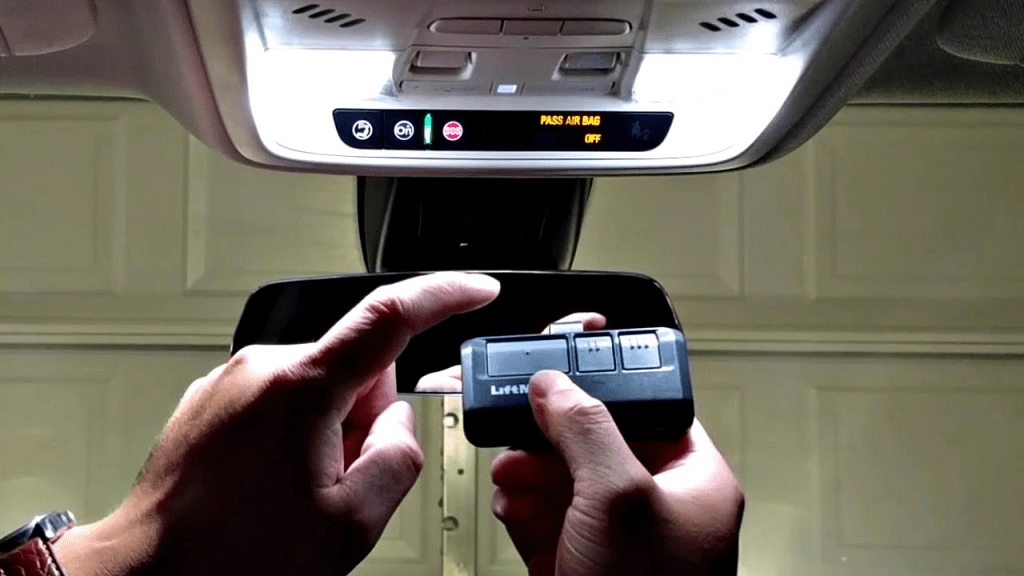
- Press and hold the desired HomeLink® button you wish to program.
- While holding the HomeLink® button, press and hold the button on your LiftMaster remote.
- Continue holding both buttons until the indicator light on your car’s system changes from slow to rapid blinking.
Step 4: Sync with the LiftMaster Garage Door Opener Motor
If your LiftMaster opener uses a rolling code system, additional steps are needed:
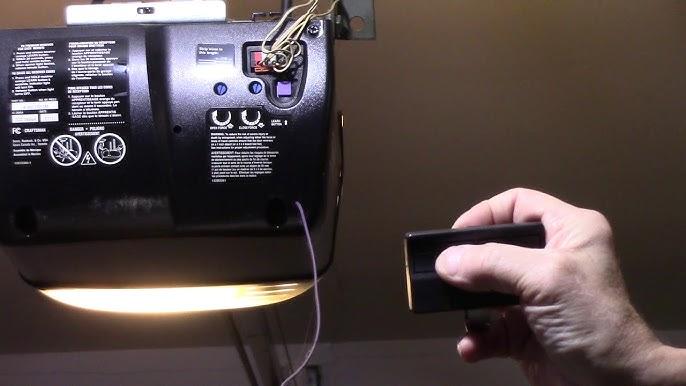
- Locate the “Learn” button on your LiftMaster motor unit. This button is typically found near the antenna wire or the back panel.
- Press and release the “Learn” button. You will have about 30 seconds to complete the next step.
- Return to your car and press the programmed HomeLink® button twice.
- The garage door opener should now respond to your car’s system.
Troubleshooting Common Issues
1. Indicator Light Doesn’t Blink Rapidly
If the light doesn’t blink rapidly during programming, check the batteries in your LiftMaster remote or move closer to the garage door opener motor.
2. Door Doesn’t Respond After Programming
Ensure you pressed the “Learn” button on the LiftMaster motor and completed the pairing within the allotted time.
3. Compatibility Concerns
Some older LiftMaster models may not be compatible with HomeLink® systems. Consult the LiftMaster manual or contact customer support for assistance.
Additional Features to Consider
1. MyQ Technology
Many LiftMaster garage door openers include MyQ technology, allowing you to control the door via a smartphone app. This feature is a great alternative if your car doesn’t have a built-in HomeLink® system.
2. Multiple Garage Doors
You can program multiple garage doors by assigning each to a different HomeLink® button. Repeat the programming process for each door.
3. Security+ 2.0 Technology
LiftMaster’s rolling code technology ensures a secure connection between your car and garage door opener, preventing unauthorized access.
Benefits of Programming Your LiftMaster Garage Door Opener to Your Car
1. Convenience
With the garage door opener programmed into your car, you’ll no longer need to carry a separate remote.
2. Increased Security
Built-in systems are less likely to be misplaced or stolen compared to handheld remotes.
3. Enhanced Efficiency
Operate your garage door with just a button press from your car’s dashboard or overhead console.
FAQs About Programming LiftMaster Garage Door Opener to Your Car
1. Can I Program More Than One Car?
Yes, multiple vehicles can be programmed to the same LiftMaster garage door opener. Each car will need to follow the same programming process.
2. What If My Car Doesn’t Have HomeLink®?
If your car lacks a HomeLink® or similar system, consider using a LiftMaster universal remote or MyQ technology for smartphone control.
3. Do I Need to Reprogram After a Power Outage?
No, power outages typically do not erase programmed settings. However, if issues arise, you may need to reprogram the system.
4. Is It Safe to Program My Garage Door Opener to My Car?
Yes, it’s safe, especially with modern security features like rolling code technology, which changes the access code each time the door is used.
Maintaining Your LiftMaster Garage Door Opener
To ensure long-term functionality, follow these maintenance tips:
1. Regular Inspections
Inspect the garage door tracks, springs, and cables for signs of wear and tear.
2. Battery Replacement
Replace the batteries in your remote control and motor unit as needed.
3. Update Firmware
If your LiftMaster opener supports firmware updates, ensure it’s running the latest version for compatibility and security.
4. Test the System Periodically
Test the HomeLink® button in your car every few months to confirm it’s still working properly.
Conclusion
Programming your car to work with your LiftMaster garage door opener is a straightforward process that enhances convenience and security. By following the steps outlined in this guide, you’ll be able to easily set up your HomeLink® system and enjoy the benefits of seamless garage door operation. For further assistance, consult your vehicle’s manual or reach out to LiftMaster support.
Leave a Reply