If you’ve recently upgraded to a vehicle with built-in garage door opener technology or just installed a new garage system, you’re likely wondering how to link a garage door opener to your car. This convenient feature saves time and simplifies your daily routine by letting you open and close your garage directly from your vehicle—no need to juggle extra remotes.
In this detailed guide, we’ll walk you through everything you need to know to complete the setup easily and safely. Whether you’re working with a HomeLink system, a rolling code opener, or a fixed code transmitter, we’ve got you covered.
Read too: Door and Garage Door Companies: Choosing the Right Partner for Your Needs
Why Linking Your Garage Door Opener to Your Car Is a Game-Changer
Before we dive into the steps, let’s take a moment to understand why this integration is such a popular feature in modern vehicles and homes:
- Convenience: No need to fumble with remote controls when pulling into your driveway.
- Security: Built-in systems often have encrypted communication, reducing the risk of hacking.
- Streamlined Lifestyle: Syncing your car with your garage door complements your smart home setup.
Linking your garage door opener to your car can also be a valuable selling point if you ever decide to put your home on the market.
Understanding the Technology Behind Garage Door Openers
To link a garage door opener to your car, it’s essential to first understand the two most common technologies in use:
- Fixed Code Systems
These systems use a static code to communicate between the remote and the opener. They’re easier to program but less secure. - Rolling Code Systems
Found in most modern garage door openers, these systems generate a new code every time the opener is used. This makes them far more secure but also slightly more complex to program.
Most vehicles manufactured after 2007 are compatible with both types, thanks to built-in systems like HomeLink or Car2U.
Tools and Information You’ll Need
Before you begin, gather the following:
- Your vehicle’s owner’s manual
- Your garage door opener’s brand and model number
- A ladder (if the learn button is located on the motor unit)
- The garage door opener remote (if needed)
How To Link A Garage Door Opener To Your Car: Step-by-Step Instructions
Let’s get into the heart of the matter—how to link a garage door opener to your car. This guide assumes you’re using a built-in system like HomeLink, but we’ll also touch on other methods where applicable.
Step 1: Clear Existing Programming (Optional but Recommended)
If your vehicle was previously owned or programmed, it’s wise to clear existing codes.
- Turn on your vehicle (without starting the engine).
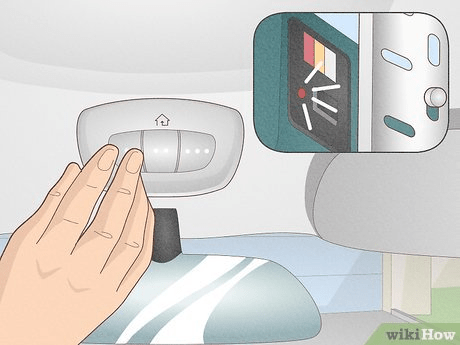
- Press and hold the two outer HomeLink buttons until the indicator light flashes rapidly (usually around 20 seconds).
- Release the buttons.
This step resets the HomeLink system to its default state.
Step 2: Program the Button in Your Car
- Hold your garage door remote 1-3 inches away from the in-car HomeLink buttons.
- Press and hold both the desired HomeLink button in your vehicle and the button on your garage remote at the same time.
- Hold until the indicator light in your car changes from a slow to a rapid blink. This may take up to 30 seconds.
Note: For fixed code systems, this might be the final step. For rolling code systems, continue to Step 3.
Step 3: Sync With the Garage Door Opener (For Rolling Code Systems)
- Locate the “Learn” or “Smart” button on your garage door opener’s motor unit (usually near the light bulb cover).
- Press the Learn button—an indicator light should begin flashing.
- Within 30 seconds, return to your vehicle and press the HomeLink button you programmed earlier. Hold for about 2-3 seconds and release.
- Repeat pressing the button 2–3 more times until the door responds.
Step 4: Test the Setup
Press the in-car button once to ensure the door opens or closes. If it doesn’t work:
- Repeat Step 3 (timing is critical).
- Double-check your garage opener type (rolling vs. fixed code).
- Consult the vehicle and garage opener manuals for brand-specific instructions.
Troubleshooting Tips
Sometimes, even when you follow every step, things don’t go as planned. Here are a few common issues and solutions:
- The indicator light never blinks rapidly: Check battery strength in your remote or reposition it closer to the car’s sensor.
- Garage door won’t respond after syncing: You may have a rolling code system and skipped Step 3.
- Button works inconsistently: Reprogram the system from scratch, ensuring the Learn button was activated correctly.
Alternative Systems: Linking Without HomeLink
If your car doesn’t have a built-in system like HomeLink or Car2U, don’t worry. You can still link your garage door opener using universal garage door remotes or third-party smart devices. Some even allow operation via smartphone apps, which sync directly with your garage system and car Bluetooth.
Safety Considerations When Linking Your Garage Door Opener
- Disable the garage door opener during programming to avoid accidental opening or closing.
- Inform household members that you’re working on the garage opener to prevent surprises.
- Secure the ladder properly when accessing the Learn button on the garage motor.
Benefits of Syncing Your Car With Your Garage Door
To further emphasize why this is a smart move:
- Reduces clutter from loose remotes
- Improves security through encrypted rolling codes
- Enhances resale value of both your vehicle and your home
- Offers convenience during bad weather or late-night arrivals
It’s a small task with long-lasting lifestyle benefits.
Final Thoughts
Learning how to link a garage door opener to your car might seem intimidating at first, but with a little patience and the right tools, it’s a straightforward DIY task. Whether you have a luxury car with built-in automation or an older vehicle with a universal remote, getting the system up and running adds convenience, safety, and a touch of smart home sophistication to your everyday life.
Just remember to double-check your owner’s manuals and follow the proper safety precautions, and you’ll be controlling your garage door from the driver’s seat in no time.



Leave a Reply