Smart home technology has revolutionized the way we manage and interact with our household systems—and the garage door opener is no exception. The MyQ garage door opener, developed by Chamberlain and LiftMaster, offers smart features like real-time alerts, remote access, and scheduling through the MyQ app. But if you’ve ever asked yourself, “How to change time on MyQ Garage Door Opener,” you’re not alone.
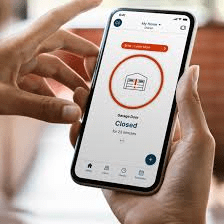
Whether you’re adjusting to daylight saving time, fixing an incorrect time zone, or reconfiguring schedules for better convenience, knowing how to change the time settings in your MyQ system is essential. In this article, we’ll provide a detailed, easy-to-follow walkthrough on how to do just that—and more.
Why Time Settings Matter in Your MyQ Garage System
Before diving into the how-to steps, it’s important to understand why time settings on your MyQ system play such a crucial role in your garage’s operation.
1. Automated Scheduling
One of the standout features of the MyQ system is the ability to schedule your garage door to open or close at certain times. If your system is set to the wrong time, these schedules may execute at incorrect intervals.
Read too: Mastering Quantum Garage Door Opener Programming: A Comprehensive Guide
2. Security Logs & Alerts
The MyQ app keeps a detailed log of all activities, including when the garage door was opened or closed. If the internal clock is wrong, your activity history will be unreliable.
3. Syncing with Other Smart Devices
If you’ve integrated your MyQ system with smart assistants like Amazon Alexa, Apple HomeKit, or Google Assistant, inconsistent time settings can lead to unsynchronized automation triggers.
How To Change Time On MyQ Garage Door Opener
Now that we understand why time accuracy matters, let’s go step-by-step into how to change time on MyQ Garage Door Opener, whether you are using the app, the control panel, or troubleshooting time-related issues.
Step 1: Identify Your MyQ-Enabled Device
There are several types of MyQ-compatible garage openers and hubs. Depending on your specific setup, the way to change the time might slightly differ. Common devices include:
- Chamberlain MyQ Smart Garage Hub
- LiftMaster Smart Garage Opener with Built-In MyQ
- Standalone MyQ Wi-Fi enabled openers
Note: Most models do not allow time to be manually set on the hardware itself. Time is managed via the MyQ cloud service through your mobile device.
Step 2: Open the MyQ App
Download or open the MyQ App on your smartphone or tablet. Make sure you are signed in to the account associated with your garage door opener.
Step 3: Navigate to Device Settings
- Tap on the menu icon (typically three horizontal lines).
- Select “Device Management” or “My Devices.”
- Choose the garage door opener or hub you want to adjust.
Step 4: Check the Time Settings
Here’s the key part: The MyQ system automatically syncs with your mobile device’s clock and time zone. That means you usually don’t set the time manually.
If the time is incorrect:
- Check your mobile device’s time settings
Go to your phone’s general settings and ensure it has the correct time, date, and time zone selected. - Check the time zone inside the MyQ app:
- Go to Account Settings.
- Select “Time Zone.”
- Make sure it matches your current location.
💡 Changing the time on your mobile device will typically correct the time across all MyQ connected services.
Step 5: Adjusting Scheduled Times
If you’re not looking to change the system time but rather want to change when your garage opens or closes automatically, do the following:
- Open the MyQ App.
- Go to the Schedules tab.
- Select an existing schedule or create a new one.
- Change the time, days of the week, and actions (e.g., “close garage at 10:00 PM”).
- Save changes.
This is helpful for:
- Setting your garage to close automatically at night.
- Ensuring it opens before you leave for work.
- Automating lighting if you’ve connected MyQ lights.
Common Issues and Troubleshooting
Sometimes, you might find that the time doesn’t seem to change even after adjusting your phone’s settings. Here’s how to address common problems when changing the time on MyQ garage door opener systems.
1. MyQ Not Syncing Time Correctly
Fix:
- Restart the app.
- Log out and log back in.
- Ensure your phone is connected to the internet (Wi-Fi or mobile data).
2. Time Zone Not Updating After Travel
Fix:
- Manually re-select your time zone in the app settings.
- Force close the app and re-open it.
3. Scheduled Actions Happen at Wrong Times
Fix:
- Delete and recreate the schedule.
- Confirm that your app’s time zone and device time are aligned.
4. System Clock Off Due to Firmware Issue
While rare, some MyQ devices may require a firmware update. To check:
- Open the MyQ App.
- Go to Device Info.
- If a firmware update is available, follow the on-screen instructions to install it.
Advanced Tips for Power Users
Sync With Smart Assistants
To make sure everything remains in sync:
- Amazon Alexa: Use the IFTTT integration or a third-party skill.
- Google Assistant: Link MyQ in the Google Home app.
- Apple HomeKit: Some MyQ devices support native HomeKit compatibility (requires additional hardware).
Create Smart Routines
Use MyQ schedules in combination with:
- Geofencing — Close your garage when you leave home.
- Sunset/Sunrise settings — Open or close based on natural light.
- Voice commands — Ask your smart speaker to check status or close the door.
Why MyQ Doesn’t Let You Set Time Manually
If you’re used to traditional garage door openers, this might seem odd. But with smart technology, the cloud-based architecture ensures time settings remain accurate and synced across all devices. That’s why you can’t change the time on the wall console or remote control.
Instead, the system uses:
- Your smartphone’s time settings.
- Your geographic location (for time zone data).
- Automatic sync from MyQ servers.
This reduces human error and ensures better security, automation, and functionality.
Frequently Asked Questions (FAQ)
Can I set time manually on the opener itself?
No. MyQ-enabled devices rely on smartphone or internet-based time settings. Manual time entry isn’t supported.
Why is my MyQ schedule not following the correct time?
Usually, this is due to a time zone mismatch. Check both your phone’s time zone and the time zone set within the MyQ app.
Do I need internet to update time settings?
Yes. MyQ devices communicate with cloud servers, so an internet connection is required for updates to take effect.
Will changing my phone’s time affect the garage opener?
Yes. Since MyQ syncs with your device, altering your phone’s clock may result in incorrect scheduling.
Final Thoughts
Changing the time on your smart garage opener might sound simple, but with today’s connected devices, it’s more about syncing than setting. Knowing how to change time on MyQ Garage Door Opener can help ensure your schedules run smoothly, your security logs stay accurate, and your smart home system functions as expected.
Whether you’re adjusting for daylight saving time, correcting a time zone, or simply optimizing your automation, MyQ makes it easier than ever—when you know where to look. Just remember: your smartphone is the command center, and the app holds the key.
Keep this guide handy for future adjustments, and enjoy the full benefits of a truly smart garage.



Leave a Reply