Introduction
Having trouble syncing your garage door remote or keypad? The Craftsman 1/2 Hp garage door opener green learn button is the key to setting up remotes, clearing old codes, and securing your garage. In this guide, we’ll explain how it works, when to use it, and provide step-by-step instructions to make programming hassle-free.
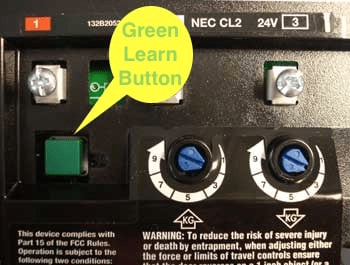
What Is the Green Learn Button?
The green learn button is located on the back or side of your Craftsman opener motor unit. It’s used to:
- Program new remotes
- Pair a wireless keypad
- Reset the system and clear old codes
- Enhance security by removing lost or stolen remotes
Read too: No Power to Genie Garage Door Opener – Resolving the Issue with Ease: Troubleshooting Guide
According to Wikipedia, modern garage door systems use rolling codes, meaning each button press generates a unique code. The learn button ensures your opener recognizes authorized devices only.
How To Program a Remote Using the Green Learn Button
Step 1: Locate the Button
- Open the light cover or check the back of the motor unit.
- Look for a green button near the LED indicator.
Step 2: Enter Learn Mode
- Press and release the button once.
- The indicator light will glow for 30 seconds, signaling it’s ready.
Step 3: Pair the Remote
- Within 30 seconds, press and hold the button on your remote.
- The opener light will blink, confirming successful programming.
How To Program a Keypad
- Press and release the green learn button.
- Enter your chosen 4-digit PIN on the keypad.
- Press and hold the Enter button until the opener light flashes.
- Test by entering the PIN again to operate the door.
How To Clear Old Codes
Sometimes you need to erase lost or stolen remotes. Here’s how:
- Press and hold the green learn button for 6–10 seconds.
- The indicator light will go out, erasing all stored remotes and keypads.
- Reprogram only the remotes you want to keep.
Troubleshooting Common Issues
| Problem | Likely Cause | Fix |
|---|---|---|
| Remote won’t program | Dead battery | Replace batteries and retry |
| Opener light doesn’t blink | Missed 30-second window | Repeat programming process |
| Keypad not working | Wrong PIN entered | Reset and program again |
| Too many devices connected | Memory full | Clear memory and reprogram remotes |
Safety & Maintenance Tips
- Keep remotes out of children’s reach.
- Update your keypad PIN regularly.
- Test the safety reverse system monthly.
- Unplug the opener when handling wiring or maintenance.
FAQ: Craftsman 1/2 Hp Garage Door Opener Green Learn Button
1. How many remotes can I connect to my Craftsman opener?
Most Craftsman models allow programming up to five remotes.
2. What does the green color mean?
The color indicates compatibility—green buttons usually work with remotes made after 1995.
3. How do I reset everything?
Hold the green learn button for about 10 seconds until the LED goes off.
4. Can I program a universal remote?
Yes, as long as the universal remote supports Craftsman’s Security+ technology.
5. Why won’t my remote sync after multiple tries?
Check for interference, replace the remote battery, and ensure you’re within range when pairing.
Conclusion
The Craftsman 1/2 Hp garage door opener green learn button is your gateway to managing remotes, keypads, and system resets with ease. Whether you’re adding a new remote or improving security, the process is quick and beginner-friendly.
👉 If this guide helped you, share it with friends and neighbors who might need to reprogram their Craftsman garage opener!



Leave a Reply