Introduction
If you own or plan to buy a Tesla Model Y, you may be asking: does Tesla Model Y have a garage door opener? Many drivers want the convenience of controlling their garage door directly from their car, but understanding Tesla’s system can be confusing. This guide will clarify whether the Model Y supports garage door integration and how to set it up for maximum convenience.
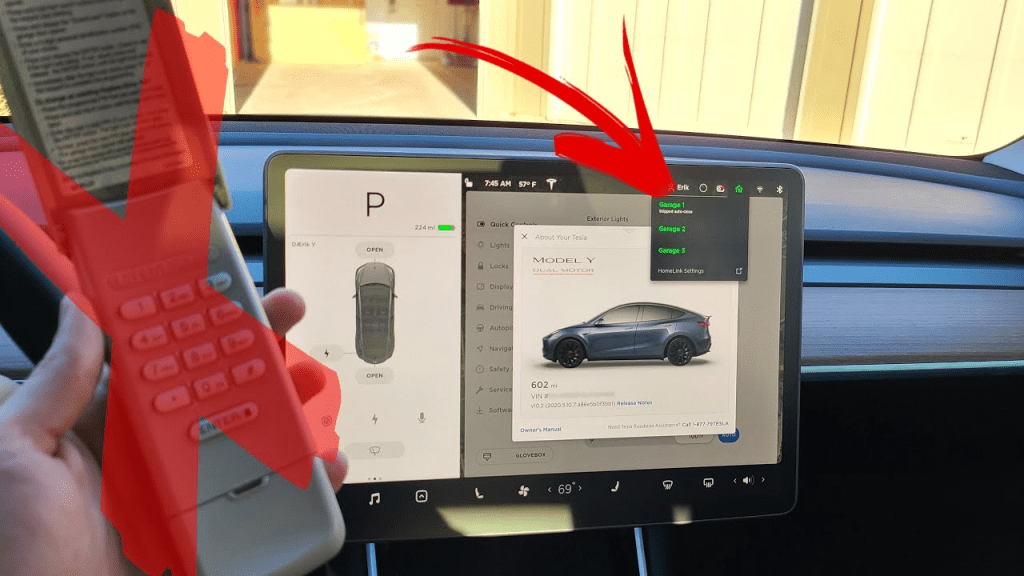
Tesla Model Y Garage Door Opener Feature Overview
The Tesla Model Y supports garage door integration through HomeLink, a built-in system for controlling compatible garage doors. Key benefits include:
- Hands-free operation: Open or close the garage without leaving the car.
- Smart automation: Integrates with Tesla routines for home arrival or departure.
- Security alerts: Receive notifications if the garage door is left open.
According to Tesla’s official specs, most vehicles equipped with HomeLink can control up to three different garage doors or gates.
Read too: The Complete Guide to Tighten Chain On Garage Door Opener for Smooth Operation
How Tesla Model Y Integrates With Garage Doors
Step 1: Check for HomeLink Availability
- Open the Controls menu on your Tesla touchscreen.
- Navigate to Settings → HomeLink.
- Ensure your vehicle supports HomeLink (some early base models may require an aftermarket adapter).
Step 2: Program HomeLink
- Tap Create HomeLink in the HomeLink menu.
- Enter your garage door manufacturer and follow on-screen instructions.
- Press the Learn button on your garage door opener within 30 seconds when prompted.
- Name your garage (e.g., “Home Garage”) and test by pressing the icon on your Tesla touchscreen.
Expert Tip: Keep a ladder nearby for safe access to the garage opener button if needed.
Step 3: Test Voice and App Commands
- Tesla supports voice commands like “Open the garage”.
- Integration with the Tesla mobile app allows remote control and status checks from anywhere.
Step 4: Troubleshooting Common Issues
| Problem | Cause | Solution |
|---|---|---|
| Garage does not open | Garage door not compatible | Verify HomeLink compatibility |
| Programming fails | Wi-Fi interference or distance | Move closer to the garage unit and retry |
| Delayed response | Weak signal | Ensure a stable Tesla Wi-Fi or 4G connection |
For more details on garage door technology, visit Wikipedia: Garage Door Opener.
Benefits of Using Tesla Model Y as a Garage Controller
- Convenience: One-touch control directly from the car.
- Safety: Reduce the risk of forgetting to close the garage.
- Automation: Integrates with Tesla routines and smart home systems for seamless daily use.
| Feature | Tesla Model Y | Traditional Remote |
|---|---|---|
| Voice control | ✅ | ❌ |
| Mobile app alerts | ✅ | ❌ |
| Multi-door support | ✅ | Limited |
FAQ Section
Q1: Does every Tesla Model Y have HomeLink?
Most newer Model Y vehicles include HomeLink, but base models from early production years may need an aftermarket adapter.
Q2: Can Tesla control multiple garages?
Yes, HomeLink supports up to three garage doors or gates.
Q3: Is it safe to use voice commands for the garage?
Yes, Tesla ensures secure operation through encryption and app confirmations.
Q4: Can I use the Tesla app to open the garage remotely?
Yes, Tesla’s mobile app supports HomeLink integration for remote operation.
Q5: What if my garage door is not compatible with Tesla?
You can use a HomeLink-compatible adapter or retrofit your garage opener for compatibility.
Q6: Does Tesla alert me if the garage is left open?
Yes, the app can send notifications to your phone when the door is left open for a specified period.
Conclusion
The Tesla Model Y offers seamless garage door control through HomeLink, combining convenience, security, and smart automation. By following the steps above, you can easily integrate your garage with your vehicle and enjoy hands-free operation.



Leave a Reply