Is your Genie Garage Door Opener Remote Model ACSCTG Type 1 acting up — maybe not opening the door, or the light flashes but nothing happens? You’re not alone. Many homeowners face similar issues after years of use or when batteries run out.
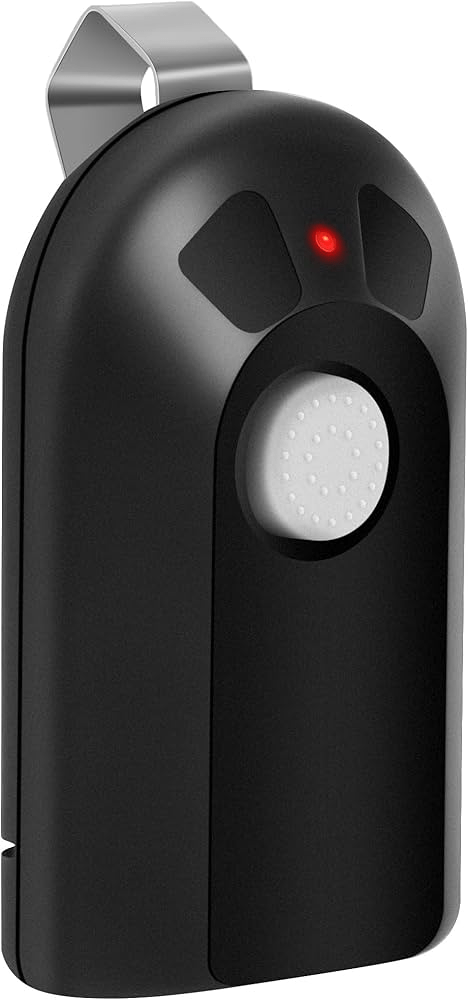
The good news is that the Genie ACSCTG Type 1 remote is one of the easiest models to maintain, reprogram, or replace. In this guide, we’ll help you understand how it works, how to replace its battery, and what to do if it stops functioning — all explained clearly and simply.
Read too: How To Replace Garage Door Roller Like a Pro? Step-by-Step Guide
What Is the Genie ACSCTG Type 1 Remote?
The Genie ACSCTG Type 1 is one of the earliest Genie Intellicode remotes, designed for single-door garage operation. It uses secure rolling code technology, which changes the access code every time the remote is used — preventing unauthorized entry.
Key specifications:
- Model: ACSCTG Type 1
- Frequency: 390 MHz
- Buttons: 1 (for a single door)
- Technology: Intellicode rolling code
- Battery type: 12V (A23) alkaline battery
This compact remote is lightweight and reliable, making it a preferred choice for Genie openers from 1998 to early 2000s.
How to Replace the Battery in Genie Garage Door Opener Remote Model ACSCTG Type 1
When your remote becomes unresponsive or works only intermittently, the battery is usually the culprit.
Follow these simple steps to replace it safely:
1. Gather Your Tools
You’ll need:
- A small flathead screwdriver
- A new A23 12-volt alkaline battery
2. Open the Remote Housing
- Locate the small seam along the side of your remote.
- Insert the flathead screwdriver into the notch.
- Gently twist the screwdriver until the case pops open.
⚠️ Be gentle — older plastic housings can crack if forced.
3. Remove the Old Battery
- Carefully lift out the old A23 battery.
- Pay attention to its orientation (positive side facing up).
4. Insert the New Battery
- Slide the new A23 battery into the slot.
- Ensure it’s snug and properly aligned.
5. Reassemble the Remote
- Snap the remote housing back together.
- Test by pressing the button — if the LED light flashes, it’s ready to go!
How to Program Genie ACSCTG Type 1 Remote
If your remote doesn’t operate your garage door, it may need reprogramming — especially after a battery change or power outage.
Follow this easy reprogramming guide:
Step 1: Locate the “Learn” Button
- On your Genie opener unit, find the “Learn” or “Program” button (usually near the antenna wire).
Step 2: Press and Hold
- Press and hold the “Learn” button until the indicator LED begins blinking (about 3 seconds).
Step 3: Press the Remote Button
- Within 30 seconds, press and hold the remote’s main button until the garage door opener light flashes or you hear a relay click.
Step 4: Test the Remote
- Press the button again to ensure the door operates smoothly.
💡 If you have multiple Genie openers, repeat this process for each unit.
Why the Genie ACSCTG Type 1 Remote May Stop Working
Even with a new battery, your remote may still fail. Here are common reasons and solutions:
| Problem | Possible Cause | Solution |
|---|---|---|
| LED light doesn’t turn on | Dead or reversed battery | Replace or flip battery orientation |
| Door doesn’t move | Remote lost programming | Reprogram using “Learn” button |
| Short range | Weak battery or interference | Replace with a new battery / move closer |
| Works intermittently | Dirty internal contacts | Clean contacts with a cotton swab and alcohol |
| Doesn’t pair at all | Outdated remote | Replace with a Genie Intellicode-compatible remote |
Battery Comparison: A23 vs CR2032
Some users confuse the A23 with smaller coin cell batteries like the CR2032. Here’s a quick comparison:
| Battery Type | Voltage | Shape | Use Case |
|---|---|---|---|
| A23 | 12V | Cylindrical | Genie Type 1, keyless entry systems |
| CR2032 | 3V | Coin cell | Genie Type 3, car remotes |
✅ Verdict: Only the A23 12V fits the Genie ACSCTG Type 1 remote.
Expert Tips for Longer Battery Life
To make your remote last longer:
- Use quality batteries (Duracell or Energizer).
- Avoid extreme heat or humidity — store the remote indoors.
- Clean the battery terminals once a year to prevent corrosion.
- Replace batteries every 2–3 years, even if still functional.
- If not in use for long periods, remove the battery to avoid leakage.
According to Wikipedia, temperature and discharge rate significantly affect a battery’s lifespan — storing remotes in moderate temperatures (15–25°C) can double their longevity.
Troubleshooting: Still Not Working After New Battery?
If your Genie ACSCTG Type 1 remote doesn’t work after replacing the battery, here’s what to check:
- Verify correct battery polarity.
The positive end must face the correct terminal. - Check for corrosion.
White or green residue indicates corrosion — clean carefully. - Reprogram your remote.
If the opener lost memory, follow the programming steps above. - Inspect the opener’s antenna wire.
If it’s broken or bent, signal range will be reduced. - Replace the remote.
If internal circuitry fails, replacement remotes are available online for $20–$30.
Genie ACSCTG Type 1 vs Newer Genie Remotes
| Feature | ACSCTG Type 1 | Genie G3T-R (New) |
|---|---|---|
| Frequency | 390 MHz | Dual frequency (315 & 390 MHz) |
| Buttons | 1 | 3 |
| Compatibility | Older Genie models | Works with Intellicode I & II |
| Battery | A23 | CR2032 |
| Price | $20–$25 | $30–$35 |
Verdict: If you have an older opener, the ACSCTG Type 1 works perfectly. But if you want better range and flexibility, upgrade to the Genie G3T-R remote.
FAQ: Genie Garage Door Opener Remote Model ACSCTG Type 1
1. What kind of battery does the Genie ACSCTG Type 1 use?
It uses a 12V A23 alkaline battery, commonly available at most hardware or electronics stores.
2. How do I program my Genie ACSCTG Type 1 remote?
Hold the “Learn” button on the opener until it flashes, then press and hold your remote’s button until the light stops blinking. Done!
3. Can I use a CR2032 battery instead?
No. The CR2032 is a 3V coin cell and will not power the Genie Type 1 remote, which requires 12V.
4. Why is my remote light on but the door doesn’t open?
It may have lost its pairing. Reprogram the remote using the steps above.
5. Is the ACSCTG Type 1 still supported?
Yes. Replacement remotes and compatible models are widely available, though production stopped around 2005.
6. How long does the battery last?
The A23 battery lasts 2–3 years, depending on usage frequency and temperature.
Conclusion
The Genie Garage Door Opener Remote Model ACSCTG Type 1 remains a trusted, durable remote for older Genie openers. With the right battery and quick reprogramming, it can continue serving you reliably for years.
Now that you know how to replace the battery, reprogram, and troubleshoot issues, you can save time, money, and stress — no need to call a technician for simple fixes.



Leave a Reply