Introduction
If you’re looking for how to erase all codes from garage door opener, it usually means one thing: you want to secure your home. Maybe you lost a remote, moved into a new house, or suspect someone unauthorized may have access. Don’t worry—resetting your garage door opener is simple, and this guide walks you through it step by step so you can restore full control and peace of mind.
Why You May Need to Erase All Codes From Your Garage Door Opener
Many homeowners aren’t aware that garage remotes can stay synced to an opener even after you lose them or move homes. According to national home-security assessments, roughly 9% of break-ins involve garage access, often due to unchanged opener codes or old remotes left active.
Read too: Door and Garage Door Companies: Choosing the Right Partner for Your Needs
Common situations where clearing all codes is essential:
- You lost a garage remote
- You bought a new house and don’t know who has old remotes
- Someone stole your car with a remote inside
- You’re upgrading remotes/keypads and want a clean reset
- You experience interference or malfunction due to corrupted codes
Resetting the opener ensures every previously programmed remote, keypad, or vehicle HomeLink system stops working instantly, restoring total security.
How To Erase All Codes From Garage Door Opener (Step-By-Step)
This procedure works on most LiftMaster, Chamberlain, Craftsman, Genie, and similar openers with a Learn, Set, or Program button.
Important: Erasing codes removes all remotes, keypads, and car-programmed HomeLink systems. You must reprogram each device afterward.
Step 1 — Locate the “Learn” or “Program” Button
You will usually find it:
- Under the opener’s light cover
- On the back panel
- Near the antenna wire
Common button colors (indicate system type):
Yellow, Purple, Red/Orange, Green
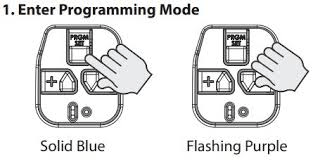
Step 2 — Press and Hold the Learn Button
Use your finger (no tools needed).
- Hold for 6–10 seconds.
- An LED will turn off, blink, or the opener light will flash.
This signals that the opener has cleared every stored code.
Step 3 — Test to Confirm Reset
Try your remote or wall keypad.
- If none of them operate the opener → reset successful
- If any still work → repeat Step 2 and hold longer (up to 12 seconds)
Step 4 — Reprogram Your Devices
You must re-add each device:
- Remotes
- Wireless keypads
- Cars with HomeLink
- Smart garage controls
Every manufacturer reprograms differently, but most require:
- Press Learn button
- Press desired remote button until opener flashes
You now have a fresh, secure system.
How To Erase All Codes on Chamberlain/LiftMaster
Most Chamberlain/LiftMaster units share identical programming logic.
Steps:
- Find the yellow, purple, or red Learn button.
- Hold it for 6 seconds until the LED turns off.
- All remote and keypad codes are deleted.
To Clear Just the Keypad:
Enter the 4-digit code → press # → hold 0 for 10 seconds.
How To Erase All Codes on Genie Garage Door Opener
Genie uses a button labeled Learn, PRGM, or SET.
Steps:
- Press and hold Learn/PRGM for 10 seconds.
- The round LED will blink → then turn off.
- All remote/keypad codes are erased.
How To Reset Garage Opener After Car Theft
If a remote was stolen with your vehicle:
- Erase codes immediately
- Reprogram only the remotes you still own
- Consider enabling rolling-code security
Studies show car theft involving garage access increases break-in risk by 300%, making immediate resets critical.
Clearing Codes vs Resetting Entire Opener (Comparison Table)
| Action | What It Does | When To Use | Difficulty |
|---|---|---|---|
| Erase All Codes | Removes all remotes, keypads, HomeLink | Lost remote, new home, security incident | Easy |
| Factory Reset | Returns opener to full default settings | Device malfunction, major interference | Medium |
| Reprogram Individual Devices | Adds single remote/keypad | Upgrading devices | Very Easy |
How Garage Door Code Storage Works
Understanding the system helps ensure the process is done correctly.
Most modern openers use:
- Rolling code technology (changes every time you press the remote)
- Secure memory chips that store unique device IDs
- 2.4 GHz interference-resistant signals
High-reliability models can store up to 50 devices, depending on brand.
Clearing codes wipes this memory entirely.
For background on opener technology and history, see the garage door opener entry on Wikipedia, an authoritative reference often cited by industry professionals.
Signs That You Need To Erase All Codes
1. Your Remote Opens Randomly or Intermittently
Interference or corrupted memory may cause unpredictable operation.
2. A Previous Owner Still Has Remote Access
One of the most common reasons to reset codes in newly purchased homes.
3. Keypad Works But Remotes Don’t (or Vice Versa)
A full memory wipe resolves software conflicts.
4. Your HomeLink Car Button Suddenly Stops Working
Clearing and reprogramming often fix compatibility glitches.
Detailed Troubleshooting Before Resetting Codes
Before wiping the system, check these items:
1. Check Opener Memory Capacity
Some models reach maximum storage (e.g., 30–50 remotes).
A reset clears space.
2. Check Antenna Wire
A damaged or curled antenna can interfere with signal reception.
3. Verify the Power Supply
Fluctuations or recent outages may corrupt memory.
4. Inspect the Wall Button
Wiring issues can cause inconsistent operation.
How To Reprogram Devices After Erasing Codes
Reprogram a Standard Remote
- Press Learn button once (LED turns on)
- Press the button on your remote
- Wait for a flash or click confirmation
Reprogram a Wireless Keypad
- Press Learn
- Enter a new 4-digit PIN
- Press Enter
Reprogram HomeLink in Your Car
- Hold car HomeLink button + remote button
- Wait for slow, then fast blink
- Press Learn on opener
- Press HomeLink button once
Takes less than 2 minutes.
Pros and Cons of Erasing All Codes
Pros
- Maximum security
- Removes unauthorized devices
- Fixes corrupted memory
- Simple and fast (under 10 seconds)
Cons
- Must reprogram all remotes
- Requires access to the opener unit
- HomeLink cars must be reconfigured
FAQ
Q1: Does erasing codes delete the wall button?
No. The wall control is hardwired and will continue to work normally.
Q2: How long should I hold the Learn button to erase codes?
Most models require 6–10 seconds until an LED shuts off or light flashes.
Q3: Will erasing codes affect my smart Wi-Fi garage hub?
Yes. Some smart hubs may require reconnection after a full memory wipe.
Q4: Do I need to unplug the opener before clearing codes?
No. All erasing is done digitally through the Learn button.
Q5: How often should I reset my opener codes?
Experts recommend resetting every 12–18 months, or immediately after losing a remote.
Q6: What if the Learn button doesn’t erase codes?
Try holding for 12–15 seconds.
If still unresponsive, the control board may need replacement.
Conclusion
Learning how to erase all codes from garage door opener is one of the fastest and most effective ways to secure your home, especially after losing remotes or moving into a new house. With just a simple 6–10 second process, you can wipe every stored device and reprogram only the ones you trust.
If this guide helped you, feel free to share it on your social media to help others protect their homes too!



Leave a Reply