If you’re tired of fumbling for a remote every time you pull into your driveway, you’re not alone. Many homeowners search How To Link Chamberlain Garage Door Opener To Car so they can open and close their garage seamlessly from their vehicle. The good news? With the right steps, most Chamberlain openers can be linked to your car in just a few minutes—no special tools required.
How To Link Chamberlain Garage Door Opener To Car (Quick Overview)
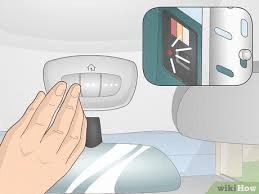
The most common way to link a Chamberlain garage door opener to a car is through HomeLink, the built-in universal garage door opener found in many vehicles.
Read too: Why Are My Garage Doors Opening By Themselves? Troubleshooting Guide
At a high level, the process looks like this:
- Clear existing HomeLink codes in your car
- Pair HomeLink with your Chamberlain opener
- Sync HomeLink to the opener’s “Learn” button
- Test and confirm operation
Below, we’ll break each step down clearly and safely.
What You Need Before You Start
Before programming, confirm compatibility and prepare your setup.
Checklist
- A working Chamberlain garage door opener
- A vehicle equipped with HomeLink buttons (usually on visor or overhead console)
- Your garage door remote (if required)
- Safe access to the opener motor unit
Most modern systems from Chamberlain use rolling-code technology, which is secure but requires an extra sync step.
How to Tell If Your Car Has HomeLink
HomeLink is standard in many U.S. vehicles.
How to Check
- Look for three buttons on the visor, overhead console, or mirror
- Check your car’s owner’s manual
- Look for the HomeLink logo
If your car does not have HomeLink, you can still use a clip-on Chamberlain remote instead.
Step 1: Clear Existing HomeLink Codes (Important)
If HomeLink has been programmed before, clear it first.
How to Reset HomeLink
- Turn the ignition to “ON” (engine off)
- Press and hold the two outer HomeLink buttons
- Hold for 20–30 seconds
- Release when the indicator light flashes rapidly
⚠️ This erases all previously stored HomeLink codes.
Step 2: Program HomeLink to the Chamberlain Remote
This step teaches HomeLink the signal pattern.
Programming Steps
- Hold your Chamberlain remote 1–3 inches from the HomeLink buttons
- Press and hold the desired HomeLink button
- Press and hold the remote button at the same time
- Wait until the HomeLink light changes from slow to rapid blinking
- Release both buttons
At this point, HomeLink has learned the remote signal—but the opener is not synced yet.
Step 3: Sync HomeLink With the Chamberlain Opener (Critical Step)
This is where rolling-code systems are authorized.
Locate the Learn Button
- Found on the motor unit (ceiling-mounted)
- Usually yellow, purple, red/orange, or green
- Near the antenna wire
Sync Process
- Press and release the Learn button on the opener
- You have 30 seconds to return to your car
- Press and hold the programmed HomeLink button for 2 seconds
- Release and repeat 2–3 times until the door moves
Once the door opens or closes, pairing is complete.
Step 4: Test the System
Testing ensures safety and reliability.
Test Checklist
- Door opens fully
- Door closes fully
- No delay or hesitation
- No unexpected reversal
Run 2–3 full cycles to confirm consistent operation.
What If You Don’t Have the Original Remote?
You can still link HomeLink directly to the opener.
Alternative Method
- Clear HomeLink
- Press Learn button on the opener
- Press HomeLink button repeatedly until pairing completes
This works on many newer Chamberlain models.
Common Problems and How to Fix Them
HomeLink Won’t Program
Possible causes:
- Weak remote battery
- Car too far from opener
- Not clearing old codes
Fix: Replace remote battery and retry from 1–3 inches away.
Door Won’t Move After Programming
Likely issue: Rolling-code sync not completed
Fix: Repeat the Learn button step and press HomeLink 2–3 times.
Works Sometimes, Not Always
Possible causes:
- Electrical interference
- Weak opener antenna
- Obstructions
Fix: Ensure antenna hangs freely and avoid metal obstructions.
How Long Does Programming Take?
Most setups take 5–10 minutes from start to finish. If issues arise, allow extra time for troubleshooting.
Security Tips After Linking Your Opener
Modern Chamberlain systems are secure, but best practices still matter.
Safety Recommendations
- Reprogram HomeLink if you sell your car
- Clear codes if you move homes
- Keep opener firmware updated (smart models)
Rolling-code technology prevents signal theft, making this setup far safer than older fixed-code remotes.
Can You Link Multiple Cars to One Opener?
Yes.
How It Works
- Each car is programmed independently
- Most Chamberlain openers support 5–7 remotes/HomeLink devices
Repeat the same steps for each vehicle.
Smart Garage Alternative (Optional)
If your Chamberlain opener supports Wi-Fi, you can also control it via smartphone apps. However, HomeLink remains the fastest and most reliable in-car solution.
Industry Background and Standards
Garage door openers and in-vehicle transmitters follow strict U.S. safety and security standards designed to prevent unauthorized access and accidental injury. For general background on garage door systems, you can reference:
https://en.wikipedia.org/wiki/Garage_door
(This link is provided for general educational context only.)
FAQ: How To Link Chamberlain Garage Door Opener To Car
Frequently Asked Questions
Q1: How long does it take to link a Chamberlain opener to a car?
A: Usually 5–10 minutes if everything works correctly.
Q2: Do all cars support HomeLink?
A: No. Many newer vehicles do, but some entry-level models do not.
Q3: Why does my HomeLink light flash but the door won’t open?
A: The rolling-code sync step with the Learn button was not completed.
Q4: Can I program multiple HomeLink buttons to one garage door?
A: Yes. You can use different buttons or different cars.
Q5: Is HomeLink more secure than a handheld remote?
A: Yes. It uses rolling-code encryption similar to modern remotes.
Conclusion: Enjoy Hands-Free Garage Access
Learning How To Link Chamberlain Garage Door Opener To Car gives you everyday convenience, improved security, and a cleaner driving experience. By following the correct HomeLink steps—especially the Learn button sync—you can complete the process quickly and confidently.
If this guide helped you program your garage successfully, share it on social media so other homeowners can enjoy hands-free garage access too.



Leave a Reply