If you’re wondering how to pair a garage door opener to car, you’re not alone. Many homeowners want the convenience of opening their garage doors directly from their vehicle without using a separate remote. Properly pairing your car’s built-in garage control system ensures hands-free access, improves security, and integrates seamlessly with your smart home setup.
In this guide, we’ll walk you through a step-by-step process to safely pair your garage door opener with your vehicle, along with tips, troubleshooting, and best practices.
Read too: The Complete Guide to Tighten Chain On Garage Door Opener for Smooth Operation
Understanding Car-to-Garage Integration
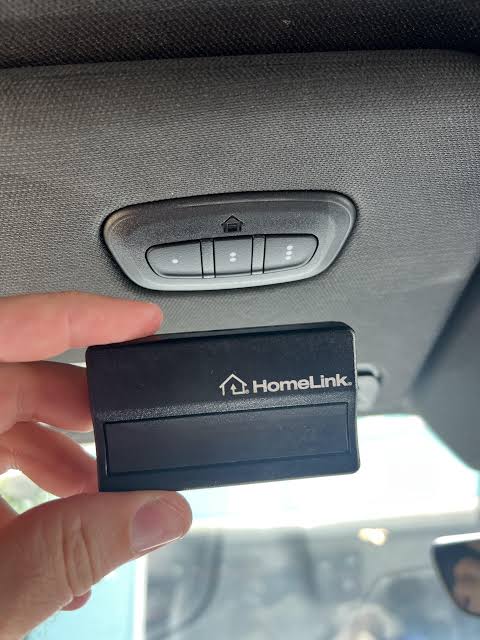
Many modern vehicles come equipped with a built-in system called HomeLink or a similar in-car garage door control feature. These systems allow your car to communicate with most garage door openers using radio frequency signals.
Benefits include:
- Hands-free operation from inside the car
- Reduced clutter—no need for multiple remote controls
- Secure operation—paired devices are encrypted and require proximity
According to Wikipedia Home Automation, integrating garage door control into vehicles enhances convenience, safety, and energy efficiency in modern homes.
Step-By-Step Guide: Pairing Your Garage Door Opener
Step 1: Prepare Your Garage Door Opener
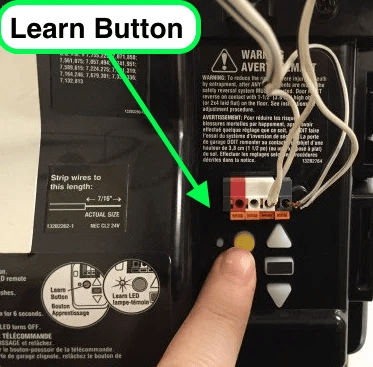
- Locate the “Learn” button on your garage door opener motor.
- Clear the area around the opener to avoid interference.
- Ensure batteries in your garage remote are fresh for initial testing.
Step 2: Prepare Your Vehicle
- Turn on your car’s ignition. Some vehicles require the engine running for safety.
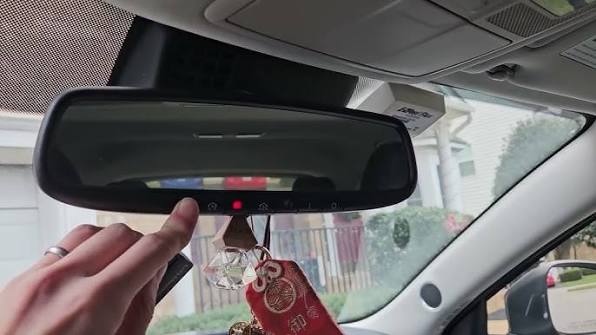
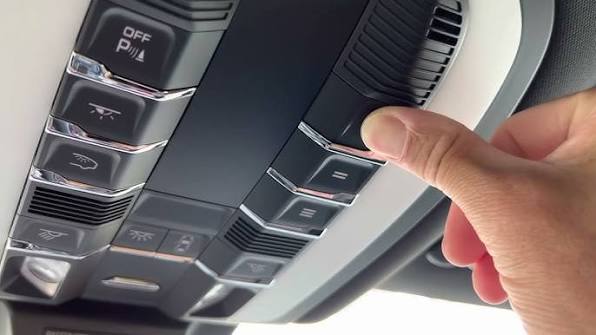
- Identify the garage control buttons in your car (usually located on the rearview mirror, visor, or dashboard).
Step 3: Programming The Car’s Control
- Press and hold the first in-car garage button until the indicator light starts blinking slowly (usually 20 seconds).
- Release the button once the light starts flashing.
Tip: Some vehicles require holding the button near the garage opener motor while programming. Consult your car manual for exact positioning.
Step 4: Pair With Garage Door Opener
- Press the “Learn” button on the garage opener motor.
- Within 30 seconds, return to your vehicle and press the in-car garage button twice for 2 seconds each.
- The opener light or indicator should flash to confirm successful pairing.
Step 5: Test Your Setup
- Press the in-car button once to open the garage.
- Press again to close it.
- Ensure the door responds reliably without delay or interference.
Note: Some older garage openers may require a rolling code feature to be disabled temporarily for pairing.
Tips For Successful Pairing
- Check Frequency Compatibility
- Most garage door openers operate at 300–390 MHz. Ensure your car system supports the same frequency.
- Update Vehicle Software
- Modern vehicles may need software updates to ensure HomeLink or similar systems function correctly.
- Clear Previous Pairings
- Reset the car’s in-car garage buttons if they were previously programmed to another garage.
- Maintain Safety Protocols
- Avoid programming while driving.
- Ensure garage is clear of obstructions during testing.
Troubleshooting Common Issues
| Issue | Solution |
|---|---|
| Garage doesn’t respond | Ensure vehicle is within range and batteries are fresh |
| Indicator light flashes rapidly but door doesn’t move | Press Learn button on motor and retry programming |
| Multiple garages in range | Clear previous pairings and program buttons individually |
| Rolling code errors | Consult opener manual to disable rolling code temporarily for pairing |
Advantages Of Pairing Garage Door To Car
- Convenience: Open and close garage doors automatically as you arrive or leave.
- Safety: Keeps you inside your car during bad weather or at night.
- Integration: Works with other smart home devices like MyQ or Alexa for broader automation.
- Reduced Clutter: No need for external remote controls or keychains.
FAQ
Q1: Can I pair multiple garage doors to my car?
A: Yes, most vehicles allow multiple in-car buttons to be programmed for different doors.
Q2: Does pairing work with MyQ or smart garage systems?
A: Some in-car systems support MyQ or similar smart controllers, but integration may require linking via mobile apps.
Q3: What if my car is old and doesn’t have a built-in garage control?
A: You can purchase aftermarket solutions like HomeLink compatible modules or universal garage remotes.
Q4: How long does the pairing process take?
A: Usually 5–10 minutes if both vehicle and opener are compatible.
Q5: Is it safe to leave my garage paired with my car permanently?
A: Yes, pairing is secure. Ensure your car has security features like key fob encryption and proximity detection.
Q6: Do I need to reprogram after battery replacement?
A: Typically, yes for the vehicle battery; garage opener batteries generally do not require reprogramming.
Conclusion
Learning how to pair a garage door opener to car adds convenience, safety, and smart automation to your daily routine. By following the step-by-step instructions above and adhering to safety protocols, you can enjoy hands-free garage access, streamline your smart home setup, and avoid fumbling with remotes. Share this guide with friends or family to help them set up a secure and convenient garage system.
Leave a Reply