A power outage can leave your garage door opener unresponsive, disconnected, or partially working—often at the worst possible time. If you’re searching for How To Reconnect Garage Door Opener After Power Outage, you’re not alone; this is one of the most common garage door issues homeowners face. This guide will walk you through practical, proven steps to restore normal operation safely and efficiently.
How To Reconnect Garage Door Opener After Power Outage (Quick Summary)
In most cases, reconnecting a garage door opener after a power outage involves resetting the opener, re-synchronizing remotes or keypads, and restoring WiFi or smart features if applicable. The process usually takes 10–20 minutes and does not require professional tools.
Read too: Mastering Quantum Garage Door Opener Programming: A Comprehensive Guide
Why Power Outages Affect Garage Door Openers
Garage door openers rely on both electrical power and electronic memory. While modern units are designed to retain settings, sudden outages can still cause disruptions.
Common effects include:
- Remote controls stop responding
- Wall button works, but remotes do not
- Smart/WiFi features disconnect
- Safety sensors lose alignment
- Opener enters a “partial reset” state
According to home automation service reports, nearly 1 in 3 garage door service calls after storms are caused by simple reconnection issues, not mechanical failures.
Is Your Garage Door Opener Actually Reset—or Just Disconnected?
Before troubleshooting, determine the exact problem.
Signs it’s only disconnected:
- Wall control works, remotes don’t
- Door opens manually without resistance
- Lights turn on when button is pressed
Signs it may need a full reset:
- No response at all
- Flashing or blinking error lights
- Grinding noise or stalled motor
This distinction helps you avoid unnecessary steps.
Safety First: What to Check Before Reconnecting
Before touching the opener:
- Ensure power is fully restored
- Confirm the circuit breaker hasn’t tripped
- Check that the outlet supplies power (plug in a lamp)
- Make sure the garage door is fully closed
⚠️ Never adjust springs or cables—they are under high tension.
Step-by-Step: How To Reconnect Garage Door Opener After Power Outage
Step 1: Power Cycle the Garage Door Opener
This is the simplest and most effective first step.
How to do it:
- Unplug the opener from the outlet.
- Wait 30–60 seconds.
- Plug it back in firmly.
This clears temporary memory glitches caused by voltage fluctuations.
Step 2: Test the Wall Control Button
Press the wall-mounted button.
- ✅ If the door opens/closes → the opener has power
- ❌ If nothing happens → check breaker, outlet, or wiring
If the wall button works but remotes don’t, continue to the next step.
Step 3: Reprogram the Remote Controls
Power outages can desynchronize remotes.
General reprogramming steps:
- Locate the “Learn” button on the opener motor.
- Press and release it (LED will light up).
- Within 30 seconds, press the remote button.
- Wait for a click or flashing light.
Repeat for each remote.
📌 Exact timing matters—most failures happen by waiting too long.
Step 4: Reconnect the Wireless Keypad (If Installed)
Keypads often need reprogramming after outages.
Typical keypad reset:
- Enter your PIN.
- Press the Enter button.
- If unresponsive, reprogram using the Learn button and follow manufacturer instructions.
Step 5: Check and Realign Safety Sensors
Safety sensors near the floor may lose alignment during power interruptions.
Proper alignment:
- Sensors face each other
- Indicator lights are solid, not blinking
- Height: usually 4–6 inches from the floor
Misaligned sensors can prevent closing, even if the opener seems “connected.”
How To Restore Smart or WiFi Garage Door Opener Features
If you use a smart garage door opener, power outages often disconnect WiFi.
Common symptoms:
- App shows “offline”
- No remote access
- Notifications stop working
Basic recovery steps:
- Restart your home router
- Power cycle the opener again
- Reconnect WiFi via the manufacturer’s app
Smart openers almost always require 2.4 GHz WiFi.
Why Smart Garage Door Openers Lose WiFi After Power Outages
WiFi modules reboot faster than routers, causing handshake failures.
Industry data shows over 70% of smart garage door WiFi issues after outages are router-related, not opener-related.
Manual Release: When and How to Use It
If electronics fail temporarily, you can still operate the door.
How to use safely:
- Ensure the door is fully closed.
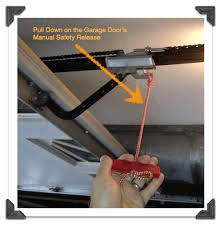
- Pull the red emergency release cord straight down.
- Lift the door manually using both hands.
Reconnect by running the opener once power is stable.
Kelebihan vs Kekurangan: Resetting After a Power Outage
Advantages
- Restores normal operation quickly
- No cost or tools required
- Improves long-term reliability
Disadvantages
- May require reprogramming
- Smart features may need extra steps
- Older units may lose memory more often
How Often Should a Garage Door Opener Be Checked After Outages?
Experts recommend:
- Testing operation after every major outage
- Full inspection once per year
- Sensor alignment check every 6 months
Preventive checks reduce emergency failures by up to 40%.
When a Power Outage Causes Permanent Damage
Rare, but possible during surges.
Warning signs:
- Burnt smell
- No lights or sound
- Repeated breaker trips
In these cases, internal circuit boards may be damaged.
About Garage Door Openers (Background)
Garage door openers are electromechanical devices designed to automate door movement safely and reliably. For a general overview of their design and function, you can reference Wikipedia’s garage door opener article:
https://en.wikipedia.org/wiki/Garage_door_opener
FAQ: How To Reconnect Garage Door Opener After Power Outage
Q1: Do I always need to reset my garage door opener after a power outage?
No. Many openers recover automatically. Reset only if issues appear.
Q2: Why does my wall button work but the remote doesn’t?
The remote likely lost synchronization and needs reprogramming.
Q3: Can a power outage erase my garage door opener settings?
Most modern openers retain memory, but remotes and WiFi may disconnect.
Q4: How long should I wait after power is restored before reconnecting?
Wait 2–5 minutes to ensure stable voltage.
Q5: Is it safe to unplug my opener during a storm?
Yes. Unplugging during severe storms can protect it from surges.
Q6: When should I call a professional?
If the opener has no power, makes unusual noises, or won’t respond after resets.
Conclusion
Knowing How To Reconnect Garage Door Opener After Power Outage can save time, money, and frustration. In most cases, a simple power cycle, remote reprogramming, or sensor check is all it takes to restore full functionality. By following the steps in this guide, you can confidently troubleshoot issues and keep your garage operating safely and smoothly.
If this article helped you, share it on social media so other homeowners can quickly recover their garage door systems after power outages.



Leave a Reply