If you’re searching for How To Program An Access Master Garage Door Opener, chances are you’ve replaced a remote, installed a new keypad, or experienced a reset after a power outage. Programming can feel confusing—especially if you’re unsure where the “Learn” button is located or how long to hold it.
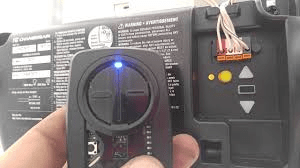
The good news? Most Access Master openers use a straightforward learning system that allows you to program remotes in just a few minutes. This complete guide walks you through remote setup, keypad programming, troubleshooting tips, and expert advice to ensure smooth operation.
Read too: The Complete Guide to Tighten Chain On Garage Door Opener for Smooth Operation
What Is an Access Master Garage Door Opener?
Access Master is a brand commonly associated with LiftMaster and Chamberlain systems. Many Access Master openers use rolling code technology, which improves security by changing the access code each time the remote is used.
For technical background on how garage door opener systems work:
https://en.wikipedia.org/wiki/Garage_door_opener
Rolling codes prevent unauthorized access by preventing signal duplication.
How To Program An Access Master Garage Door Opener (Remote Setup)
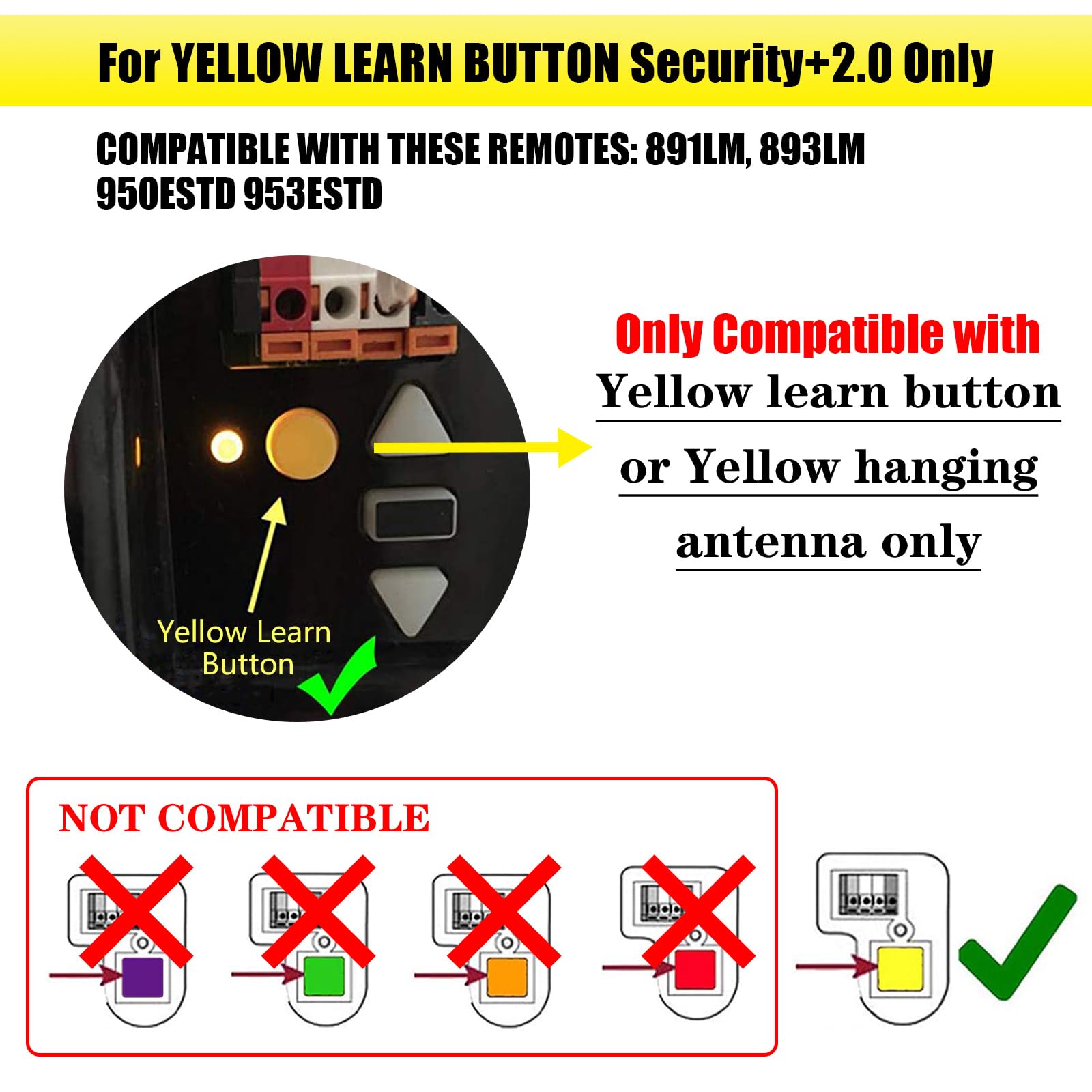
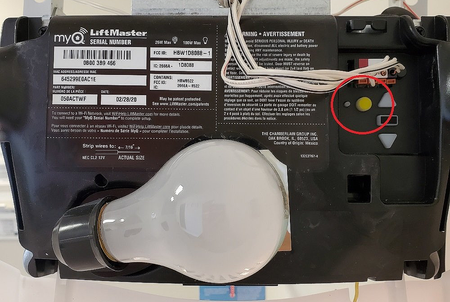
Step 1: Locate the “Learn” Button
4
The Learn button is typically:
- On the back or side of the motor unit
- Behind the light lens cover
- Near the antenna wire
Button colors may include:
- Yellow
- Purple
- Red/orange
- Green
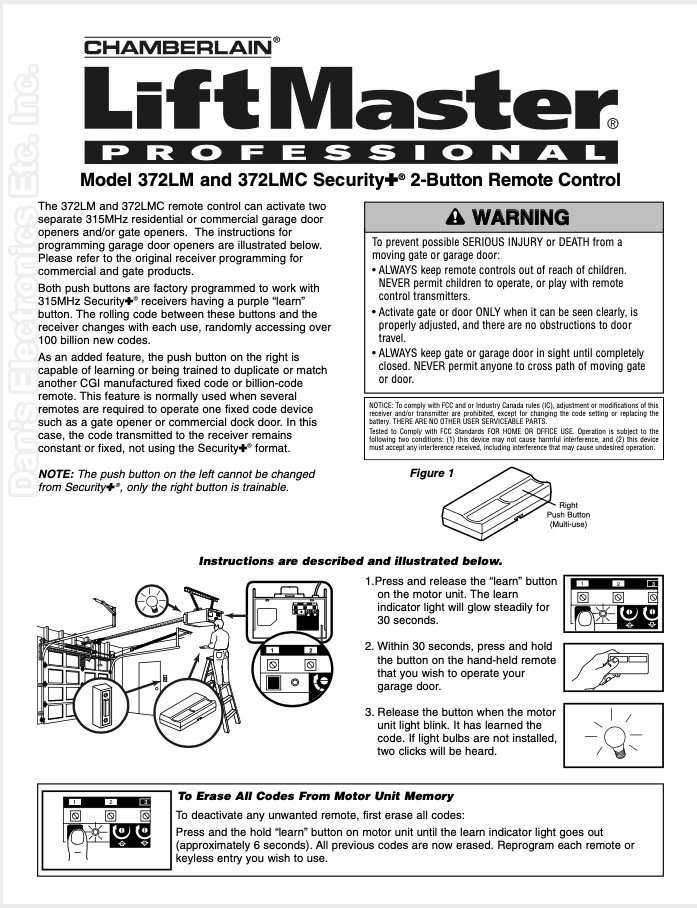
Step 2: Press and Release the Learn Button
- Press and release the Learn button.
- The LED light will illuminate or blink.
- You have approximately 30 seconds to complete programming.
Step 3: Program the Remote
- Press and hold the button on your remote.
- Wait for the opener lights to blink or hear a click.
- Release the button.
If successful, the motor unit confirms the pairing.
Step 4: Test the Remote
Stand 5–10 feet away and press the programmed button.
If the garage door moves, programming is complete.
How To Program an Access Master Keypad
If you’re installing a wireless keypad:
Step-by-Step Keypad Programming
- Press and release the Learn button on motor.
- Enter your desired 4-digit PIN on keypad.
- Press and hold the Enter button.
- Wait for opener light to blink.
- Release Enter.
Test by entering PIN and pressing Enter again.
How To Erase All Remote Codes
If you’ve lost a remote or moved into a new home, clearing old codes improves security.
To Clear Memory:
- Press and hold the Learn button for 6–10 seconds.
- LED light turns off.
- All programmed remotes and keypads are erased.
Reprogram each device individually afterward.
Why Won’t My Access Master Remote Program?
Common causes include:
1. Weak Remote Battery
Replace battery even if LED lights up.
Most remotes use:
- CR2032
- CR2016
- 3V lithium coin battery
2. Incorrect Learn Button Press
Press and release—do not hold unless clearing memory.
3. Memory Full
Most systems store:
- 7–20 remotes
Clear memory and reprogram.
4. Signal Interference
Possible interference sources:
- LED light bulbs
- WiFi routers
- Security cameras
Temporarily unplug nearby electronics and retry.
How Long Does Programming Take?
Average time:
- Remote setup: 2–3 minutes
- Keypad programming: 5 minutes
If programming takes longer, review troubleshooting checklist.
How Secure Is Access Master Rolling Code?
Rolling code systems change the code every time the remote is used.
Advantages:
- Prevents replay attacks
- Reduces hacking risk
- Complies with modern safety standards
This technology is significantly more secure than older fixed-code dip switch systems.
Step-by-Step Troubleshooting Checklist
If programming fails:
- Replace remote battery.
- Confirm compatibility.
- Stand within 3–5 feet of opener.
- Press Learn button briefly (not long).
- Clear memory and retry.
- Inspect antenna wire (must hang freely).
Systematic steps resolve most issues.
Can You Program Multiple Doors?
Yes.
Most Access Master remotes include:
- 2–3 programmable buttons
Repeat programming process for each door.
Safety Reminders During Programming
- Ensure door area is clear.
- Keep children and pets away.
- Do not stand under moving door.
- Confirm safety sensors are aligned.
Safety systems prevent accidental injury.
When Should You Replace the Opener?
Consider upgrading if:
- Unit is over 15–20 years old
- Frequent programming failures occur
- Motor is excessively loud
- Lacks safety sensors
Modern openers offer quieter operation and smart home integration.
FAQ – How To Program An Access Master Garage Door Opener
Where is the Learn button located?
Usually on the motor unit near the antenna wire or behind the light cover.
Why does my remote light up but door doesn’t move?
Likely weak battery or programming not completed properly.
Can I reprogram without a ladder?
You must access the motor unit to press the Learn button.
How many remotes can be programmed?
Most units store between 7 and 20 devices.
Does unplugging erase programming?
No, unless you manually clear memory.
Can I program a universal remote?
Yes, if compatible with Access Master frequency and rolling code system.
Conclusion
Learning How To Program An Access Master Garage Door Opener is simple once you locate the Learn button and follow the correct pairing sequence. Most remote and keypad setups take just a few minutes when done properly.
If issues persist, replacing batteries, clearing memory, or checking for signal interference usually resolves the problem.
If this guide helped you successfully program your Access Master opener, consider sharing it with friends or neighbors—garage door programming doesn’t have to be complicated when you follow clear, step-by-step instructions.



Leave a Reply