If you’re searching for help with the Overhead Door Wireless Garage Door Opener Keypad OKP BX, you’re likely trying to program it, reset it, or troubleshoot connection issues. Wireless keypads are incredibly convenient—but they can be frustrating if not set up correctly.
This complete guide walks you through installation, programming steps, compatibility, common errors, battery replacement, and security tips—so you can get your garage access working smoothly again.
Read too: Mastering the Art of Adjusting a Chamberlain Garage Door Opener for Smooth Operation and Safety
What Is the Overhead Door Wireless Garage Door Opener Keypad OKP BX?
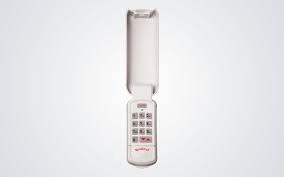
The Overhead Door Wireless Garage Door Opener Keypad OKP BX is an exterior-mounted keypad that allows you to open and close your garage door using a PIN code—without a remote or smartphone.
It is designed for compatibility with many Overhead Door brand openers that use rolling code technology.
Wireless keypads operate via radio frequency signals. For general understanding of garage door opener systems, see:
https://en.wikipedia.org/wiki/Garage_door_opener
Why Use a Wireless Garage Door Keypad?
Homeowners choose wireless keypads for several practical reasons:
- No need to carry remotes
- Temporary PINs for guests
- Backup entry method
- Convenient access during outdoor activities
- Improved household flexibility
According to home security surveys, over 60% of U.S. homeowners prefer keyless entry options for at least one entry point.
Garage keypad systems provide both convenience and added functionality.
Is the OKP BX Compatible With My Opener?
Compatibility depends on:
- Opener brand (must be Overhead Door or compatible Genie models)
- Rolling code frequency
- Manufacture year
Most Overhead Door openers manufactured after 1995 support rolling code systems.
Quick Compatibility Checklist
✔ Overhead Door brand motor
✔ Intellicode system
✔ Learn button present on opener motor
If your opener has a visible “Learn” button, you likely have compatibility.
How To Program the Overhead Door Wireless Garage Door Opener Keypad OKP BX
Here’s the step-by-step process.
Before You Begin
You will need:
- A ladder
- Access to the garage opener motor
- Fresh 9V battery (if needed)
- 4-digit PIN you want to set
Step 1: Locate the Learn Button
Climb safely and find the “Learn” button on your garage door opener motor housing.
It is typically:
- Red
- Purple
- Yellow
- Green
Press and release the Learn button.
You now have approximately 30 seconds to complete programming.
Step 2: Enter Your PIN
On the OKP BX keypad:
- Enter your chosen 4-digit PIN.
- Press the “Up/Down” or “Program” button.
- Wait for the opener light to blink or hear a click.
This confirms synchronization.
Step 3: Test the Keypad
Close the garage door.
Enter your PIN and press the open/close button.
If the door moves, programming is complete.
What If the Keypad Doesn’t Work?
Here are the most common causes.
1. Dead Battery
Wireless keypads rely on a 9V battery.
Symptoms:
- No backlight
- No LED flash
- Intermittent operation
Replace battery every 12–24 months for optimal performance.
2. Signal Interference
Metal siding or thick concrete can reduce signal range.
Solution:
- Mount keypad closer to garage door.
- Avoid placing near large metal objects.
3. Programming Timeout
If more than 30 seconds passed after pressing Learn, repeat process.
4. Incorrect PIN Entry
Re-enter programming mode and confirm chosen PIN carefully.
How To Reset the OKP BX Keypad
If you forgot the PIN:
- Remove battery.
- Press and hold the program button.
- Reinsert battery while holding button.
- Release after 5–10 seconds.
- Reprogram using Learn button method.
This restores factory settings.
How Secure Is the OKP BX Keypad?
Modern Overhead Door systems use rolling code technology.
This means:
- Each time you press the keypad, a new encrypted code is generated.
- Prevents signal replay attacks.
- Increases resistance to hacking attempts.
Rolling code systems dramatically improved garage door security over fixed-code systems.
Pros and Cons of the OKP BX Keypad
Advantages
✔ Wireless installation
✔ No interior wiring required
✔ Easy programming
✔ Weather-resistant casing
✔ Secure rolling code
Disadvantages
✖ Battery dependent
✖ Limited PIN length (usually 4 digits)
✖ Occasional reprogramming needed
How To Install the OKP BX Properly
Correct mounting ensures durability.
Step-by-Step Installation
- Choose mounting location:
- 5 feet above ground
- Within 3–10 feet of door frame
- Use included screws.
- Avoid direct rain exposure.
- Seal screw holes if needed.
- Test signal before final tightening.
Avoid mounting directly onto metal siding without proper anchors.
How Long Does the Battery Last?
On average:
- 12–24 months depending on usage.
- Heavy use households may require annual replacement.
If backlight dims, replace battery promptly.
Can You Program Multiple Doors?
Yes, depending on your opener system.
Some Overhead Door models allow:
- Multiple keypad programming
- Multiple door assignment
- Separate PINs for separate doors
Refer to your specific motor model manual for confirmation.
Is Professional Installation Necessary?
For most homeowners:
No.
Installation time:
- 10–20 minutes
- Basic DIY skill required
However, if your opener lacks a Learn button or uses older technology, a technician may be required.
How To Improve Garage Security With a Keypad
To maximize safety:
✔ Avoid simple PINs like 1234
✔ Change PIN annually
✔ Install motion lighting
✔ Disable keypad if moving homes
Security habits matter more than technology alone.
Troubleshooting Quick Reference Table
| Issue | Likely Cause | Solution |
|---|---|---|
| No response | Dead battery | Replace 9V |
| Door won’t open | Not synced | Reprogram |
| Intermittent | Weak signal | Move mounting |
| LED blinking | Programming mode | Complete setup |
FAQ Section
1. How do I program the Overhead Door Wireless Garage Door Opener Keypad OKP BX?
Press the Learn button on the opener, enter your PIN on the keypad, then press the open/close button within 30 seconds.
2. Why is my OKP BX keypad not working?
Most commonly due to a dead battery or incomplete programming.
3. Can I change my PIN after setup?
Yes. Reset the keypad and reprogram with a new PIN.
4. Is the OKP BX secure?
Yes. It uses rolling code technology to prevent signal duplication.
5. How often should I replace the battery?
Every 12–24 months, depending on usage.
6. Does it work with non-Overhead Door openers?
Typically no. It is designed for Overhead Door and compatible Genie systems.
Conclusion
The Overhead Door Wireless Garage Door Opener Keypad OKP BX is a reliable, convenient, and secure solution for keyless garage entry.
When properly installed and programmed, it provides:
- Easy household access
- Guest entry flexibility
- Rolling code security
- Wireless convenience
If you follow the setup steps carefully and maintain the battery, the OKP BX can function reliably for years.
If this guide helped you troubleshoot or install your keypad, share it on social media to help other homeowners solve their garage access issues quickly and safely.



Leave a Reply