Need to Program Craftsman Garage Door Opener To Car Without Remote because you lost the handheld transmitter? You’re not alone. Many homeowners want to connect their car’s built-in garage button system directly to the opener—without relying on a separate remote.
The good news is that most Craftsman garage door openers can be programmed directly using the “Learn” button on the motor unit. In this complete guide, you’ll learn exactly how to sync your car, what to do if it doesn’t work, and how to troubleshoot common problems.
Read too: Door and Garage Door Companies: Choosing the Right Partner for Your Needs
Can You Program Craftsman Garage Door Opener To Car Without Remote?
Yes. You can Program Craftsman Garage Door Opener To Car Without Remote using your vehicle’s built-in HomeLink or similar system—without needing the original handheld transmitter.
Most Craftsman openers manufactured after 1993 include a “Learn” button that allows direct pairing.
Craftsman openers operate using rolling code radio frequencies for security. For general background on how garage door openers work, see:
https://en.wikipedia.org/wiki/Garage_door_opener
Understanding rolling code technology helps explain the programming steps.
What You Need Before Programming
Before starting, confirm:
- Your Craftsman opener has a “Learn” button
- Your car includes HomeLink or built-in garage buttons
- The opener is powered on
- You have ladder access to the motor unit
Typical Learn button colors:
- Yellow
- Purple
- Red/Orange
- Green
Button color indicates frequency generation.
Where Is The Learn Button On Craftsman Openers?
The Learn button is usually located:
- On the back of the motor housing
- Under a light cover
- Near the antenna wire
You may need to remove the light lens to access it.
Step-by-Step: Program Craftsman Garage Door Opener To Car Without Remote
Follow these steps carefully.
Step 1: Clear Car’s Existing Codes (If Needed)
If your car was previously programmed:
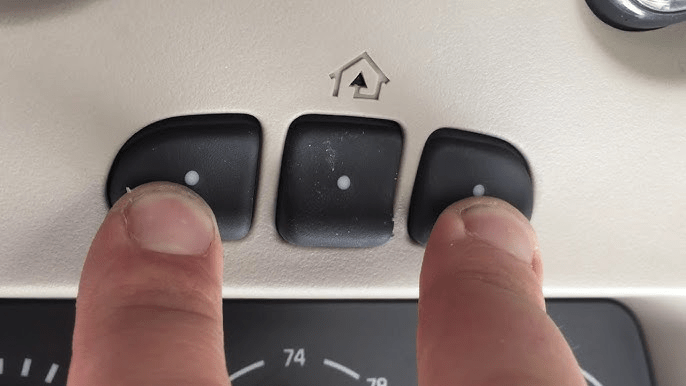
- Hold the two outer HomeLink buttons.
- Continue holding for about 10–20 seconds.
- Wait until indicator light flashes rapidly.
This clears stored codes.
Step 2: Press the Learn Button on Opener
- Climb ladder safely.
- Press and release the Learn button.
- A small LED light will turn on for 30 seconds.
You now have a limited window to complete pairing.
Step 3: Program From Inside Your Car
Within 30 seconds:
- Sit in the driver’s seat.
- Press and hold the desired HomeLink button.
- Hold for 10–30 seconds until the garage light flashes or clicks.
This confirms successful pairing.
Step 4: Test the System
Press the programmed button.
The garage door should open or close.
If it doesn’t work, repeat the process.
What If Programming Fails?
Common issues include:
- Expired opener memory
- Incompatible frequency
- HomeLink version mismatch
- Car requiring additional sync steps
Some newer vehicles require a two-step rolling code sync:
- Program basic signal.
- Press Learn button again.
- Press programmed car button twice.
Check your vehicle manual for specific instructions.
Which Cars Are Compatible?
Most vehicles manufactured after 2007 include:
- HomeLink system
- Car2U system
- Built-in programmable buttons
Brands commonly compatible:
- Ford
- Toyota
- Honda
- Chevrolet
- Nissan
- BMW
- Mercedes
Older cars may require a bridge device.
Do You Need a Remote at All?
No, if:
- Your car has HomeLink
- The Learn button functions properly
However, if your car lacks built-in controls, you will need a compatible remote.
Troubleshooting Guide
If your opener does not respond:
1. Check Antenna Wire
Ensure antenna wire hangs freely.
2. Reset Opener Memory
To erase all codes:
- Hold Learn button for 6–10 seconds.
- LED will turn off.
All remotes will be erased.
3. Verify Rolling Code Compatibility
Most Craftsman openers use Security+ rolling code systems.
Older fixed-code vehicles may not pair directly.
4. Replace Car Battery (If Weak)
Low vehicle battery can interfere with programming.
How Long Does Programming Take?
Typically:
- 5–10 minutes
If troubleshooting required:
- 15–20 minutes
Security Considerations
Rolling code systems change signal codes after each use, increasing security.
Advantages:
- Prevents signal cloning
- Reduces hacking risk
- Enhances safety
Modern Craftsman models use advanced encryption.
When Should You Replace the Opener Instead?
Consider upgrading if:
- Opener is 20+ years old
- It lacks rolling code technology
- Programming repeatedly fails
Modern openers offer:
- Wi-Fi connectivity
- Smartphone control
- Enhanced security
Pros vs Cons of Programming Without Remote
Advantages:
- No need to buy new remote
- Cleaner car interior
- More convenient access
- Enhanced security
Disadvantages:
- Requires ladder access
- May need multiple attempts
- Some older cars incompatible
Real-World Scenario
A homeowner lost original remote but had 2018 Toyota Camry.
Used Learn button method:
- Programming completed in 7 minutes
- No new remote required
- Saved $40 on replacement transmitter
Direct pairing is often simple.
Can You Program Multiple Cars?
Yes.
Each car must:
- Repeat Learn button process
- Be programmed separately
Most openers store:
- 5–10 remote codes
Check your model’s memory limit.
FAQ – Program Craftsman Garage Door Opener To Car Without Remote
1. Can I program without the original remote?
Yes, using the Learn button and built-in car controls.
2. How long does the Learn mode stay active?
Approximately 30 seconds after pressing the button.
3. Why does my car button blink but door won’t open?
You may need the second rolling code sync step.
4. Will this erase other remotes?
No, unless you hold Learn button for 6–10 seconds.
5. What if my opener is very old?
Pre-1993 models may not support direct car programming.
6. Can I program two garage doors?
Yes, assign different HomeLink buttons to each door.
Conclusion
You can successfully Program Craftsman Garage Door Opener To Car Without Remote by using the Learn button on the motor unit and your vehicle’s built-in system.
The process typically takes less than 10 minutes and requires:
- Access to Learn button
- Functional HomeLink system
- Proper timing
No remote is necessary in most modern setups.
If this guide helped you sync your Craftsman opener, consider sharing it with other homeowners who may have misplaced their remote.



Leave a Reply