If you’re trying Programming A LiftMaster Garage Door Opener To My Car, you’re likely tired of juggling handheld remotes or dealing with a car button that just won’t connect. It can feel confusing when the garage door refuses to respond — especially when you’re in a rush.
The good news? Most LiftMaster systems can be paired with your vehicle in under 10 minutes. This comprehensive guide will walk you through the exact steps, explain why each step matters, and help you troubleshoot like a pro.
Read too: Door and Garage Door Companies: Choosing the Right Partner for Your Needs
What Is Programming A LiftMaster Garage Door Opener To My Car?
Programming A LiftMaster Garage Door Opener To My Car means syncing your vehicle’s built-in transmitter system (usually HomeLink or Car2U) with your LiftMaster garage door motor.
LiftMaster uses rolling code technology, which enhances security by changing the code every time the opener is activated. This prevents signal theft and unauthorized access. You can learn more about rolling code systems here:
https://en.wikipedia.org/wiki/Rolling_code
Because of this security feature, programming requires both:
- Training your vehicle to the remote signal
- Syncing with the motor unit using the Learn button
How Do I Know If My Car Has a Built-In Garage Transmitter?
Most vehicles manufactured after 2007 in the U.S. include HomeLink integration.
Look for:
- Three small buttons on your visor or overhead console
- A small house icon
- “HomeLink” branding
According to automotive integration data, over 70% of modern vehicles in North America come with built-in garage control systems.
If unsure, check your vehicle owner’s manual.
What Do I Need Before Starting?
Before programming, gather:
- Access to the LiftMaster motor unit
- A stable ladder
- Your car parked in the driveway or garage
- Ignition turned to ON (engine can remain off)
- 5–10 uninterrupted minutes
Safety Tip: Ensure the garage door is fully closed before starting.
Step-by-Step: Programming A LiftMaster Garage Door Opener To My Car
Follow these instructions carefully.
Step 1: Clear Existing Codes in Your Vehicle
This prevents interference from old programming.
- Turn ignition to ON.
- Press and hold the two outer HomeLink buttons.
- Hold for 10–20 seconds.
- Release when the indicator light flashes rapidly.
Your system is now reset.
Step 2: Train the Vehicle to the LiftMaster Remote
This copies the handheld remote’s signal.
- Hold the LiftMaster remote 1–3 inches from your vehicle’s HomeLink buttons.
- Press and hold both:
- The remote button
- The desired HomeLink button
- Hold for 15–30 seconds.
- Watch the light:
- Slow blink → training
- Rapid blink → signal learned
Release both buttons.
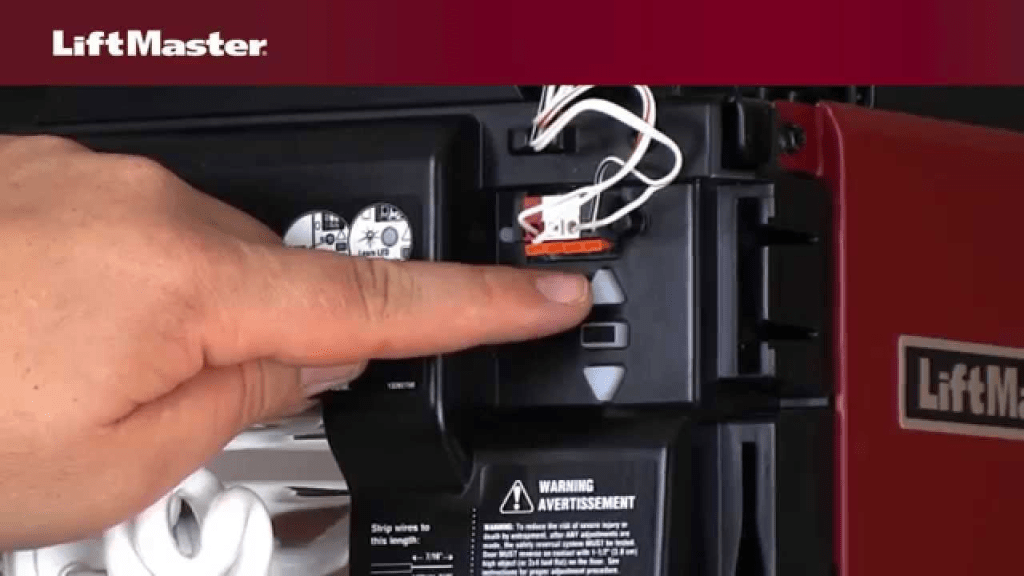
Step 3: Locate and Press the Learn Button on LiftMaster
Now you must sync with the opener itself.
- Climb ladder safely.
- Locate the Learn button on the motor unit.
- Button colors may be:
- Yellow
- Purple
- Red/Orange
- Green
- Press the Learn button once.
- A small LED will illuminate.
- You now have 30 seconds.
Step 4: Complete the Sync From Your Car
- Return to your vehicle immediately.
- Press and hold the programmed HomeLink button for 2 seconds.
- Release.
- Press again for 2 seconds.
- Repeat up to 3 times.
You’ll know it worked when:
- Garage light blinks
- Motor clicks
- Door moves
Programming complete.
LiftMaster Learn Button Color Guide
| Color | Frequency | Year Range | System |
|---|---|---|---|
| Yellow | 310/315/390 MHz | 2011–Present | Security+ 2.0 |
| Purple | 315 MHz | 2005–2014 | Security+ |
| Red/Orange | 390 MHz | 1997–2005 | Rolling Code |
| Green | 390 MHz | 1993–1996 | Early Rolling |
Most HomeLink systems are compatible with these models.
Why Is My LiftMaster Not Connecting?
If programming failed, here are the most common causes.
1. Weak Remote Battery
Replace battery before training.
2. Skipped Learn Button Step
Rolling code systems require confirmation from the motor unit.
3. Memory Is Full
Most LiftMaster units store 5–7 devices.
To clear memory:
- Press and hold Learn button for 6–10 seconds
- LED turns off
- All devices erased
Reprogram afterward.
4. Signal Interference
LED bulbs and Wi-Fi routers can disrupt signals.
Try programming:
- With garage lights off
- Vehicle closer to motor
- Engine off
How Long Does Programming Take?
Average time breakdown:
- Reset: 1 minute
- Remote training: 2–3 minutes
- Learn button sync: 2–3 minutes
- Testing: 1 minute
Total: 5–8 minutes
Most homeowners complete this without professional help.
LiftMaster Built-In WiFi vs Car Integration
Many modern LiftMaster models include MyQ smart control.
Comparison Table
| Feature | Car Integration | MyQ App |
|---|---|---|
| Requires Internet | No | Yes |
| Open from Anywhere | No | Yes |
| Monthly Fee | No | Optional |
| Setup Time | 5–10 minutes | 10–15 minutes |
Best Practice: Use both for maximum convenience and security.
Safety Considerations
Garage doors weigh between 130–400 pounds depending on material.
Always:
- Keep children and pets away
- Avoid standing under moving door
- Use stable ladder
- Keep door path clear
According to U.S. injury statistics, thousands of garage-related injuries occur annually due to improper operation or unsafe testing.
Advanced Tip: Programming Without Original Remote
If you lost your handheld remote:
- Clear vehicle codes.
- Press Learn button on LiftMaster.
- Within 30 seconds, press and hold HomeLink button.
- Repeat up to 3 times.
This method works on most Security+ 2.0 systems.
Quick Troubleshooting Checklist
If it doesn’t work:
✔ Reset HomeLink
✔ Replace remote battery
✔ Press Learn button again
✔ Clear opener memory
✔ Reduce interference
✔ Move vehicle closer
FAQ: Programming A LiftMaster Garage Door Opener To My Car
Q1: Can I program multiple cars to one LiftMaster?
Yes. Most models allow 5–7 programmed transmitters.
Q2: Do I need to reprogram after a power outage?
Usually no. Codes remain stored in non-volatile memory.
Q3: Why does the HomeLink light blink but door won’t move?
This typically means the rolling code sync step was incomplete.
Q4: Can I program without climbing a ladder?
No. Access to the Learn button is required.
Q5: Is professional installation necessary?
In most cases, no. Setup is beginner-friendly.
Q6: Will older LiftMaster models work?
Models manufactured after 1993 with rolling code are usually compatible.
Expert Insight: Why Rolling Code Technology Is Important
Rolling code technology significantly reduces unauthorized access by generating a new access code every time the remote is used.
Security professionals strongly recommend rolling code systems over fixed-code transmitters due to increased protection against signal cloning devices.
Conclusion
Programming A LiftMaster Garage Door Opener To My Car is a straightforward process once you follow the correct sequence: reset, train, press Learn, and confirm sync.
With just a few careful steps, you can eliminate handheld remotes and enjoy seamless garage access directly from your vehicle.
If this guide helped you, consider sharing it on social media so other homeowners can quickly and confidently solve the same issue.



Leave a Reply