If you’re trying to program a remote or keypad and can’t find the Sears 1 3 Hp Garage Door Opener Learn Button, you’re not alone. Many homeowners struggle to locate it or figure out how to use it correctly.
The good news? Once you understand where the learn button is and how it works, programming your opener takes less than five minutes. In this complete guide, we’ll walk through identification, setup, troubleshooting, and safety tips.
Read too: The Complete Guide to Tighten Chain On Garage Door Opener for Smooth Operation
What Is the Sears 1 3 Hp Garage Door Opener Learn Button?
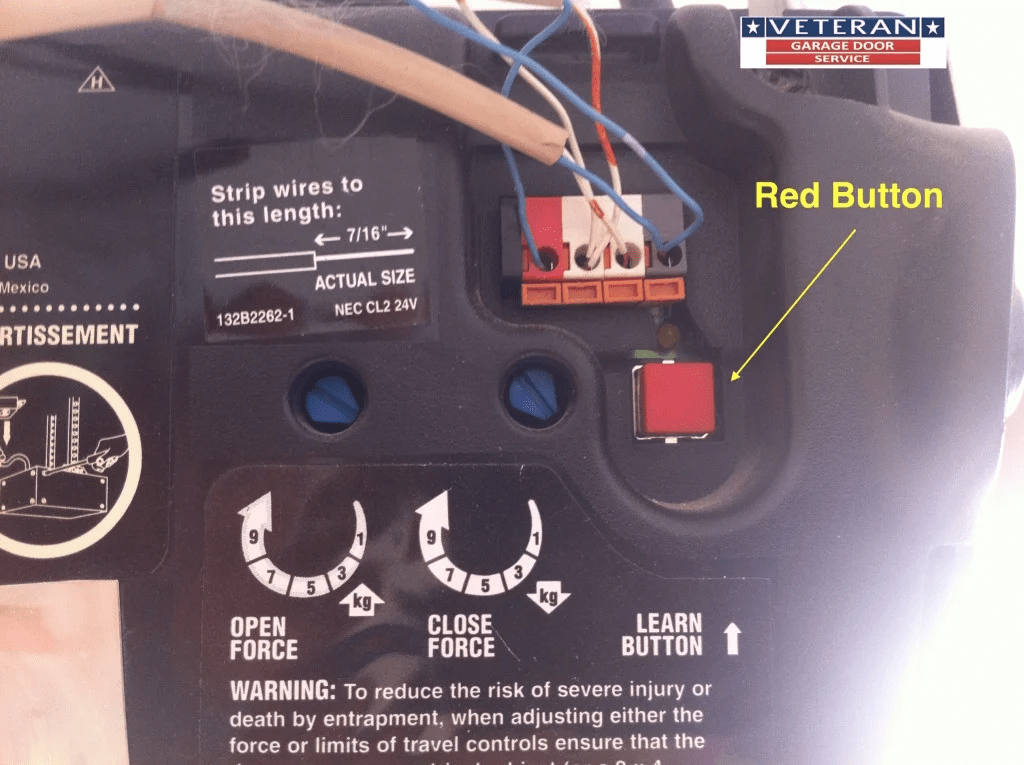
The Sears 1 3 Hp Garage Door Opener Learn Button is a small colored button located on the motor unit. It allows you to:
- Program remote controls
- Sync wireless keypads
- Reset memory
- Erase old remote codes
Sears garage door openers were commonly manufactured under the Craftsman brand and share similar internal systems.
For technical background on how garage door opener systems communicate, see this reference:
https://en.wikipedia.org/wiki/Garage_door_opener
Where Is the Learn Button Located?
Step 1: Use a Ladder
Position a stable 6–8 ft ladder beneath the opener motor housing.
Step 2: Look Under the Light Cover
In most Sears 1/3 HP models, the learn button is:
- On the back panel of the motor unit
- Behind the light lens cover
- Near the antenna wire
Step 3: Identify Button Color
The button may be:
- Red/Orange
- Purple
- Green
- Yellow
The color often indicates frequency and manufacturing year.
What Does the Learn Button Do?
The learn button controls the opener’s internal radio receiver.
When pressed:
- The unit enters programming mode.
- It waits 30 seconds for a signal.
- It stores the remote or keypad code.
If no signal is received within 30 seconds, programming mode automatically exits.
How To Program a Remote Using the Sears 1 3 Hp Garage Door Opener Learn Button
Programming takes approximately 3–5 minutes.
Tools Needed
- Ladder
- Compatible remote
- Fresh remote battery
Step-by-Step Programming Guide
Step 1: Press the Learn Button
Press and release the learn button once.
An LED indicator will light up or blink.
Step 2: Press Remote Button
Within 30 seconds:
- Press and hold the remote button.
- Hold for 3–5 seconds.
The opener light will blink or you’ll hear a click.
Step 3: Test the Remote
Press the remote again.
If programmed correctly, the garage door will open or close.
How To Program a Wireless Keypad
Step 1:
Press the learn button on the motor unit.
Step 2:
Within 30 seconds, enter your desired 4-digit PIN on the keypad.
Step 3:
Press the “Enter” button.
Wait for confirmation light flash.
How To Erase All Remote Codes
If you suspect lost remotes or security issues:
Step 1:
Press and hold the learn button for 6–10 seconds.
Step 2:
Release when LED turns off.
This clears all programmed remotes and keypads.
You must reprogram devices afterward.
Why Is My Learn Button Not Working?
If pressing the button doesn’t activate programming mode, check:
1. Power Supply
Ensure the opener is plugged in and breaker is on.
2. Burned-Out Logic Board
If LED doesn’t respond, the control board may be faulty.
3. Stuck Button
Dirt or age may cause the button to stick.
Gently clean area using dry cloth.
4. Memory Full
Some older Sears units store up to 5–7 remotes only.
Erase memory before adding new devices.
Common Learn Button Issues and Solutions
| Problem | Possible Cause | Solution |
|---|---|---|
| LED won’t light | No power | Check outlet |
| Remote won’t sync | Wrong frequency | Confirm compatibility |
| Door opens randomly | Signal interference | Reset memory |
| Keypad won’t program | Weak battery | Replace battery |
How Long Does Programming Last?
Once programmed, remote codes remain stored even during power outages.
However:
- Power surges may reset memory.
- Logic board failure may erase codes.
- Manual reset clears all programming.
Are Sears 1/3 HP Openers Still Reliable?
Many Sears 1/3 HP models last 10–15 years with proper maintenance.
They are best suited for:
- Single garage doors
- Lightweight steel doors
- Standard 7-ft height doors
Heavier insulated doors may strain the motor.
Safety Tips When Using the Learn Button
Garage doors weigh between 130–300 pounds.
Always:
- Keep clear of moving door.
- Test safety sensors after programming.
- Avoid standing under the door during testing.
- Keep children away during setup.
Test auto-reverse feature after any reprogramming.
When Should You Replace the Opener?
Consider replacement if:
- Unit is over 15 years old
- Frequent remote syncing problems
- Loud grinding noises
- Motor overheating
Modern openers offer quieter operation and enhanced security rolling codes.
Real-World Example
A homeowner in Texas lost remote access after replacing batteries. The issue wasn’t the remote—it was a power surge that reset memory.
Solution:
- Held learn button 8 seconds to clear system.
- Reprogrammed two remotes.
- Total fix time: 6 minutes.
No professional service needed.
FAQ: Sears 1 3 Hp Garage Door Opener Learn Button
1. Where is the Sears 1 3 Hp Garage Door Opener Learn Button located?
Usually on the back or side of the motor housing, often under the light cover near the antenna wire.
2. How long do I hold the learn button?
Press and release for programming. Hold 6–10 seconds to erase all codes.
3. Why won’t my remote program?
Common causes include:
- Dead battery
- Incompatible remote
- Memory full
- Faulty logic board
4. How many remotes can I program?
Most older Sears 1/3 HP models store 5–7 remotes.
5. What if the LED doesn’t light up?
Check power source first. If power is confirmed, the control board may need replacement.
6. Is it safe to program it myself?
Yes. Programming is simple and safe if you follow instructions and avoid moving parts.
Conclusion
The Sears 1 3 Hp Garage Door Opener Learn Button is the key to programming remotes and keypads quickly and securely. Once you understand its location and function, setup takes just minutes.
If you’re experiencing programming issues:
- Check power.
- Replace batteries.
- Reset memory.
- Reprogram carefully.
A properly configured opener improves security and daily convenience.
If this guide helped you, share it on social media to assist other homeowners troubleshooting their garage door openers.
Leave a Reply