Introduction
Are you tired of fumbling for a bulky remote control every time you pull into your driveway, or worse, leaving it at home? You are certainly not alone; studies show that the average driver spends nearly 50 hours a year just entering and exiting their garage. Integrating your opener directly into your truck’s mirror isn’t just a luxury—it’s a convenience that saves time and reduces daily stress. If you are looking for the definitive guide on how to program 2022 Ram 1500 garage door opener systems, you have come to the right place to get it done in under 10 minutes.
Why Use HomeLink in Your 2022 Ram 1500?
Before we dive into the steps, it is important to understand why this feature is a game-changer. The 2022 Ram 1500 comes equipped with the HomeLink transceiver, a system compatible with over 400 million devices, including garage doors, gates, and even home lighting.
- Security: Modern systems use encrypted signals that are much harder to intercept than old “dip-switch” remotes.
- Convenience: No more batteries to replace in a visor clip remote.
- Resale Value: A fully functional integrated system is a desirable feature for future buyers.
Preparation: What You Need Before Starting
To ensure a smooth programming process, gather the following items. You do not need any special tools, just a little bit of time and access to your garage.
- Your 2022 Ram 1500: Ensure the ignition is in the “ON” or “RUN” position (engine can be off, but the electrical system must be active).
- The Original Hand-Held Remote: The one you currently use to open the garage. Note: Ensure the remote has fresh batteries.
- A Stepladder: You may need this to reach the motor unit on the garage ceiling to press the “Learn” or “Smart” button.
- A Helper (Optional): It can be helpful to have someone watch the indicator light on the garage motor while you sit in the truck.
How To Program 2022 Ram 1500 Garage Door Opener: Step-by-Step
This process is divided into three distinct phases: clearing old memory, training the vehicle, and syncing with the motor.
Step 1: Clear the HomeLink Memory (The “Hard Reset”)
If you bought your Ram used, or if previous programming attempts failed, you must first erase the existing memory. This prevents signal conflicts.
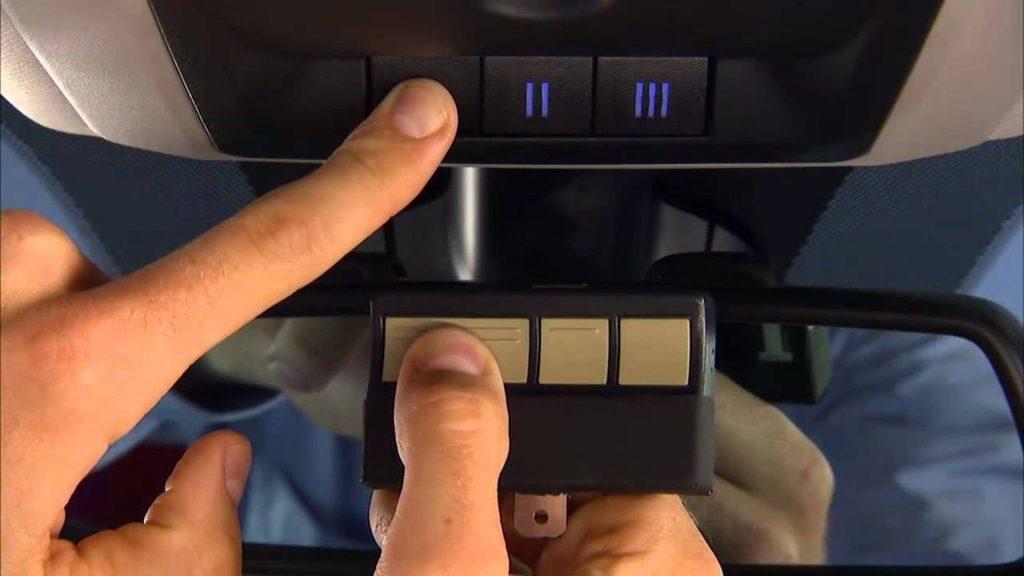
- Locate the three HomeLink buttons on your overhead console or rearview mirror.
- Press and hold the two outer buttons (Button 1 and Button 3) simultaneously.
- Do not let go until the indicator light begins to flash rapidly. This usually takes about 20 seconds.
- Release the buttons. The system is now cleared and ready for a new code.
Step 2: Program the Universal Transceiver
Now we will teach your Ram 1500 the frequency of your specific garage door remote.
- Hold your original hand-held remote 1–3 inches away from the HomeLink buttons you want to program.
- Press and hold the button on the HomeLink system you wish to use (e.g., Button 1).
- While holding the HomeLink button, simultaneously press and hold the button on your original remote.
- Watch the LED indicator on the HomeLink mirror:
- It will start flashing slowly, then transition to a rapid flash.
- Once the rapid flash occurs (usually within 20–40 seconds), release both buttons. The solid or rapidly flashing light indicates the signal has been captured.
Step 3: Sync with the Garage Door Motor (Rolling Code)
This is the most critical step for modern openers. Most garage door openers manufactured after 1996 use “Rolling Code” technology for security.
- Go to your garage door motor unit (the box hanging from the ceiling).
- Locate the “Learn” or “Smart” button. It is typically colored Purple, Yellow, Orange, or Red and located near the antenna wire.
- Press and release the “Learn” button. The indicator light next to it will glow or blink, signaling it is in “learning mode.” You typically have 30 seconds to complete the next step.
- Return to your 2022 Ram 1500.
- Press the programmed HomeLink button firmly and hold it for two seconds, then release.
- Repeat this “press and hold for 2 seconds” cycle three times in total.
- Test the button. Your garage door should now activate.
Troubleshooting Common Issues
Even with the right steps, technology can be finicky. Here is a quick reference table for common problems.
| Issue | Potential Cause | Solution |
|---|---|---|
| Light Flashes but Door Won’t Move | “Learn” button on motor not pressed. | Go to the motor unit and press the colored “Learn” button, then cycle the truck button 3 times. |
| No Light on HomeLink | Ignition not in “Run” mode. | Turn the key to the “ON” position or press the Start button twice without your foot on the brake. |
| Only Works When Very Close | Weak remote battery or interference. | Replace the battery in your handheld remote. Ensure LED bulbs in the motor aren’t causing RF interference. |
| Erratic Operation | Frequency mismatch. | Ensure your opener is compatible with HomeLink (most are, but some very old or specific European brands may need a converter). |
Understanding Rolling Code Technology
You might wonder why Step 3 is necessary when the truck already “learned” the remote in Step 2. This is due to Rolling Code technology. Unlike older fixed-code systems, rolling codes change every time the remote is used to prevent thieves from “scanning” and copying your signal.
Because the car and the garage motor must be synchronized on the same code sequence, simply training the car isn’t enough; the motor must also be told to accept the car as a new transmitter. For a deeper technical understanding of how these security encryption sequences work, you can refer to the Rolling Code entry on Wikipedia.
Expert Tips for Ram 1500 Owners
- The “Visor” Trick: If you have a remote that is difficult to program, try placing it directly against the HomeLink buttons. Sometimes, shielding the signal from other RF noise in the garage helps.
- Check the Antenna: Ensure the purple or yellow antenna wire hanging from your garage motor is fully extended. This wire acts as the receiver for the signal from your truck.
- Dip-Switch Openers: If you have a very old opener (pre-1996) with “Dip Switches” inside the remote, you do not need to press the “Learn” button on the motor. However, these are less secure and we highly recommend upgrading your motor unit.
Frequently Asked Questions (FAQ)
1. How many devices can I program in my 2022 Ram 1500? The HomeLink system in the 2022 Ram 1500 typically features three buttons. This means you can program up to three different devices, such as a main garage door, a side gate, or a holiday home garage.
2. Why won’t my HomeLink reset? If holding the outer buttons for 20 seconds doesn’t flash the light, ensure your ignition is in the “RUN” mode. If the light still doesn’t respond, try turning the vehicle off, locking it, waiting 10 minutes (to let the modules sleep), and trying again.
3. Can I program a HomeLink remote without a ladder? If your garage motor has a “Learn” button that is accessible from the ground, or if you have a smart garage controller (like MyQ) that allows digital syncing, you might avoid the ladder. However, for 90% of standard installations, a ladder is required to press the physical motor button.
4. Does programming erase the old remote? No. Programming your 2022 Ram 1500 does not erase your existing handheld remotes. The system can remember multiple remotes simultaneously.
5. What if I buy a new house? How do I clear the old code? Simply repeat “Step 1” from this guide (hold outer buttons for 20 seconds) to wipe the memory clean before programming the new garage door.
Conclusion
Mastering how to program 2022 Ram 1500 garage door opener settings is a straightforward process that significantly enhances your daily driving experience. By following these steps—clearing memory, training the transceiver, and syncing the rolling code—you ensure that your vehicle communicates seamlessly with your home.
Not only does this save you from the annoyance of carrying extra remotes, but it also adds a layer of modern convenience that makes every arrival home feel a little smoother.



Leave a Reply