Introduction
Are you tired of juggling multiple remotes every time you pull into your driveway? It is a common frustration for new car owners who want to streamline their daily routine. If you are wondering how to program 2023 Hyundai Palisade garage door opener, you are in the right place. This guide will walk you through the process simply and safely, ensuring your vehicle communicates perfectly with your home system.
The 2023 Hyundai Palisade comes equipped with the HomeLink® universal transceiver, a feature designed to replace up to three standard handheld remote controls. While the technology is robust, the initial setup can seem intimidating if you have never done it before. Do not worry; we have broken down the technical steps into easy-to-follow instructions that prioritize safety and accuracy.
Understanding the HomeLink System in Your Palisade
Before pressing any buttons, it is helpful to understand what you are working with. The HomeLink system in your 2023 Palisade is not just a simple radio transmitter; it is a sophisticated learning device that mimics the signal of your existing garage door remote.
According to HomeLink Official Documentation, this system uses rolling code technology for enhanced security. This means that every time you press the button, the code changes, preventing unauthorized access to your garage. Understanding this helps explain why the programming process requires specific timing and proximity to your garage door motor unit.
Key Components You Need
- Your 2023 Hyundai Palisade: Ensure the vehicle is parked outside your garage.
- Original Garage Door Remote: You must have the handheld remote that currently works.
- A Step Ladder (Optional): Helpful if your garage motor unit is high up.
- Patience: The process may take 5–10 minutes per door.
Step-by-Step Guide: How To Program 2023 Hyundai Palisade Garage Door Opener
Follow these steps precisely. Deviating from the sequence is the most common reason for programming failure.
Step 1: Clear Previous Settings (If Necessary)
If your Palisade was previously owned or if you are reprogramming a button, you must clear the memory first.
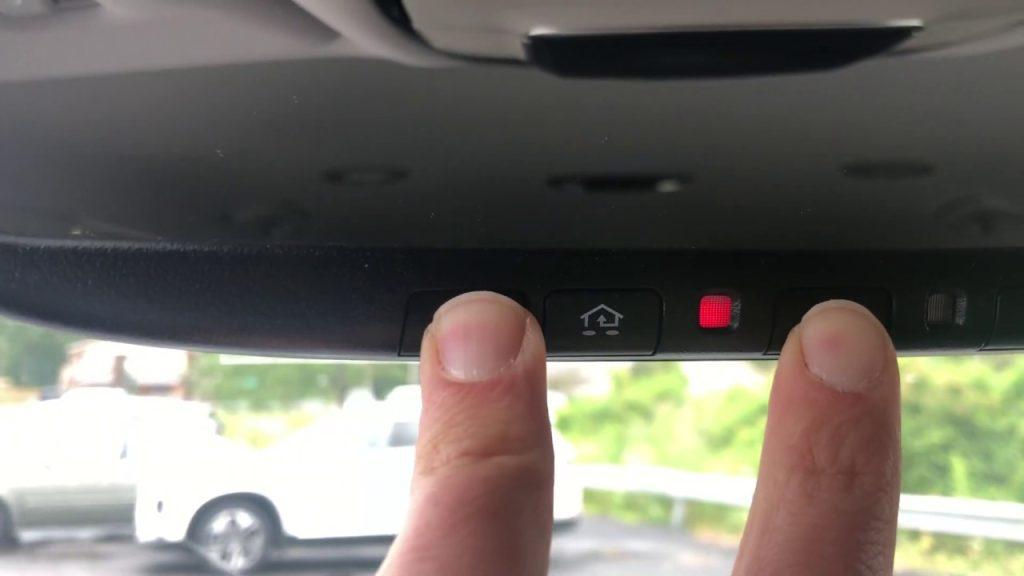
- Press and hold the two outer HomeLink buttons simultaneously.
- Keep holding them for about 20 seconds.
- Watch the indicator light. It will begin to flash slowly, then rapidly.
- Once the light flashes rapidly, release the buttons. The memory is now cleared.
Step 2: Position Your Vehicle
Park your Hyundai Palisade outside your garage, facing the door. Ensure you are within range of the garage door opener motor (usually within 10–15 feet). Keep the engine running or the ignition in the “ON” position to ensure consistent power during the process.
Step 3: Initiate Learning Mode
- Choose the HomeLink button you wish to program (Button 1, 2, or 3).
- Press and hold the chosen HomeLink button and your original garage door remote button simultaneously.
- Hold both buttons until the HomeLink indicator light changes from a slow blink to a rapid flash. This usually takes 20–30 seconds.
- Release both buttons once the rapid flashing begins.
Step 4: Train the Garage Door Motor
This is the critical step where your garage door “learns” the new signal.
- Locate the “Learn” or “Smart” button on your garage door opener motor unit inside the garage. It is usually located on the back or side of the motor box.
- Press and release the “Learn” button. You typically have 30 seconds to complete the next step.
- Return to your Palisade. Press and hold the programmed HomeLink button for two seconds, then release it.
- Repeat this press-hold-release cycle up to three times.
- Observe your garage door. If it moves, the programming is successful.
Pro Tip: If your garage door uses a rolling code system (most modern doors do), you may need to press the HomeLink button repeatedly until the door responds. This syncs the changing codes between the car and the motor.
Troubleshooting Common Programming Issues
Even with careful following of instructions, things can go wrong. Here is a breakdown of common issues and how to fix them.
| Issue | Possible Cause | Solution |
|---|---|---|
| Light does not flash rapidly | Battery weak in remote | Replace the battery in your handheld remote. |
| Garage door does not move | Out of range | Move the car closer to the garage door. |
| Door moves partially | Interference | Check for LED bulbs in the garage opener causing signal noise. |
| System won’t clear | Timing error | Ensure you hold the buttons for the full 20 seconds until the rapid flash occurs. |
Dealing with Rolling Codes
If you have a newer garage door opener (manufactured after 1996), it likely uses rolling codes. If the standard programming does not work, you may need to perform a “cycling” procedure. After pressing the “Learn” button on the motor, press the HomeLink button in your car, wait for the door to move, and then press it again. Some systems require this cycle to be repeated 3–5 times to fully synchronize the encryption keys.
Safety Precautions and Best Practices
Safety should always be your top priority when working with automatic garage doors.
- Keep Hands Clear: Never place your hands or objects under the garage door while testing the programming.
- Check Sensors: Ensure the safety sensors at the bottom of your garage door tracks are aligned and unobstructed. If the beam is blocked, the door will not close, which might make you think the programming failed.
- Test Multiple Times: After successful programming, test the opener at least five times to ensure consistency.
- Consult Your Manual: Always refer to your specific garage door opener’s manual for brand-specific nuances. Chamberlain, LiftMaster, and Genie all have slight variations in their “Learn” button procedures.
Frequently Asked Questions (FAQ)
1. Can I program more than one garage door in my 2023 Hyundai Palisade?
Yes, the HomeLink system in the 2023 Palisade can store up to three different devices. You can program three separate garage doors, or a combination of garage doors, gate operators, and home lighting systems. Each button operates independently.
2. Why is my HomeLink light flashing green but the door won’t open?
A flashing green light usually indicates that the HomeLink button has been trained to a signal, but it has not yet been synchronized with the garage door motor. You need to complete Step 4 of the guide above by pressing the “Learn” button on your garage motor unit and then cycling the HomeLink button in your car.
3. Do I need to be inside the garage to program the opener?
No, you should start the process from inside your vehicle, parked outside the garage. However, you will need to enter the garage briefly to press the “Learn” button on the motor unit. Ensure you have safe access to the motor unit before starting.
4. What if I lost my original garage door remote?
If you do not have the original handheld remote, programming becomes more difficult. You may need to contact the manufacturer of your garage door opener to purchase a compatible remote. Alternatively, some modern smart garage openers allow programming via a smartphone app, which can then be synced to HomeLink using a specific digital protocol.
5. Does programming the HomeLink void my car’s warranty?
No, using the built-in HomeLink system as intended by Hyundai does not void your vehicle’s warranty. It is a factory-installed feature designed for this exact purpose. However, improper modification of the electrical system unrelated to HomeLink could affect warranty coverage.
6. How do I reset the HomeLink system completely?
To reset all buttons, press and hold the two outer HomeLink buttons for 20 seconds until the indicator light flashes rapidly. This clears all stored codes and returns the system to its factory default state, ready for new programming.
Conclusion
Learning how to program 2023 Hyundai Palisade garage door opener is a straightforward process that enhances your daily convenience and security. By following the step-by-step instructions outlined above, you can seamlessly integrate your home’s access systems with your vehicle. Remember to prioritize safety, ensure your batteries are fresh, and be patient with the synchronization process.
Once programmed, you will enjoy the luxury of entering your home without fumbling for keys or remotes. If you found this guide helpful, please share it with fellow Hyundai owners on social media. Have you successfully programmed your HomeLink? Let us know in the comments below!



Leave a Reply