Introduction
Have you ever pulled into your driveway only to realize you’ve forgotten your garage door remote? Or perhaps you’re tired of juggling multiple remotes for different devices? Learning how to program a car to garage door opener can transform your daily routine, offering convenience and security at the touch of a button. This comprehensive guide will walk you through everything you need to know about integrating your vehicle with your garage door system, whether you drive a Ford, Toyota, BMW, or any other make with built-in garage door capabilities.
Modern vehicles increasingly come equipped with built-in garage door openers, with over 60% of new cars sold in the United States featuring this technology according to recent automotive industry reports. Understanding how to properly set up this feature not only saves time but also enhances your home’s security by eliminating the need for separate remotes that can be lost or stolen.
What Is a Built-In Garage Door Opener in Cars?
Before diving into the programming process, it’s essential to understand what you’re working with. Most modern vehicles use one of several systems:
Common Built-In Systems
- HomeLink: The most widespread system, found in Ford, Honda, Toyota, Chrysler, and many other brands
- Car2U: Used primarily in some General Motors vehicles
- Integrated Transmitters: Brand-specific systems like BMW’s Universal Garage Door Opener
These systems work by transmitting radio frequency signals that mimic your original garage door remote. The beauty of built-in systems is their versatility—they can typically control up to three different garage doors or gates from a single location in your vehicle.
According to Wikipedia’s entry on garage door openers, modern systems operate on frequencies ranging from 300 MHz to 400 MHz, with newer models using rolling code technology for enhanced security.
Step-by-Step: How to Program Your Car to Garage Door Opener
The exact process varies depending on your vehicle make and garage door brand, but the general procedure follows these fundamental steps:
Step 1: Identify Your System Type
First, determine which system your car uses:
- Check your owner’s manual for “HomeLink,” “Car2U,” or “Universal Garage Door Opener”
- Look for buttons on your rearview mirror, sun visor, or overhead console
- Note your garage door opener brand (Chamberlain, LiftMaster, Genie, Craftsman, etc.)
Step 2: Clear Previous Programming (If Necessary)
If your system has been previously programmed:
- Press and hold the two outer buttons simultaneously
- Continue holding for 10-20 seconds until the indicator light flashes rapidly
- Release both buttons when the light changes pattern
Step 3: Position Your Vehicle Correctly
For successful programming:
- Park your car 6-10 feet from the garage door opener motor unit
- Ensure your vehicle’s engine is running or in accessory mode
- Have your original garage door remote handy
Step 4: Enter Programming Mode
For HomeLink Systems:
- Press and hold the desired button for 20 seconds
- Wait for the indicator light to change from slow to rapid flashing
- Release the button
For Other Systems: Consult your specific vehicle manual, as procedures may vary slightly
Step 5: Train the System with Your Remote
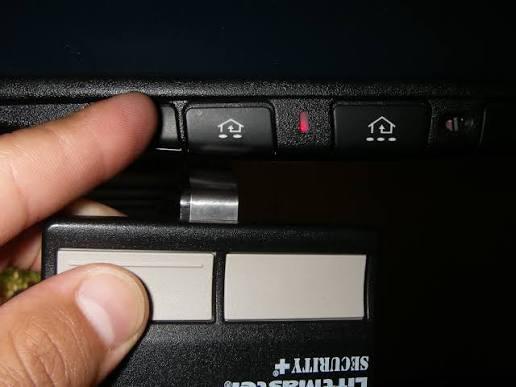
- Hold your original garage remote 1-3 inches from the vehicle’s programmed button
- Press and hold both the vehicle button and remote button simultaneously
- Continue holding until the vehicle’s indicator light flashes rapidly (typically 10-30 seconds)
- Release both buttons
Step 6: Test the Connection
- Press the programmed button in your vehicle
- The garage door should activate within 2-3 seconds
- If unsuccessful, repeat Steps 4-5, ensuring proper distance and timing
Step 7: Program Additional Doors (Optional)
Repeat the entire process for each additional garage door or gate you wish to control, using different buttons for each device.
Troubleshooting Common Programming Issues
Even with careful following of instructions, problems can arise. Here are solutions to frequent issues:
| Problem | Possible Cause | Solution |
|---|---|---|
| Light doesn’t flash | Weak vehicle battery | Start engine or charge battery |
| Door doesn’t respond | Wrong frequency match | Verify compatibility; may need learning receiver |
| Intermittent operation | Signal interference | Reposition vehicle; remove electronic devices |
| Programming won’t save | Memory full | Clear all previous codes first |
| Remote won’t sync | Battery low in remote | Replace remote battery before programming |
When You Need a Compatibility Bridge
Some older garage door openers (particularly those manufactured before 1993) use fixed codes rather than rolling codes. If your system won’t program directly:
- Purchase a compatibility bridge or learning receiver from your garage door manufacturer
- Install it according to manufacturer instructions
- Program your car to the bridge instead of directly to the opener
Major brands like Chamberlain and LiftMaster offer these adapters for $20-$40, and they resolve compatibility issues in approximately 95% of cases.
Security Considerations for Garage Door Integration
While convenient, connecting your car to your garage door raises important security questions:
Rolling Code Technology
Modern systems use rolling code technology, which changes the access code with each use. This prevents code-grabbing thieves from capturing and replaying your signal. Always verify that both your vehicle system and garage door opener support rolling codes for maximum security.
Best Practices for Secure Setup
- Never share your programming sequence with unauthorized individuals
- Reprogram immediately if you lose your vehicle or suspect unauthorized access
- Use unique buttons for different doors to maintain organizational clarity
- Regularly test your system to ensure it’s functioning correctly
- Keep your original remote as a backup in a secure location
According to security experts, properly configured integrated systems are actually more secure than traditional remotes because they eliminate the risk of losing a physical device that could fall into wrong hands.
Brand-Specific Programming Tips
Ford and Lincoln Vehicles
Ford’s HomeLink system typically requires pressing and holding buttons 1 and 3 simultaneously. Some newer models feature a touchscreen interface that guides you through the process visually.
Toyota and Lexus
Toyota vehicles often require cycling through ignition positions (OFF → ACC → ON) during programming. Consult your specific model year manual for exact sequences.
BMW and Mercedes
European luxury brands frequently use menu-driven systems accessed through the iDrive or COMAND interfaces. These systems may require entering your garage door’s specific frequency manually.
Honda and Acura
Honda’s system usually involves holding the HomeLink button until the light changes, then syncing with the remote. Some models require dealer activation before first use.
FAQ: Common Questions About Programming Cars to Garage Door Openers
Q: Can I program any car to any garage door opener?
A: Most modern vehicles with built-in garage door systems can work with the majority of garage door openers manufactured after 1993. However, very old openers using fixed codes may require a compatibility bridge. Check your vehicle manual and garage door manufacturer’s website for specific compatibility information.
Q: How long does the programming process take?
A: The actual programming typically takes 5-15 minutes per garage door. However, allow 30-45 minutes total if you’re unfamiliar with the process, including time for troubleshooting and reading instructions.
Q: What if my car doesn’t have a built-in garage door opener?
A: You can purchase aftermarket universal garage door remotes designed for vehicles, such as visor-clipped remotes or smartphone-controlled systems. Alternatively, some auto electronics shops can install aftermarket HomeLink systems for $150-$300.
Q: Will programming my car void my warranty?
A: No, programming your built-in garage door opener is a standard feature and will not affect your vehicle warranty. However, improper installation of aftermarket systems could potentially impact warranty coverage for related electrical components.
Q: Can I reprogram my car if I move to a new house?
A: Absolutely. Simply clear the existing programming using the method described in Step 2, then follow the programming steps for your new garage door opener. This process can be repeated unlimited times.
Q: Why won’t my garage door respond after successful programming?
A: Several factors could cause this: the garage door opener may need its safety sensors checked, the travel limits might need adjustment, or there could be signal interference. Try reprogramming with your vehicle positioned closer to the opener, and ensure nothing is blocking the door’s path.
Conclusion
Learning how to program a car to garage door opener is a valuable skill that enhances both convenience and security in your daily life. By following the step-by-step instructions outlined in this guide, you can successfully integrate your vehicle with your garage door system in under 30 minutes. Remember to identify your specific system type, position your vehicle correctly, and test thoroughly before relying on the connection.
The benefits extend beyond mere convenience—integrated systems reduce clutter, minimize the risk of lost remotes, and provide peace of mind through enhanced security features. Whether you’re driving a brand-new vehicle or working with an older model, the principles remain consistent: patience, proper positioning, and attention to detail ensure success.
Ready to streamline your garage access? Share this guide with friends and family who might benefit from learning how to program their cars to garage door openers. Follow us on social media for more automotive tips and home integration tutorials!
Have questions or experiences to share? Leave a comment below—we’d love to hear about your programming success stories!



Leave a Reply