Introduction
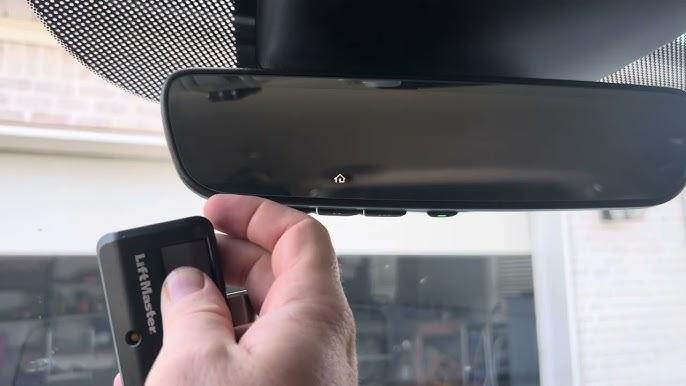
There is nothing quite as frustrating as standing in your driveway with rain pouring down, frantically pressing a button in your new car, only to watch your garage door remain stubbornly closed. If you have just upgraded to the latest model, you likely want to enjoy its modern conveniences immediately, but technology can sometimes feel like a hurdle rather than a help. You are not alone in wondering how to program 2025 Honda Pilot garage door opener systems efficiently without spending hours reading dense technical manuals. This guide is designed to walk you through the process with empathy and clarity, ensuring you get back to the comfort of your home quickly.
Understanding the HomeLink System in the 2025 Honda Pilot
Before diving into the buttons, it is essential to understand what you are working with. The 2025 Honda Pilot utilizes the HomeLink system, a universal transceiver that replaces multiple handheld remotes. According to industry standards, HomeLink is compatible with over 95% of garage door openers manufactured since 1993.
The system works by capturing the radio frequency signal from your existing garage door remote and storing it in the vehicle’s memory. When you press the HomeLink button in your Pilot, it retransmits that exact signal to your garage door motor.
Expert Insight: “Modern vehicles like the 2025 Pilot use rolling code technology for security. This means the code changes every time you use the remote, preventing hackers from intercepting and replaying the signal to open your garage.” – Source: HomeLink Universal Transceiver Technology
Key Features of the 2025 Pilot HomeLink
- Three Programmable Buttons: Allows control for up to three different devices (garage, gate, or home lights).
- Rolling Code Compatibility: Essential for security with modern openers (LiftMaster, Chamberlain, Genie).
- Indicator Light Feedback: Visual cues to tell you if the programming is successful or still in progress.
Step-by-Step Guide: How to Program Your Garage Door Opener
Programming your garage door opener involves two main phases: clearing old codes (if necessary) and training the new remote. Follow these steps precisely for the best results.
Phase 1: Preparation and Safety
- Park Safely: Ensure your 2025 Honda Pilot is parked outside the garage with the engine turned off. Do not attempt this while inside the garage to avoid accidental injury from the moving door.
- Gather Tools: You will need your existing handheld garage door remote. If you do not have one, you may need to locate the “Learn” button on your garage door motor unit.
- Check Batteries: Ensure both your car battery and your handheld remote batteries are fresh. Weak signals are the most common cause of programming failure.
Phase 2: Clearing Previous Codes (If Applicable)
If this is the first time using HomeLink in your new Pilot, you can skip this step. However, if you are reprogramming a button that was previously used:
- Press and hold the two outer HomeLink buttons simultaneously.
- Keep holding them for about 20 seconds.
- Watch the indicator light. It will begin to flash slowly, then rapidly.
- Once the light flashes rapidly, release the buttons. The memory is now cleared.
Phase 3: Programming the New Remote
This is the core process for learning how to program 2025 Honda Pilot garage door opener functions.
- Position the Remote: Hold your handheld garage door remote 1 to 3 inches away from the HomeLink buttons in your Pilot. The exact distance may vary depending on the strength of your remote’s signal.
- Select the Button: Choose which HomeLink button you wish to program (e.g., Button 1).
- Simultaneous Press:
- Press and hold the chosen HomeLink button in the car.
- While still holding the car button, press and hold the button on your handheld remote.
- Wait for the Signal: Continue holding both buttons. The HomeLink indicator light will change from a slow blink to a rapid flash. This usually takes between 10 to 30 seconds.
- Release: Once the light flashes rapidly, release both buttons.
Phase 4: Testing the Connection
- Press the programmed HomeLink button in your Pilot firmly.
- Observe your garage door. It should activate.
- If the door does not move, repeat Phase 3, trying different distances (move the remote closer or further away by half-inch increments).
Troubleshooting Rolling Code Systems
If your garage door opener was manufactured after 1993, it likely uses a rolling code system. In this case, simply programming the car is not enough; you must sync the car with the motor unit itself.
Identifying a Rolling Code Opener
Look at your garage door motor unit (the box hanging from your ceiling). Look for a small button, often colored yellow, purple, or red, labeled “Learn,” “Smart,” or “Program.” If this button exists, you have a rolling code system.
The Syncing Process
- Complete Phase 3 above so that the HomeLink light is flashing rapidly.
- Locate the Learn Button: Use a ladder to safely reach the motor unit in your garage.
- Press the Learn Button: Press and release the “Learn” button on the motor unit. You typically have 30 seconds to complete the next step.
- Return to the Car: Within those 30 seconds, go back to your 2025 Honda Pilot.
- Finalize the Sync: Press and hold the programmed HomeLink button for 2 seconds, then release. Repeat this press-and-release cycle three times.
- Test: Press the HomeLink button again. The garage door should now operate.
| Issue | Possible Cause | Solution |
|---|---|---|
| Light blinks slowly forever | Signal not detected | Move remote closer/further; check remote battery. |
| Door moves partially | Interference | Reprogram away from other electronics; try different button. |
| Rolling code fails | Missed timing window | Reset motor unit; ensure you press “Learn” before returning to car. |
| No response at all | Wrong frequency | Verify remote compatibility; consult garage door manual. |
Common Mistakes to Avoid
Even with a straightforward guide, users often encounter hiccups. Here are the most frequent errors when learning how to program 2025 Honda Pilot garage door opener systems:
- Holding the Buttons Too Briefly: Many users release the buttons as soon as they see a light change. You must wait for the rapid flash, not just the initial slow blink.
- Ignoring the “Learn” Button: For rolling code systems, skipping the step at the garage motor unit is the number one reason for failure. The car learns the remote, but the garage doesn’t recognize the car yet.
- Using Weak Remotes: If your handheld remote requires multiple presses to work at home, it will likely fail to program the car. Replace the battery first.
- Interference: Trying to program near strong Wi-Fi routers, microwave ovens, or other RF devices can disrupt the signal. Perform the task in an open driveway.
Advanced Tips for Multiple Devices
The 2025 Honda Pilot allows you to program up to three devices. This is incredibly useful if you have:
- A primary garage door.
- A secondary gate or workshop door.
- Home lighting systems compatible with HomeLink.
Pro Tip: Label your buttons mentally or with a small, non-residue sticker on the visor if you have trouble remembering which button controls which device. For example, assign Button 1 to the main garage, Button 2 to the side gate, and Button 3 to exterior lights.
FAQ Section
1. Why won’t my 2025 Honda Pilot HomeLink program?
The most common reasons are weak batteries in the handheld remote, incorrect distance between the remote and the car buttons, or failing to complete the “Learn” button step for rolling code openers. Ensure you are within 1–3 inches and hold the buttons until the light flashes rapidly.
2. Can I program a garage door opener without the handheld remote?
Yes, but it is more complex. You will need to access the motor unit in your garage and follow specific instructions for “keypad programming” or use a wireless keypad if your system supports it. However, using the original handheld remote is the most reliable method.
3. Is the HomeLink system secure?
Yes. The HomeLink system in the 2025 Honda Pilot uses encrypted rolling codes, which change with every use. This makes it extremely difficult for thieves to intercept and replicate the signal, offering superior security compared to older fixed-code systems.
4. What if my garage door opener is very old (pre-1993)?
Older openers use fixed codes. The programming process is simpler because you do not need to press the “Learn” button on the motor unit. Simply follow Phase 3 in the guide above. If it still doesn’t work, you may need a compatibility bridge kit from the HomeLink website.
5. Can I reset the HomeLink system if I sell my car?
Absolutely. It is highly recommended to clear all codes before selling or trading in your 2025 Honda Pilot. To do this, press and hold the two outer HomeLink buttons for 20 seconds until the indicator light flashes rapidly. This ensures your personal security data is removed.
6. Does programming HomeLink affect my car warranty?
No. Programming HomeLink is a standard user feature intended by the manufacturer. It does not void any part of your Honda warranty. However, damage caused by improper installation of aftermarket garage door hardware is not covered by Honda.
Conclusion
Mastering how to program 2025 Honda Pilot garage door opener settings transforms your daily commute from a chore into a seamless experience. By following the steps outlined above—preparing your tools, executing the simultaneous button press, and syncing with rolling code motors—you can ensure your garage responds instantly to your command.
Remember, patience is key. If the first attempt doesn’t work, check your batteries and try adjusting the distance between the remote and the console. With the 2025 Honda Pilot’s advanced HomeLink system, you are equipped with one of the most reliable and secure integration technologies on the market today.
Did this guide help you get your garage door working? Share this article with fellow Honda owners on social media who might be struggling with their new vehicle’s tech features!



Leave a Reply