Introduction
Is your garage door refusing to open when you press the button on your new remote? It is a frustrating situation, especially when you are rushing to leave for work or just arriving home with groceries. You are not alone; thousands of homeowners face this connectivity issue every year. The good news is that learning how to program a Chamberlain garage door opener 953EV/EVC is simpler than it looks. With the right guidance, you can sync your remote in under five minutes without calling a technician. This guide will walk you through the process safely and efficiently, ensuring your home security remains intact while restoring your convenience.
Understanding Your Chamberlain 953EV/EVC Remote
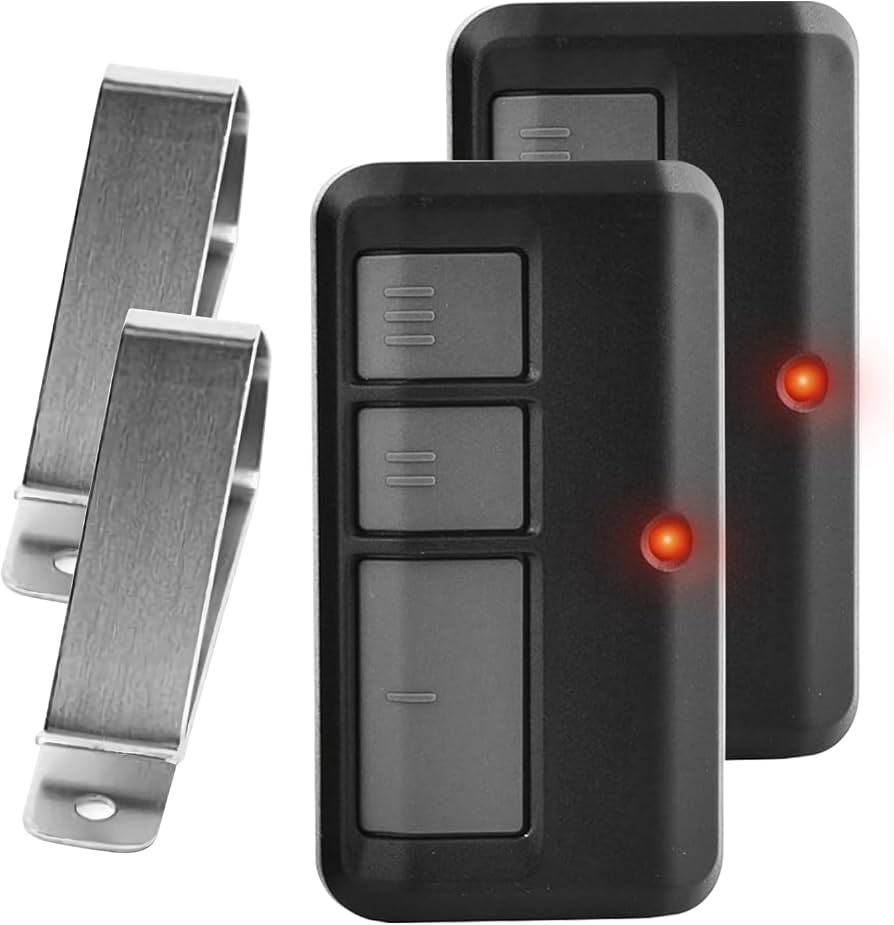
Before diving into the programming steps, it is essential to understand what device you are holding. The Chamberlain 953EV (and its variant, the 953EVC) is a universal 3-button remote control designed to work with most Chamberlain, LiftMaster, and Craftsman garage door openers manufactured after 1993.
These remotes utilize Security+ 2.0 technology, which uses rolling code encryption. This means that every time you press the button, the remote sends a new code to the opener. This feature prevents hackers from “capturing” your signal to open your garage illegally. Because of this advanced security, the pairing process requires a specific sequence of actions to ensure the opener recognizes the remote as a trusted device.
Key Features of the 953EV/EVC:
- Compatibility: Works with Security+, Security+ 2.0, and older yellow learn button models.
- Range: Typically operates up to 1,500 feet in open areas.
- Battery: Uses a standard CR2032 coin-cell battery.
- Visor Clip: Includes a built-in clip for easy storage in your car.
Preparation: What You Need Before Starting
Successful programming relies on preparation. Rushing the process often leads to errors or timeout issues. Ensure you have the following ready before you begin:
- A Stable Ladder: You will need to reach the motor unit mounted on your garage ceiling. Safety is paramount; ensure the ladder is on flat ground.
- Fresh Batteries: Even if your remote is new, check the battery. A weak battery may not send a strong enough signal during the pairing mode. The 953EV uses a CR2032 battery.
- Clear Access to the Motor Unit: Remove any boxes or items stored directly beneath the garage door opener so you can see the “Learn” button clearly.
- Patience: The programming window is short. Once you press the Learn button, you typically have only 30 seconds to complete the next step.
Step-by-Step: How To Program A Chamberlain Garage Door Opener 953Ev/Evc
This is the core procedure. Follow these steps precisely. Note that there are two common methods depending on whether you are programming a single remote or multiple devices. We will focus on the standard method using the Learn Button on the motor unit, which is the most reliable approach for the 953EV series.
Step 1: Locate the Learn Button
Climb your ladder and look at the back or side of the garage door opener motor unit. You are looking for a small button, usually labeled “Learn” or “Program.”
- On newer models (Security+ 2.0), this button is often yellow, purple, or orange.
- It may be located under a light lens cover. If so, gently remove the cover to access the button.
- Note: Do not confuse the “Learn” button with the antenna wire hanging down. The button is solid and fixed to the circuit board housing.
Step 2: Clear Old Codes (Optional but Recommended)
If you are replacing a lost remote or suspect interference, it is wise to clear the opener’s memory.
- Press and hold the Learn button for about 6–10 seconds.
- Release the button when the indicator light next to it turns off.
- Warning: This will erase ALL previously programmed remotes and keypads. You will need to reprogram every device you own. If you are just adding a new remote, skip this step.
Step 3: Initiate Programming Mode
Press and release the Learn button once.
- The indicator LED next to the button will turn on (solid or blinking, depending on the model).
- You now have 30 seconds to complete the next step. If the light goes out before you finish, you must start over from Step 3.
Step 4: Sync the Remote
Within those 30 seconds:
- Take your Chamberlain 953EV/EVC remote.
- Press and hold the button you wish to use (e.g., the large bottom button) for 2–3 seconds.
- Release the button.
- Watch the motor unit. The indicator light should blink or flash, confirming it has received the signal.
- Test the remote immediately by pressing the button again. The garage door should activate.
Step 5: Test and Finalize
Stand clear of the door and test the remote from inside your car. If the door opens and closes smoothly, the programming is successful. If it does not work, repeat the process, ensuring you are within range and the battery is fresh.
| Component | Detail |
|---|---|
| Remote Model | Chamberlain 953EV / 953EVC |
| Battery Type | CR2032 Lithium |
| Programming Window | 30 Seconds after pressing Learn Button |
| Max Remotes per Opener | Typically up to 8 devices |
| Technology | Security+ 2.0 Rolling Code |
Troubleshooting Common Issues
Even with careful following, things can go wrong. Here are solutions to the most frequent problems users encounter when trying to program their Chamberlain 953EV/EVC.
The Learn Light Does Not Turn On
If pressing the Learn button yields no response, check the following:
- Power Supply: Ensure the garage door opener is plugged in and the circuit breaker hasn’t tripped.
- Lock Feature: Some openers have a “Lock” or “Vacation” mode. Check your wall console to ensure the system isn’t locked.
- Faulty Button: The Learn button itself may be worn out. If you have tried multiple times with no LED response, the logic board may need replacement.
The Remote Programs but Doesn’t Open the Door
If the light blinks on the motor unit but the door doesn’t move:
- Obstruction Sensors: Check the safety eyes near the floor. If they are misaligned or blocked, the door will refuse to close or open for safety reasons.
- Travel Limits: The door’s travel limits might be set incorrectly. Refer to your opener’s manual to adjust the up/down limits.
- Interference: LED light bulbs in the garage can sometimes emit frequency interference. Try turning off the garage lights and testing the remote again.
Battery Issues
The 953EV is known for being sensitive to battery voltage.
- Use high-quality brands like Energizer or Duracell.
- Avoid rechargeable batteries, as they often output 1.2V instead of the required 3V (two cells in series) or stable 3V lithium output, leading to inconsistent performance.
Why Professional Help Might Be Needed
While DIY programming is straightforward, there are scenarios where calling a professional is advisable. According to industry standards, garage door springs and cables are under extreme tension and can cause severe injury if handled incorrectly. However, programming a remote is generally safe.
If you have attempted the steps above multiple times without success, the issue may lie within the opener’s receiver board rather than the remote. In such cases, consulting a certified technician ensures that electrical components are handled correctly. For more technical specifications on garage door safety standards, you can refer to resources like Wikipedia’s page on Garage Door Openers to understand the broader mechanical context.
FAQ Section
Q1: Can I program the Chamberlain 953EV to work with a non-Chamberlain opener?
A: The 953EV is primarily designed for Chamberlain, LiftMaster, and Craftsman openers. While it is “universal” within these brands, it may not work with Genie, Sommer, or other proprietary systems unless they specifically support Security+ 2.0 protocols. Always check your opener’s compatibility list first.
Q2: How do I know if my battery is dead?
A: If the LED light on the remote does not flash when you press a button, the battery is likely dead or inserted incorrectly. Replace it with a new CR2032 battery. Ensure the positive (+) side is facing up as indicated in the battery compartment.
Q3: Can I program multiple 953EV remotes to one opener?
A: Yes. Most Chamberlain openers can store codes for up to 8 different remotes or keypads. Simply repeat the programming steps for each additional remote. You do not need to clear the memory unless you want to remove old devices.
Q4: What is the difference between the 953EV and 953EVC?
A: Functionally, they are identical. The “C” in 953EVC often denotes a specific packaging variation or a minor revision in the casing design, but the internal circuitry and programming method remain the same. Both use the same CR2032 battery and Security+ 2.0 technology.
Q5: My remote works intermittently. What should I do?
A: Intermittent issues are usually caused by weak batteries or radio frequency interference. First, replace the battery. If the problem persists, try changing the position of the remote in your car (metal roofs can block signals). Also, check if new LED bulbs in your garage are causing interference.
Q6: Is it safe to clear all codes from my opener?
A: Yes, it is safe for the hardware, but inconvenient. Clearing codes enhances security if you lost a remote, as it prevents anyone who found it from accessing your garage. Just remember that you must reprogram all your existing remotes and wireless keypads afterward.
Conclusion
Learning how to program a Chamberlain garage door opener 953EV/EVC empowers you to maintain your home’s convenience and security without relying on expensive service calls. By understanding the role of the Learn button, respecting the 30-second programming window, and using fresh batteries, you can successfully sync your remote in minutes.
Remember, the key to success is patience and precision. If you follow the steps outlined above, you will have your garage door responding to your command in no time.
Did this guide help you get your garage door working again? Share this article with friends or neighbors who might be struggling with their garage remotes, and save it for future reference!



Leave a Reply