Introduction
Have you ever pulled into your driveway only to realize you left your garage door remote at home or lost it entirely? It is a frustrating situation that many Ford owners face, but the good news is that your vehicle likely has a built-in solution. Learning how to program Ford garage door opener without remote is simpler than you might think, thanks to the integrated HomeLink system found in most modern Ford models. This guide will walk you through the process clearly and safely, ensuring you can open your garage with just the push of a button in your car.
Understanding the Ford HomeLink System
Before diving into the programming steps, it is essential to understand what you are working with. Most Ford vehicles equipped with garage door opening capabilities use a technology called HomeLink. This system acts as a universal transmitter, allowing your car to mimic the signal of your original garage door remote.
According to Wikipedia, HomeLink is a wireless control system primarily used in vehicles to operate devices such as garage doors, gates, and lighting systems. It was originally developed by Johnson Controls and has become an industry standard for automotive convenience.
Why You Might Not Need Your Old Remote
While having the original handheld remote makes the initial setup slightly faster, it is not always strictly necessary. Many modern garage door openers have a “Learn” button located on the motor unit itself. This feature allows you to sync new devices directly from the source, bypassing the need for an existing remote. However, the method varies depending on the age and brand of your garage door opener (e.g., Chamberlain, LiftMaster, Genie).
Step-by-Step: How To Program Ford Garage Door Opener Without Remote
If you do not have your old remote, you will need to access your garage door opener motor unit. Ensure you have a sturdy ladder and that someone is available to help if needed for safety.
Step 1: Prepare Your Vehicle
- Park your Ford outside the garage, keeping the engine running or in accessory mode.
- Ensure all garage doors are closed for safety during the testing phase.
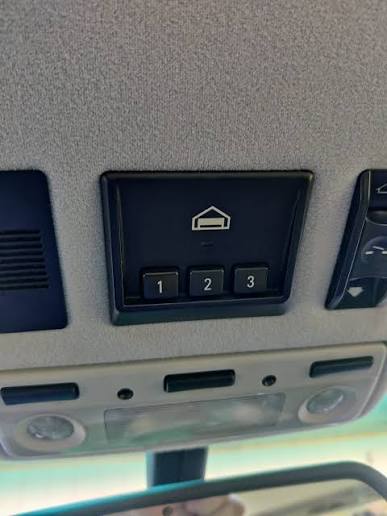
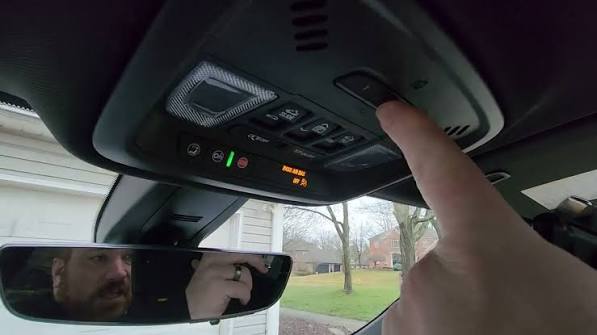
- Locate the HomeLink buttons in your vehicle. These are typically found on the rearview mirror, overhead console, or dashboard, depending on your model year.
Step 2: Clear Previous Memory (If Necessary)
If your HomeLink system has been used before, it is best to clear the memory to avoid signal conflicts.
- Press and hold the two outer HomeLink buttons simultaneously.
- Hold them for about 10–20 seconds until the indicator light begins to flash rapidly.
- Release the buttons once the light changes pattern. This indicates the system is reset and ready for new programming.
Step 3: Initiate Training Mode in Your Ford
- Choose the HomeLink button you wish to program (e.g., Button 1).
- Press and hold this button. Do not release it yet.
- While holding the button, watch the indicator light. It will typically change from a slow blink to a solid light or a rapid flash, indicating it is in “learning mode.”
Step 4: Activate the Garage Door Opener Motor
Since you do not have the remote, you must trigger the learning mode on the garage door opener unit itself.
- Climb the ladder to reach the garage door motor unit hanging from the ceiling.
- Locate the “Learn” or “Smart” button. It is usually colored yellow, purple, or red and is located near the antenna wire.
- Press and release the “Learn” button. The indicator light on the motor unit should turn on or blink, signaling that it is ready to accept a new code. Note: You typically have 30 seconds to complete the next step.
Step 5: Sync the Signals
- Return to your vehicle quickly.
- Press and hold the HomeLink button you selected in Step 3 again.
- Hold it for 2–3 seconds, then release. Repeat this press-and-release cycle three times.
- Press-Hold-Release
- Press-Hold-Release
- Press-Hold-Release
- Watch the garage door. If programmed correctly, the door should move (open or close) immediately after the third press.
Step 6: Test and Finalize
- Drive your car closer to the garage door (about 10–15 feet away).
- Press the programmed HomeLink button firmly.
- The door should activate. If it does, you have successfully learned how to program Ford garage door opener without remote.
| Scenario | Action Required | Success Indicator |
|---|---|---|
| Older Openers (Pre-1995) | May require a “rolling code” adapter kit | Door moves immediately |
| Modern Openers (Chamberlain/LiftMaster) | Use the “Learn” button on motor | Light on motor blinks, then door moves |
| Genie Openers | Press “Learn” button twice quickly | LED flashes, then door activates |
Troubleshooting Common Issues
Even with careful following of instructions, things don’t always go smoothly. Here are common hurdles and how to overcome them.
The Door Does Not Respond
If the garage door does not move after completing the steps:
- Check the Battery: Ensure your car battery is strong. Weak voltage can affect signal transmission.
- Distance: Move your vehicle closer to the garage door. Signal strength decreases with distance and obstacles.
- Interference: LED bulbs in your garage door opener can sometimes interfere with radio frequencies. Try temporarily replacing them with incandescent bulbs to test.
The Light Flashes But Door Doesn’t Move
This often indicates a compatibility issue with rolling codes. Modern security systems change the code every time the remote is used to prevent hacking.
- Solution: You may need to perform the “cycling” process. Press the HomeLink button repeatedly (up to 8–10 times) while standing close to the door. This helps the system synchronize the changing codes.
Safety Sensor Obstruction
Ensure that the safety sensors at the bottom of your garage door tracks are aligned and clean. If these are blocked, the door will refuse to move regardless of the signal sent from your Ford.
Alternative Methods If HomeLink Fails
If your Ford model does not have HomeLink, or if the built-in system refuses to sync, you have other options.
1. Universal Remote Cloning
You can purchase a universal garage door remote from a hardware store. These devices often come with instructions on how to clone signals directly from the motor unit’s “Learn” button, similar to the process described above.
2. Smartphone Control
Many modern garage door openers support Wi-Fi connectivity. Devices like the MyQ Smart Garage Hub allow you to control your garage door via a smartphone app. While this doesn’t put the button in your car’s console, it allows you to open the door using your phone’s GPS location or manual trigger, effectively solving the “no remote” problem.
3. Professional Installation
If you are uncomfortable climbing ladders or dealing with electrical components, hiring a professional technician is the safest route. They can ensure that the frequency matches and that safety protocols are maintained.
FAQ Section
Q1: Can I program my Ford HomeLink if I have a rolling code garage door opener?
A: Yes, most modern Ford vehicles support rolling codes. The process involves pressing the HomeLink button multiple times (cycling) to synchronize the changing security codes with the garage door motor. Refer to your vehicle’s owner manual for specific cycling instructions.
Q2: What if my Ford doesn’t have HomeLink buttons?
A: If your vehicle lacks built-in HomeLink, you cannot program the car itself. However, you can use a visor clip-on universal remote or install an aftermarket HomeLink module. Alternatively, use a smartphone-based smart garage controller.
Q3: How many garage doors can I program into my Ford?
A: Most Ford HomeLink systems allow you to program up to three different devices. This means you can control your main garage door, a gate, and perhaps a secondary workshop door independently.
Q4: Is it safe to program the garage door opener without a remote?
A: Yes, it is safe as long as you follow safety precautions. Always keep hands and feet clear of the door tracks, ensure no one is under the door when testing, and use a stable ladder when accessing the motor unit.
Q5: Why does my HomeLink work intermittently?
A: Intermittent issues are often caused by weak car batteries, interference from LED lights in the garage, or distance. Try replacing the garage opener’s light bulb with a non-LED version or reprogramming the system while parked closer to the door.
Q6: Do I need to reprogram my Ford every time I change the car battery?
A: No, HomeLink settings are stored in non-volatile memory. Changing your car battery will not erase your programmed garage door codes. However, if you disconnect the battery for an extended period, it is wise to test the system afterward.
Conclusion
Learning how to program Ford garage door opener without remote empowers you to take control of your home access without relying on fragile handheld devices. By utilizing the built-in HomeLink system and interacting directly with your garage door motor’s “Learn” button, you can establish a reliable connection in just a few minutes.
Remember, patience is key. If the first attempt doesn’t work, check your distance, clear the memory, and try the cycling method for rolling codes. With your Ford now synced to your garage, you can enjoy the seamless convenience of driving straight into your home.
Did you find this guide helpful? Share this article with fellow Ford owners on social media who might be struggling with their garage door setup!
Leave a Reply