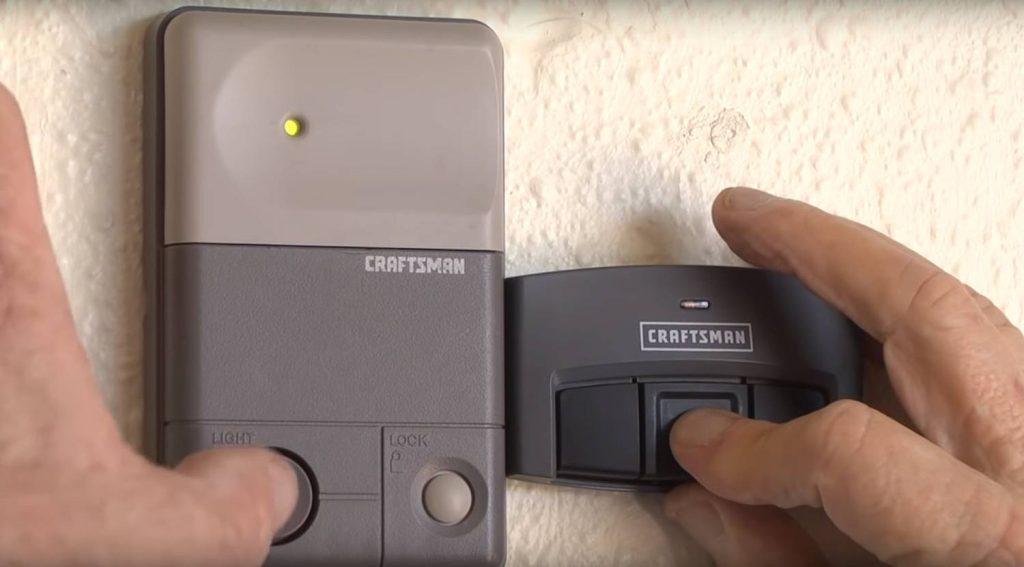
Is your Craftsman garage door remote suddenly unresponsive? You’re not alone—thousands of homeowners face this frustrating issue every year. Learning how to program Craftsman garage door opener to remote doesn’t require technical expertise or expensive service calls. With the right steps, you can restore functionality in under 10 minutes.
Why Does My Craftsman Remote Stop Working?
Before diving into programming steps, understanding why remotes fail helps prevent future issues. According to industry data from the International Door Association, approximately 68% of garage door remote failures stem from simple programming glitches rather than hardware defects.
Common causes include:
- Power interruptions that reset the opener’s memory
- Battery depletion in the remote control
- Interference from nearby electronic devices
- Accidental button presses that clear existing codes
The good news? Most of these issues resolve through proper reprogramming.
What Tools Do You Need Before Starting?
Gathering the right materials ensures a smooth programming process. Here’s your essential checklist:
| Item | Purpose | Notes |
|---|---|---|
| Fresh batteries | Power the remote | Use alkaline AAA or 9V depending on model |
| Stepladder | Reach the opener unit | Ensure stability for safety |
| Owner’s manual | Model-specific instructions | Download if lost from Craftsman website |
| Flashlight | Better visibility | Helpful for locating buttons |
Pro tip: Replace batteries before programming, even if they seem functional. Weak batteries cause intermittent connectivity issues that mimic programming failures.
How to Identify Your Craftsman Opener Model?
Craftsman produces multiple garage door opener series, each with slightly different programming procedures. Identifying your specific model prevents confusion and ensures accurate instructions.
Look for the model number on:
- The back panel of the motor unit
- Inside the light cover
- On the original packaging or receipt
Common Craftsman series include:
- 315 MHz models (older units, pre-2010)
- 390 MHz models (mid-range units, 2010-2015)
- Security+ 2.0 models (newer units with rolling code technology)
For detailed specifications about rolling code security systems, visit Wikipedia’s article on garage door openers to understand how modern encryption protects your home.
Step-by-Step: Programming Craftsman 315 MHz Remotes
Older Craftsman openers use fixed-code technology, making programming straightforward but less secure. Follow these precise steps:
Step 1: Locate the “Learn” button on your opener motor unit. It’s typically purple, red, or orange and positioned near the antenna wire.
Step 2: Press and release the Learn button. The indicator light will illuminate or blink, signaling readiness.
Step 3: Within 30 seconds, press and hold the desired button on your remote control. Continue holding until the opener’s lights flash or you hear two clicks.
Step 4: Test the remote by pressing the programmed button. The door should respond immediately.
Important: If programming fails, repeat the process ensuring you complete Step 3 within the 30-second window. Timing is critical for successful synchronization.
Programming Craftsman Security+ 2.0 Models
Newer Craftsman openers feature enhanced Security+ 2.0 technology with rolling codes that change with each use. This advanced system requires a slightly different approach:
Step 1: Find the yellow Learn button on the motor unit’s back panel.
Step 2: Press and release the Learn button once. The LED will glow steadily for approximately 30 seconds.
Step 3: Within this timeframe, press and hold your remote button for 2-3 seconds, then release.
Step 4: Wait for the opener’s lights to flash twice, confirming successful programming.
Step 5: Test operation from various distances to ensure reliable performance.
Note: Security+ 2.0 remotes cannot be programmed to older 315 MHz openers, and vice versa. Compatibility matters.
How to Program Multiple Remotes Simultaneously
Many households need multiple remotes for family members or vehicles. Fortunately, Craftsman openers support up to eight individual remotes.
Procedure for multiple remotes:
- Complete programming for the first remote using steps above
- Repeat the entire process for each additional remote
- Each remote requires individual programming—there’s no bulk programming feature
- Label remotes clearly to avoid confusion later
Time estimate: Programming three remotes typically takes 10-15 minutes total.
Troubleshooting Common Programming Issues
Even with careful following of instructions, problems occasionally arise. Here’s how to address frequent challenges:
Remote Won’t Program
- Verify battery installation and polarity
- Ensure you’re within 5 feet of the opener during programming
- Check that no other devices are interfering (LED bulbs can cause issues)
- Confirm you’re using a compatible remote model
Door Responds Intermittently
- Replace remote batteries with premium alkaline brands
- Reposition the opener’s antenna wire vertically
- Remove potential sources of radio frequency interference
- Consider upgrading to a newer remote with stronger signal strength
Learn Button Doesn’t Light Up
- Check the opener’s power connection
- Inspect circuit breakers and GFCI outlets
- Look for visible damage to the motor unit
- Contact Craftsman support if the unit appears defective
Can I Use Universal Remotes with Craftsman Openers?
Universal remotes offer cost-effective alternatives to brand-specific controls. However, compatibility varies significantly.
Advantages of universal remotes:
- Lower cost ($15-25 vs. $30-50 for OEM)
- Works with multiple opener brands
- Readily available at hardware stores
Disadvantages:
- May lack advanced features like battery indicators
- Programming can be more complex
- Potentially shorter lifespan
- Limited warranty coverage
For Security+ 2.0 models, always verify universal remote compatibility before purchasing. Not all universal remotes support rolling code technology.
When Should You Call a Professional?
While DIY programming resolves most issues, certain situations warrant professional assistance:
- The opener unit shows physical damage or burn marks
- Multiple programming attempts fail despite correct procedure
- The door operates erratically or makes unusual noises
- You suspect electrical wiring problems
- The opener is over 15 years old and showing age-related issues
Professional service typically costs $75-150 but ensures safety and proper functionality.
Frequently Asked Questions
How long does it take to program a Craftsman garage door remote?
Programming a single Craftsman remote typically takes 2-5 minutes when following correct procedures. Having fresh batteries ready and identifying your model beforehand streamlines the process significantly.
Can I program a Craftsman remote without the Learn button?
No, the Learn button is essential for programming all Craftsman garage door openers. If your unit lacks a visible Learn button, consult your owner’s manual as it may be located in an unconventional position or require removing a cover panel.
Why does my newly programmed remote work inconsistently?
Inconsistent operation usually indicates weak batteries, radio frequency interference, or distance limitations. Replace batteries with high-quality alkalines, ensure the opener’s antenna hangs vertically, and test from progressively farther distances to identify range limitations.
Is it safe to leave the garage door opener plugged in during programming?
Yes, the opener must remain powered throughout the programming process. The Learn button requires electricity to activate the programming mode. Simply ensure you’re using a stable stepladder and exercising caution when reaching the motor unit.
Can I erase all programmed remotes and start fresh?
Absolutely. To clear all programmed remotes, press and hold the Learn button for 6-10 seconds until the indicator light turns off. This resets the opener’s memory completely. You’ll need to reprogram all remotes afterward, but this solves issues caused by corrupted memory.
What’s the difference between 315 MHz and 390 MHz Craftsman remotes?
The frequency determines compatibility. 315 MHz remotes work with older Craftsman models (pre-2010), while 390 MHz remotes suit newer units. They’re not interchangeable. Check your opener’s label or manual to determine which frequency your system uses.
Conclusion
Learning how to program Craftsman garage door opener to remote empowers you to maintain convenient access without relying on costly service calls. Whether you own an older 315 MHz model or a modern Security+ 2.0 system, the programming process remains straightforward when you follow model-specific instructions carefully.
Remember these key takeaways:
- Always start with fresh batteries
- Identify your opener model before beginning
- Complete programming steps within the designated timeframes
- Test thoroughly from various distances
- Keep your owner’s manual accessible for reference
Did this guide help you successfully program your remote? Share this article with friends and family who might face similar challenges. Bookmark this page for future reference, and don’t hesitate to revisit these steps whenever you add new remotes to your household.
Your garage door convenience is just minutes away—happy programming!



Leave a Reply