Introduction
Are you tired of fumbling for your remote every time you pull into your driveway? You are not alone. Many drivers find themselves frustrated when their new vehicle doesn’t immediately sync with their existing home security systems. If you are looking for a clear guide on how to program garage door opener 2019 Chevy Equinox, you have come to the right place. This process can seem intimidating at first, but with the right steps, you can have your car’s built-in transmitter working perfectly in under ten minutes. Let’s get your convenience back on track.
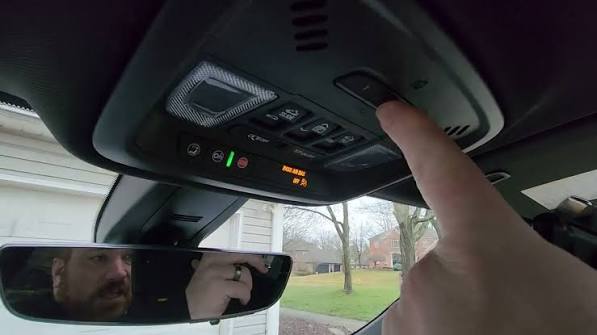
Understanding the HomeLink System in Your 2019 Equinox
Before we dive into the buttons and sequences, it is essential to understand what technology you are working with. The 2019 Chevrolet Equinox comes equipped with HomeLink, a universal transceiver that replaces your handheld remotes.
Unlike older systems that required complex dip-switch settings, modern HomeLink systems use “rolling code” technology. This enhances security by changing the access code every time you use the remote, preventing hackers from intercepting and replaying your signal. According to general automotive standards, this encryption is crucial for maintaining home security while offering convenience.
For more detailed technical specifications on universal transceivers, you can refer to Wikipedia’s entry on Garage Door Openers, which provides excellent background on how these frequencies and security protocols operate globally.
Preparation: What You Need Before Starting
Success lies in preparation. Trying to program the system while sitting in a cold driveway or rushing before work often leads to errors. Ensure you have the following ready:
- Your Existing Remote: Have the original garage door remote handy. You will need it to transmit the signal to the car.
- A Ladder (If Necessary): If your garage door motor unit is mounted high on the ceiling, you may need a ladder to reach the “Learn” button on the motor itself.
- A Helper (Optional): While not strictly necessary, having a second person to press the remote button while you hold the car buttons can make the process smoother.
- Clear Line of Sight: Park your Equinox outside the garage, facing the door. Ensure there are no large metal obstructions between the car and the garage door motor.
Step-by-Step Guide: How to Program Garage Door Opener 2019 Chevy Equinox
This section breaks down the exact procedure. Follow these steps carefully. Note that there are two primary methods depending on whether you have a standard fixed-code remote or a newer rolling-code remote. Most 2019 models will require the rolling-code method.
Phase 1: Clearing Previous Settings (If Applicable)
If your HomeLink buttons have been used before, you must clear them to avoid interference.
- Turn the ignition to the ON/RUN position. You do not need to start the engine, but the electronics must be active.
- Press and hold the two outer HomeLink buttons simultaneously.
- Keep holding them for about 20 seconds.
- Watch the indicator light. It will begin to flash slowly, then rapidly. Once it flashes rapidly, release the buttons. The memory is now cleared.
Phase 2: Programming the New Device
Now, let’s pair your 2019 Equinox with your garage door.
- Position the Remote: Hold your existing garage door remote 1–3 inches away from the HomeLink buttons in your Equinox. Choose the specific HomeLink button you wish to use (e.g., Button 1).
- Simultaneous Press: Press and hold both the HomeLink button in your car and the button on your handheld remote at the same time.
- Wait for the Signal: Keep holding both buttons. Do not let go.
- Observe the Light: The HomeLink indicator light will change from a slow blink to a rapid flash. This indicates that the frequency has been learned.
- Release: Once the light flashes rapidly, release both buttons.
Phase 3: Testing and Finalizing
Programming is not complete until the door actually moves.
- Press the programmed HomeLink button in your Equinox firmly.
- Observe the garage door.
- If the door moves: You are done! Test it twice more to ensure consistency.
- If the door does not move: You likely have a rolling-code system that requires an additional step at the motor unit (see the Troubleshooting section below).
Troubleshooting: When the Door Won’t Open
It is common for the initial programming to fail if the garage door opener uses advanced security encryption. Here is how to handle the most frequent issues.
The “Learn Button” Method
If the door did not respond after Phase 2, you must complete the handshake at the garage door motor unit.
- Locate the “Learn” or “Smart” button on your garage door motor unit. It is usually located on the back or side of the hanging motor box. It is often colored yellow, purple, or red.
- Press and release the Learn button. The indicator light on the motor will usually turn on or blink. You typically have 30 seconds to complete the next step.
- Return to your 2019 Chevy Equinox.
- Press and hold the programmed HomeLink button for two seconds, then release.
- Repeat this press-and-release cycle three times.
- The garage door should now activate. If it does, the programming is successful.
Common Errors and Solutions
| Issue | Possible Cause | Solution |
|---|---|---|
| Light flashes but door doesn’t move | Rolling code not synced | Perform the “Learn Button” method at the motor unit. |
| Light does not flash at all | Battery issue in remote | Replace the battery in your handheld remote. |
| Intermittent operation | Distance too far | Reprogram while parked closer to the garage door. |
| System won’t clear | Ignition off | Ensure the vehicle is in ON/RUN mode, not just ACC. |
Why Use HomeLink Instead of a Visor Clip?
You might wonder why you should go through the trouble of programming the car when you can just clip the remote to your sun visor. Here is a quick comparison of the benefits.
- Aesthetics and Clutter: HomeLink integrates seamlessly into the overhead console, keeping your visor clean and free of dangling plastic remotes.
- Security: Handheld remotes can be lost or stolen. Since HomeLink is built into the vehicle, it stays with you. Furthermore, if you sell the car, you can easily reset the system.
- Reliability: Built-in antennas in vehicles like the 2019 Equinox are often more powerful than the small transmitters in clip-on remotes, providing a stronger signal range.
- Convenience: You never have to search for the remote. It is always in the same spot, right above your rearview mirror.
Expert Tips for Long-Term Maintenance
To ensure your HomeLink system continues to work flawlessly for years, consider these professional tips:
- Check Remote Batteries Annually: Even though the car is new, the handheld remote you use for programming might have an old battery. A weak signal during programming can cause incomplete data transfer.
- Avoid Interference: LED light bulbs in your garage can sometimes emit electromagnetic interference that disrupts radio frequencies. If you experience inconsistent performance, try switching to incandescent bulbs temporarily to test.
- Update Your Vehicle Software: Occasionally, GM releases software updates for the infotainment and body control modules. Ensure your 2019 Equinox is up to date via your local dealership.
FAQ Section
1. Can I program multiple garage doors to my 2019 Chevy Equinox?
Yes. The HomeLink system in the 2019 Equinox typically supports up to three different devices. You can program your primary garage door, a secondary gate, or even a home lighting system. Simply repeat the programming steps for each device using a different HomeLink button.
2. What if I don’t have my original remote control?
If you have lost your original remote, you cannot program the HomeLink system directly. You will need to purchase a compatible universal remote from a hardware store or contact your garage door manufacturer to get a replacement. Once you have a working remote, you can proceed with the programming steps.
3. Does programming HomeLink void my warranty?
No. Programming HomeLink is a standard feature supported by Chevrolet. It does not involve modifying the vehicle’s electrical system or software in any unauthorized way. Therefore, it will not affect your vehicle’s warranty.
4. Why does my garage door close immediately after opening?
This is usually a safety sensor issue, not a programming issue. Check the photo-eye sensors at the bottom of your garage door tracks. If they are misaligned or blocked by debris, the door will reverse for safety. Ensure the sensors are clean and aligned properly.
5. Can I program a Chamberlain or LiftMaster opener specifically?
Yes. HomeLink is compatible with over 95% of garage door openers on the market, including major brands like Chamberlain, LiftMaster, Genie, and Craftsman. The steps provided above are universal for these brands, though the location of the “Learn” button may vary slightly.
6. Is it safe to leave my car running while programming?
You do not need to leave the engine running. It is safer and more fuel-efficient to keep the ignition in the “ON/RUN” position without starting the engine. This ensures the electrical systems are active while minimizing carbon monoxide risk if you are in a partially enclosed space.
Conclusion
Learning how to program garage door opener 2019 Chevy Equinox is a simple yet rewarding task that significantly enhances your daily driving experience. By following the step-by-step guide above, you can transition from fumbling with clips to enjoying seamless, integrated access to your home. Remember, patience is key during the synchronization phase, and always double-check your garage door safety sensors if you encounter irregularities.
Now that your garage door is synced, you can enjoy the full convenience of your vehicle’s smart features. Did you find this guide helpful? Share this article with your fellow Chevy owners on social media to help them streamline their morning routines too!



Leave a Reply