Introduction
Struggling to sync your garage door with your Chevy Silverado? You’re not alone. Many truck owners find themselves frustrated when their new vehicle doesn’t automatically connect to their existing garage door system. Learning how to program garage door opener in Chevy Silverado can save you countless trips out of your car in bad weather and streamline your daily routine.
The good news? Most modern Chevy Silverados come equipped with the HomeLink system, making this process straightforward once you know the right steps. Whether you drive a 2015 model or the latest 2024 version, this comprehensive guide will walk you through everything you need to get your garage door working seamlessly with your truck.
Understanding Your Chevy Silverado’s HomeLink System
What Is HomeLink and Why Does It Matter?
HomeLink is a universal transceiver system built into many vehicles, including the Chevy Silverado. This technology allows your truck to communicate with various radio-frequency devices, most commonly garage door openers, but also gate operators, home lighting systems, and security alarms.
According to Wikipedia, HomeLink was first introduced in 1992 and has since become an industry standard, installed in over 60 million vehicles worldwide. The system operates on multiple frequencies (typically 315 MHz, 390 MHz, or 433 MHz), ensuring compatibility with most residential garage door openers manufactured after 1995.
Which Chevy Silverado Models Have HomeLink?
Not every Silverado comes with HomeLink standard. Here’s what you need to know:
| Model Year | Trim Levels with HomeLink | Location of Buttons |
|---|---|---|
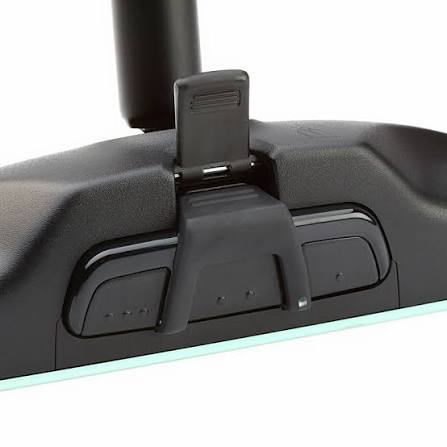
| 2014-2018 | LT, LTZ, High Country | Rearview mirror |
| 2019-2023 | All trims (standard) | Overhead console |
| 2024+ | All trims (standard) | Overhead console |
Note: Base work trucks may require HomeLink as an optional package.
Step-by-Step Guide: How to Program Garage Door Opener in Chevy Silverado
Preparation Before You Begin
Before starting the programming process, gather these items:
- Your garage door remote control (the original handheld unit)
- A ladder (if your garage door motor is mounted high)
- Patience (the process takes 5-10 minutes)
Important safety tip: Ensure your garage door area is clear of people, pets, and obstacles before testing.
Method 1: Standard Programming (Works for Most Openers)
This method works for approximately 85% of garage door openers on the market today.
Step 1: Clear Existing Codes Press and hold the two outer HomeLink buttons simultaneously for about 20 seconds until the indicator light begins flashing rapidly. This clears any previously stored codes.
Step 2: Position Your Vehicle Park your Silverado outside the garage, ensuring the rear of the truck faces the garage door motor unit. Keep the engine running throughout the process.
Step 3: Initiate Learning Mode Choose which HomeLink button you want to use (1, 2, or 3). Press and hold this button while simultaneously pressing and holding your garage door remote button. Hold both for 20-30 seconds until the HomeLink indicator light changes from slow blinking to rapid blinking.
Step 4: Test the Connection Press the programmed HomeLink button three times. Your garage door should respond. If it doesn’t, repeat Steps 3-4.
Method 2: Rolling Code Programming (For Newer Openers)
Many modern garage door openers use rolling code technology for enhanced security. If Method 1 doesn’t work, try this approach:
Step 1: Locate the Learn Button Find the “Learn” or “Smart” button on your garage door motor unit. It’s typically located on the back or side of the unit and may be colored yellow, purple, orange, or red.
Step 2: Activate Learning Mode Press and release the Learn button on your garage door motor. You’ll have approximately 30 seconds to complete the next step. The indicator light on the motor will illuminate or blink.
Step 3: Program HomeLink Within those 30 seconds, press and hold your chosen HomeLink button in the Silverado for 2 seconds, release it, then press and hold it again for another 2 seconds. Repeat this press-release-hold cycle up to three times.
Step 4: Verify Success The garage door motor light should flash or turn off, indicating successful programming. Test by pressing the HomeLink button in your truck.
Method 3: Compatibility Bridge (For Older Systems)
If you have a garage door opener manufactured before 1995 or a non-compatible brand, you may need a compatibility bridge module.
Brands requiring bridges include:
- Chamberlain (certain models)
- LiftMaster (older units)
- Genie (pre-1995 models)
Contact your garage door manufacturer or visit their website to purchase the appropriate compatibility kit. Installation typically involves connecting the bridge to your garage door motor’s terminal board.
Troubleshooting Common Issues
Problem: HomeLink Won’t Clear Previous Codes
Solution: Try holding the buttons for a full 30 seconds instead of 20. If that fails, disconnect your vehicle’s battery for 5 minutes, reconnect it, and attempt the clearing process again.
Problem: Garage Door Responds Intermittently
Solution: This usually indicates weak signal strength. Try repositioning your vehicle closer to the garage during programming. Also, check if your garage door remote batteries are fresh.
Problem: Nothing Happens When Pressing HomeLink
Solution: Verify you’re pressing the correct button. Some Silverado models have HomeLink buttons integrated into the overhead console near the rearview mirror, while others place them on the sun visor. Consult your owner’s manual for exact locations.
Problem: Programming Works But Range Is Limited
Solution: Signal interference from LED bulbs, wireless routers, or other electronic devices can reduce range. Try replacing garage lights with incandescent bulbs temporarily to test if this improves performance.
Expert Tips for Optimal Performance
Maintenance Recommendation: Reprogram your HomeLink system annually to maintain optimal signal strength and ensure security codes remain current.
Professional Insight: According to automotive technicians, keeping your vehicle’s battery in good condition directly impacts HomeLink performance. A weak battery can result in inconsistent signal transmission.
Security Best Practice: If you move to a new home, always clear and reprogram your HomeLink system. This prevents previous homeowners from potentially accessing your garage.
Frequently Asked Questions
Q: Can I program multiple garage doors to my Chevy Silverado?
A: Yes! Most Chevy Silverado HomeLink systems support up to three different devices. You can program three separate garage doors, or a combination of garage doors, gates, and home lighting systems. Each button (1, 2, and 3) controls one device independently.
Q: How long does the programming process take?
A: The actual programming typically takes 5-10 minutes. However, allow 20-30 minutes total to account for troubleshooting if needed. Having your garage door remote and vehicle ready beforehand streamlines the process significantly.
Q: Will programming HomeLink void my warranty?
A: No, programming HomeLink is a standard feature supported by Chevrolet and will not affect your vehicle warranty. However, improper modification of your garage door opener itself could void that specific warranty. Always follow manufacturer guidelines for both your vehicle and garage door system.
Q: What if my garage door opener isn’t compatible with HomeLink?
A: Most openers manufactured after 1995 are compatible. For older or incompatible units, you can purchase a universal compatibility bridge module ($20-$40) from brands like Chamberlain or LiftMaster. Alternatively, consider upgrading to a modern smart garage door opener with built-in HomeLink compatibility.
Q: Can someone else copy my HomeLink signal?
A: Modern rolling code technology makes signal copying extremely difficult. Each time you use HomeLink, it generates a new code, preventing replay attacks. However, always clear and reprogram when selling your vehicle or moving homes for maximum security.
Q: Does the engine need to be running during programming?
A: Yes, keep your engine running or at least turn the ignition to the “On” position. HomeLink requires electrical power to transmit signals properly. Programming with the vehicle completely off will likely fail.
Conclusion
Learning how to program garage door opener in Chevy Silverado doesn’t have to be complicated. With the right approach—whether using standard programming, rolling code methods, or compatibility bridges—you can have your truck syncing with your garage in under 15 minutes.
The convenience of opening your garage without fumbling for remotes, especially during rain or snow, makes this small investment of time worthwhile. Remember to keep your owner’s manual handy, ensure your garage door remote has fresh batteries, and don’t hesitate to consult professional help if you encounter persistent issues.
Did this guide help you program your Chevy Silverado’s HomeLink system? Share this article with fellow truck owners on Facebook, Twitter, or Reddit who might be struggling with the same issue. Your share could save someone else from frustration on their next rainy day!
Leave a Reply