Introduction
Are you tired of fumbling for a separate remote every time you pull into your driveway? You are not alone. Many Audi Q5 owners struggle to integrate their vehicle with their home automation systems, leading to unnecessary frustration during daily commutes. If you are wondering how to program garage door opener in Audi Q5, this guide is designed specifically for you. We will walk you through the process clearly, ensuring you can open your garage door with the simple press of a button in your car.
The Audi Q5 features the HomeLink system, a universal transceiver that replaces handheld remotes for devices like garage doors, gate operators, and home lighting. While the technology is robust, the pairing process can vary depending on the age of your garage door opener and the model year of your Audi. This article breaks down the technical steps into simple, actionable instructions, helping you save time and enhance your driving convenience.
Understanding the HomeLink System in Your Audi Q5
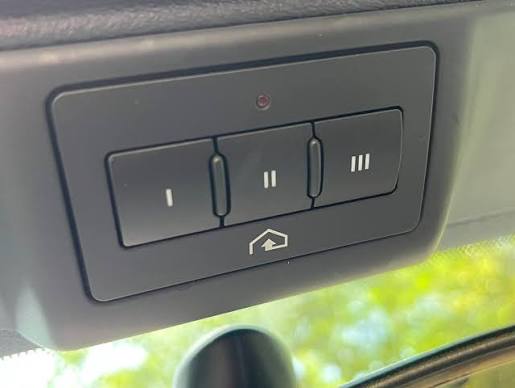
Before diving into the buttons, it is essential to understand what you are working with. The HomeLink system in the Audi Q5 is located in the overhead console, near the rearview mirror. It typically features three programmable buttons. These buttons do not store the signal themselves; rather, they learn the frequency and code from your existing garage door remote or wall-mounted control panel.
According to HomeLink’s official documentation, the system operates on various radio frequencies, making it compatible with over 95% of garage door openers manufactured since 1982. However, compatibility does not always guarantee an easy setup. Security features in modern garage door openers, such as rolling codes, require specific programming steps to ensure your home remains secure while allowing your Audi to communicate with the opener.
Why Programming Fails: Common Issues
Many users attempt to program their device but fail on the first try. Understanding why this happens can save you significant time. Common reasons include:
- Interference: Other electronic devices nearby can disrupt the signal transmission.
- Battery Issues: A weak battery in your handheld garage remote prevents it from sending a strong enough signal for the Audi to learn.
- Incorrect Mode: Newer garage door openers use “rolling codes” for security, which require a different programming sequence than older “fixed code” systems.
- Distance: Standing too far or too close to the garage door motor during the learning phase can affect signal strength.
Step-by-Step: How To Program Garage Door Opener In Audi Q5
This section provides a detailed tutorial. Please ensure your Audi Q5 is parked outside the garage with the ignition turned on (or in accessory mode) before beginning. This ensures the electrical system is active without draining the battery excessively.
Phase 1: Clearing Previous Settings (If Applicable)
If you have previously attempted to program a button or bought a used Audi Q5, it is best to clear the memory first.
- Press and hold the two outer HomeLink buttons simultaneously.
- Keep holding them for about 20 seconds until the indicator light begins to flash rapidly.
- Release the buttons. The memory is now cleared, and you can start fresh.
Phase 2: Programming the Handheld Remote
This is the most common method. You will need your original garage door remote control.
- Positioning: Sit in your Audi Q5. Hold your handheld garage remote 1–3 inches away from the HomeLink buttons on the overhead console.
- Select Button: Choose which HomeLink button you want to use (e.g., Button 1).
- Initiate Learning: Press and hold the chosen HomeLink button. Do not release it yet.
- Send Signal: While still holding the HomeLink button, press and hold the button on your handheld garage remote.
- Wait for Flash: Keep both buttons held down. The HomeLink indicator light will change from a slow blink to a rapid flash. This usually takes between 20 to 60 seconds.
- Note: Once the light flashes rapidly, release both buttons. The slow flash indicates the system is learning; the rapid flash indicates it has successfully captured the signal.
Phase 3: Testing the Connection
Now that the Audi has learned the signal, you must test if it works.
- Stand outside your vehicle, near the garage door.
- Press the programmed HomeLink button in your Audi Q5 firmly.
- Observe the garage door. If it moves, the programming is complete.
- If the door does not move, repeat Phase 2, ensuring you are holding the remote closer to the overhead console.
Handling Rolling Code Garage Door Openers
If you have a newer garage door opener (manufactured after 1995), it likely uses a rolling code system for enhanced security. In this system, the code changes every time you press the button. If the standard method above did not work, or if the door moves slightly and then stops, you need to perform the “Rolling Code” synchronization.
Identifying a Rolling Code Opener
Check your garage door motor unit. Look for a label that says “Security+” or “Rolling Code.” Alternatively, consult your garage door opener’s manual. Popular brands like LiftMaster, Chamberlain, and Genie often use this technology.
The Rolling Code Programming Steps
- Locate the Learn Button: Find the “Learn” or “Smart” button on your garage door motor unit inside the garage. It is usually colored yellow, purple, or red.
- Press the Learn Button: Press and release the Learn button on the motor unit. You typically have 30 seconds to complete the next step. An indicator light on the motor will usually turn on or blink.
- Return to Your Audi: Within those 30 seconds, go back to your Audi Q5.
- Finalize Sync: Press and hold the programmed HomeLink button for two seconds, then release it. Repeat this “press-hold-release” cycle three times.
- Test Again: Press the HomeLink button once more. The garage door should now operate correctly.
| Feature | Fixed Code Systems | Rolling Code Systems |
|---|---|---|
| Security Level | Lower | Higher |
| Programming Complexity | Simple (Direct Learn) | Moderate (Requires Motor Unit Access) |
| Signal Type | Static | Changing/Dynamic |
| Common Brands | Older Genie, Craftsman | LiftMaster, Chamberlain, Newer Genie |
Troubleshooting Common Problems
Even with careful following of instructions, issues can arise. Here are solutions to the most frequent problems encountered when learning how to program garage door opener in Audi Q5.
The Indicator Light Does Not Flash Rapidly
If the light stays solid or blinks slowly without changing speed, the Audi is not receiving the signal from your remote.
- Solution: Replace the battery in your handheld garage remote. Even if it works for opening the door manually, the signal strength might be too weak for the HomeLink receiver to learn the code. Try moving the remote closer to the overhead console, experimenting with angles.
The Garage Door Moves But Reverses Immediately
This is a safety feature trigger. The door thinks there is an obstruction.
- Solution: Check the safety sensors at the bottom of your garage door tracks. Ensure they are aligned and clean. If they are fine, you may need to adjust the force settings on your garage door motor unit, as described in its manual.
HomeLink Buttons Are Unresponsive
- Solution: Ensure your Audi Q5 is in accessory mode or running. The HomeLink system requires power from the vehicle’s electrical system. Also, check if the fuse for the overhead console is intact, though this is rare.
Expert Tips for Long-Term Success
To ensure your HomeLink system remains reliable, consider these professional tips:
- Keep Your Remote Handy: Always keep your original handheld remote in your glove box. If the HomeLink system ever loses its programming (which can happen after a battery disconnect in the car), you will need the original remote to reprogram it.
- Update Firmware: While HomeLink is hardware-based, some newer Audi models with integrated MMI systems may receive software updates that improve connectivity. Check with your local Audi dealer for any relevant service bulletins.
- Label Your Buttons: Use a small piece of tape or a marker to note which button corresponds to which door if you have multiple garages. This prevents confusion, especially for family members who share the vehicle.
FAQ Section
1. Can I program more than one garage door in my Audi Q5?
Yes, the HomeLink system in the Audi Q5 typically has three independent buttons. You can program each button to control a different garage door, gate, or even home lighting system. Each button must be programmed individually using the steps outlined above.
2. What if I don’t have my original garage door remote?
If you have lost your original remote, you cannot program the HomeLink system directly. You will need to purchase a universal remote compatible with your garage door opener brand or contact the manufacturer to get a replacement. Once you have a working remote, you can proceed with the programming steps.
3. Does programming HomeLink void my garage door warranty?
No, programming a universal transmitter like HomeLink does not void your garage door opener’s warranty. It is a standard feature supported by most major manufacturers. However, always refer to your specific garage door opener’s manual for any brand-specific warnings.
4. Why does my Audi Q5 HomeLink work intermittently?
Intermittent issues are often caused by distance or interference. Ensure you are within range of the garage door when pressing the button. If the problem persists, reprogram the button using the rolling code method, as the synchronization may have been interrupted. Also, check for new electronic devices in your garage that might cause signal interference.
5. Is the HomeLink system secure?
Yes, HomeLink uses encryption and rolling code technology (when paired with compatible openers) to prevent code grabbing and unauthorized access. It is considered as secure as using your original handheld remote.
Conclusion
Learning how to program garage door opener in Audi Q5 is a straightforward process that significantly enhances your daily convenience. By understanding whether your system uses fixed or rolling codes and following the precise steps for clearing memory and syncing signals, you can master this feature in minutes. Remember to keep your original remote accessible for future reprogramming needs and troubleshoot systematically if issues arise.
Now that your garage door is seamlessly integrated with your Audi Q5, enjoy the luxury of hands-free entry. If you found this guide helpful, please share it with fellow Audi owners on social media or leave a comment below with your experience. Happy driving!



Leave a Reply