Introduction
There is nothing quite as frustrating as pulling into your driveway after a long day, only to realize you have to dig through your bag or glove compartment to find that clunky plastic remote just to open your garage. You bought your 2019 Mazda CX-5 for its sleek design and smart technology, so it makes sense that you want to use its built-in convenience features. If you are wondering how to program garage door opener Mazda CX-5 2019 models, you are not alone. Many owners find the initial setup slightly confusing, but once configured, the HomeLink system transforms your daily routine. This guide will walk you through the process step-by-step, ensuring you get it right the first time without unnecessary stress.
Understanding the HomeLink System in Your Mazda
Before we dive into the buttons and blinking lights, it is helpful to understand what you are working with. The 2019 Mazda CX-5 is equipped with the HomeLink Universal Transceiver. This system is designed to replace up to three separate hand-held remotes for devices like garage doors, gate operators, or even home lighting systems.
Unlike older car systems that required complex coding, the HomeLink in your Mazda uses a “learning” mechanism. It mimics the signal of your original garage door remote. According to Wikipedia, HomeLink is one of the most widely integrated vehicle-to-home wireless control systems in the world, known for its compatibility with over 95% of garage door openers manufactured since 1993. This high compatibility rate means that if you have a standard residential garage door, your Mazda can almost certainly control it.
Preparation: What You Need Before Starting
Success lies in preparation. Trying to program the system while sitting in a cold car or rushing against time often leads to errors. Follow this checklist before you begin:
- Your Original Garage Door Remote: Ensure it has fresh batteries. A weak signal from the handheld remote will fail to teach the car’s system.
- A Step Ladder (Optional): If your garage door motor unit is high up, you may need to reach the “Learn” button on the motor itself.
- Patience: The process involves holding buttons for specific durations. Do not rush.
- Clear Line of Sight: Park your Mazda CX-5 inside the garage, close to the door opener motor, but ensure the engine is off.
Pro Tip: Keep your garage door closed during the initial programming phase to prevent accidental openings while you are testing signals.
Step-by-Step: How to Program Garage Door Opener Mazda CX-5 2019
The process varies slightly depending on whether your garage door opener is a newer “rolling code” model or an older fixed-code model. Most modern openers (post-1993) use rolling codes for security. We will cover the standard method which works for the majority of users.
Step 1: Clear Existing Codes (If Necessary)
If you are replacing an old device or if the buttons were previously programmed, you must clear them first.
- Press and hold the two outer HomeLink buttons (Buttons 1 and 3) simultaneously.
- Hold them for about 20 seconds.
- Release when the indicator light begins to flash rapidly.
- Note: If this is your first time using HomeLink, you can skip this step.
Step 2: Position Your Remotes
- Sit in the driver’s seat of your 2019 Mazda CX-5.
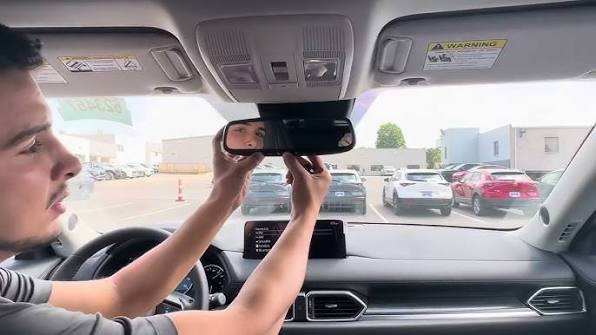
- Hold your original garage door remote 1 to 3 inches away from the HomeLink buttons located on your rearview mirror or overhead console.
- Ensure the HomeLink indicator light is off.
Step 3: Train the HomeLink Button
- Choose which HomeLink button you want to use (e.g., Button 1).
- Press and hold the chosen HomeLink button and the button on your handheld garage remote simultaneously.
- Do not release either button yet.
- Watch the HomeLink indicator light. It will start slow, then turn solid, and finally begin to flash rapidly.
- Once the light flashes rapidly, release both buttons. This usually takes between 20 to 60 seconds.
Step 4: Test the Connection
- Press and hold the newly programmed HomeLink button.
- Observe your garage door.
- If the door moves: You are done! Proceed to the “Rolling Code” section below if your door only moves briefly and stops, or if you have a Security+ opener.
- If the door does not move: You may need to complete the “Rolling Code” synchronization.
Handling Rolling Code Garage Door Openers
Most garage door openers installed in the US after 1993 use rolling code technology. This means the code changes every time you press the button to prevent hacking. If your door didn’t open in Step 4, or if it opens but doesn’t stay open, follow these additional steps.
Locate the “Learn” Button
Look at your garage door opener motor unit hanging from the ceiling. Find the “Learn” or “Smart” button. It is usually colored yellow, purple, orange, or red.
Synchronize the System
- Press the “Learn” button on the motor unit firmly. The indicator light on the motor will typically blink or turn on.
- You have approximately 30 seconds to return to your Mazda.
- Inside the car, press and hold the programmed HomeLink button for 2 seconds, then release.
- Repeat this press-and-release cycle three times.
- Wait for the garage door to respond. It should now open and close fully.
| Feature | Fixed Code Openers | Rolling Code Openers |
|---|---|---|
| Security Level | Low | High |
| Programming Complexity | Easy (Direct Copy) | Moderate (Requires Motor Sync) |
| Common Brands | Older Genie, Chamberlain | LiftMaster, Craftsman, Newer Genie |
| Sync Step Required? | No | Yes |
Troubleshooting Common Issues
Even with careful following of instructions, things can go wrong. Here are solutions to the most common problems faced by Mazda CX-5 owners.
The Indicator Light Does Not Flash
If the light stays solid or does not change behavior during Step 3:
- Check Batteries: Replace the battery in your handheld remote.
- Distance: Move the handheld remote closer to the HomeLink buttons. Try different angles.
- Interference: LED bulbs in your garage can sometimes interfere with radio frequencies. Try turning off nearby LED lights during programming.
The Door Moves But Reverses Immediately
This is a safety feature issue, not a programming issue.
- Check the safety sensors at the bottom of your garage door tracks. Ensure they are aligned and clean.
- Ensure nothing is blocking the door’s path.
HomeLink Buttons Are Unresponsive
- Ensure your vehicle is in “Park.” Some safety features disable HomeLink operation while the car is in motion or in gear.
- Check your Mazda’s fuse box if the entire mirror console is dead, though this is rare.
Frequently Asked Questions (FAQ)
Q1: Can I program more than one garage door to my 2019 Mazda CX-5?
A: Yes. The HomeLink system in the 2019 Mazda CX-5 supports up to three different devices. You can program a second garage door, a gate, or even a home lighting system to the remaining buttons using the same process outlined above.
Q2: Why does my garage door only open halfway when using HomeLink?
A: This usually indicates that the “force” or “travel limits” on your garage door motor need adjustment, or the rolling code synchronization was incomplete. Try repeating the “Learn” button synchronization step (Step 4 in the Rolling Code section) ensuring you press the car button three distinct times.
Q3: Is it safe to use HomeLink?
A: Absolutely. HomeLink uses encrypted rolling codes that change with every use, making it extremely difficult for thieves to intercept or replicate the signal. It is considered safer than leaving a handheld remote visible in your car.
Q4: What if I don’t have my original handheld remote?
A: You can still program the system, but it is more complex. You will need to locate the dip switches on your garage door motor and manually match them to the HomeLink settings, or contact a professional installer. Having the original remote is highly recommended for ease of setup.
Q5: Does programming HomeLink void my car’s warranty?
A: No. Using the built-in HomeLink feature is part of the vehicle’s standard functionality and does not affect your Mazda warranty. However, damaging the garage door motor due to incorrect limit settings would not be covered by Mazda.
Q6: Can I use HomeLink for non-garage devices?
A: Yes. HomeLink is universal. It can control ceiling fans, home security systems, automated blinds, and outdoor gates, provided they operate on a compatible radio frequency (usually 315 MHz or 390 MHz in the US).
Conclusion
Learning how to program garage door opener Mazda CX-5 2019 models is a small investment of time that yields significant daily convenience. By following the steps above, you can seamlessly integrate your home access with your vehicle, eliminating the need for cluttered keychains and lost remotes. Remember, patience is key during the synchronization phase, especially with rolling code openers.
Now that your garage door responds to the touch of a button in your Mazda, enjoy the smooth entry every time you come home. If you found this guide helpful, please share it with fellow Mazda owners on social media or leave a comment below with your experience. Safe driving and happy automating!
Leave a Reply