Introduction
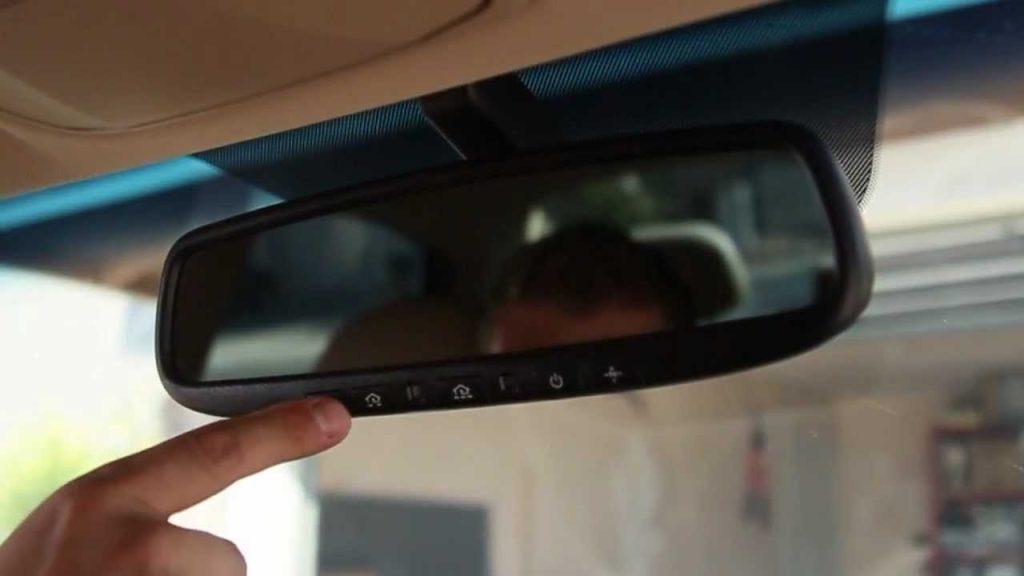
Are you tired of fumbling for your garage remote every time you pull into your driveway? You’re not alone. Many Kia Telluride owners struggle with setting up their built-in garage door opener system, often wasting precious time searching for solutions online. Learning how to program garage door opener on Kia Telluride can transform your daily routine, giving you the convenience of opening your garage with just a button press from your vehicle’s overhead console.
The Kia Telluride comes equipped with the HomeLink universal transceiver system, a sophisticated technology that replaces multiple remotes with a single integrated solution. However, the programming process isn’t always intuitive, and many drivers find themselves confused by the manufacturer’s instructions. This comprehensive guide will walk you through every step, ensuring you get your garage door opener working perfectly with your Telluride.
Understanding the HomeLink System in Your Kia Telluride
Before diving into the programming process, it’s essential to understand what you’re working with. The HomeLink system in your Kia Telluride is a universal wireless control system that can operate up to three different garage doors, gates, or other compatible devices.
What Is HomeLink?
HomeLink is a radio frequency transmitter built into your vehicle’s overhead console. According to Wikipedia, this technology has been integrated into millions of vehicles worldwide since the 1990s, becoming an industry standard for in-car garage door control systems.
The system works by learning and replicating the signal from your existing garage door remote. Once programmed, your Telluride essentially becomes a remote control itself, transmitting the same codes that your handheld device uses.
Compatibility Check
Not all garage door openers work seamlessly with HomeLink. Here’s what you need to know:
Compatible Systems:
- Most major brands (Chamberlain, LiftMaster, Genie, Craftsman)
- Rolling code and fixed code systems
- Garage doors manufactured after 1982
Potential Issues:
- Very old systems (pre-1982) may require additional hardware
- Some European brands might need special adapters
- Security+ 2.0 systems require specific programming steps
Step-by-Step Guide: How to Program Garage Door Opener on Kia Telluride
Now let’s get to the heart of the matter. Follow these detailed steps to successfully program your garage door opener.
Step 1: Prepare Your Materials
Before starting, gather everything you’ll need:
- Your Kia Telluride (parked outside your garage)
- Your existing garage door remote control
- A ladder (if needed to reach the garage door motor unit)
- Approximately 15-20 minutes of uninterrupted time
Important: Ensure your garage door is in good working condition and your remote has fresh batteries.
Step 2: Clear Existing HomeLink Memory
If this is your first time programming, skip to Step 3. Otherwise, clear previous settings:
- Turn your ignition to the “ON” position (engine can be off)
- Press and hold the two outer HomeLink buttons simultaneously
- Continue holding for approximately 20 seconds until the indicator light begins flashing rapidly
- Release both buttons when the light changes from slow to rapid flashing
This process erases all previously programmed devices, giving you a clean slate.
Step 3: Choose Your Programming Method
There are two primary methods depending on your garage door opener type:
Method A: Standard Programming (Most Common)
- Position your vehicle 6-10 feet away from the garage door
- Hold your garage door remote 1-3 inches from the HomeLink button you want to program
- Simultaneously press and hold both the HomeLink button and your remote button
- Keep both buttons pressed until the HomeLink indicator light changes from slow blinking to rapid flashing (typically 20-30 seconds)
- Release both buttons
Method B: Rolling Code Programming (For Newer Systems)
If Method A doesn’t work, your opener likely uses rolling code technology:
- Complete Steps 1-4 from Method A above
- Locate the “Learn” or “Smart” button on your garage door motor unit (usually inside the garage)
- Press and release the Learn button (the indicator light will illuminate)
- Within 30 seconds, return to your vehicle and press the programmed HomeLink button three times
- Test the garage door operation
Step 4: Test Your Programming
After completing the programming steps:
- Press the programmed HomeLink button
- Observe if the garage door responds
- If successful, the door should open or close accordingly
- Test from different distances to ensure reliable operation
Troubleshooting Common Issues
| Problem | Possible Cause | Solution |
|---|---|---|
| Light doesn’t flash | Weak remote battery | Replace remote batteries |
| Door doesn’t respond | Wrong programming method | Try rolling code method |
| Intermittent operation | Signal interference | Reprogram closer to garage |
| Multiple presses needed | Incomplete programming | Repeat entire process |
Advanced Tips for Optimal Performance
Positioning Matters
The distance between your vehicle and garage door during programming significantly affects performance. Experts recommend:
- Initial programming: 6-10 feet from the garage door
- Testing range: Start close, gradually increase distance
- Optimal location: Park where you normally enter/exit your garage
Dealing with Security Features
Modern garage door openers include sophisticated security features that can complicate programming:
Security+ 2.0 Systems: These require pressing the Learn button twice during programming. Look for a yellow Learn button on your motor unit.
Intellicode Systems: May require holding the Learn button for 5-10 seconds until the light blinks, then proceeding with standard programming.
Programming Multiple Devices
Your Telluride’s HomeLink system can control up to three devices. To program additional remotes:
- Choose an unused HomeLink button
- Repeat the programming process
- Label each button mentally or with small stickers for easy identification
Frequently Asked Questions
Q: How long does it take to program a garage door opener on a Kia Telluride?
A: The entire process typically takes 15-20 minutes for first-time users. Experienced users can complete it in under 10 minutes. Factors affecting timing include your garage door opener type, whether you need to clear existing memory, and any troubleshooting required.
Q: Can I program my Kia Telluride to open two different garage doors?
A: Yes! The HomeLink system supports up to three separate devices. Each button on your overhead console can be programmed independently. Simply repeat the programming process for each additional garage door or gate you want to control.
Q: What should I do if my garage door opener uses rolling codes?
A: Rolling code systems require an extra step. After the initial programming, you must locate the Learn button on your garage door motor unit, press it, then return to your vehicle within 30 seconds to press the programmed HomeLink button three times. This synchronizes the changing codes between your vehicle and opener.
Q: Will programming my HomeLink affect my existing garage door remote?
A: No, programming your Kia Telluride’s HomeLink system does not interfere with your existing remote controls. Both will continue working independently. However, if you experience issues, try reprogramming both devices to ensure they’re synchronized properly.
Q: My HomeLink indicator light won’t flash. What’s wrong?
A: Several factors could cause this issue:
- Weak vehicle battery: Ensure your car battery is charged
- Remote battery issues: Replace your garage remote batteries
- System malfunction: Try clearing memory and restarting
- Fuse problems: Check your vehicle’s fuse box for blown fuses
If problems persist, consult your Kia dealership or a qualified technician.
Q: Can I program non-garage devices with HomeLink?
A: Absolutely! HomeLink can control various RF-operated devices including:
- Gate operators
- Outdoor lighting systems
- Home security systems
- Pool covers
- Entry door locks
The programming process remains similar, though some devices may require specific procedures outlined in their manuals.
Conclusion
Learning how to program garage door opener on Kia Telluride doesn’t have to be complicated. With the right approach and patience, you can enjoy the convenience of integrated garage door control within minutes. The HomeLink system represents one of the most practical features in modern vehicles, eliminating the clutter of multiple remotes while enhancing your daily driving experience.
Remember, successful programming depends on following each step carefully, understanding your specific garage door opener type, and being prepared to troubleshoot if necessary. Don’t hesitate to consult your vehicle’s owner manual or contact Kia customer support if you encounter persistent issues.
Ready to simplify your life? Share this guide with fellow Kia Telluride owners on social media who might be struggling with their HomeLink setup. Your share could save someone hours of frustration! Have questions or success stories? Drop them in the comments below—let’s help each other master our Tellurides together.



Leave a Reply