Programming your garage door opener to your Ford vehicle shouldn’t be a headache. If you’ve ever stood in your driveway pressing buttons repeatedly without success, you’re not alone. Many Ford owners struggle with this task, but learning how to program garage door opener to car Ford is actually simpler than most people think.
Whether you drive a Ford F-150, Explorer, Mustang, or any other model equipped with the HomeLink system, this comprehensive guide will walk you through every step. We’ll cover everything from initial setup to troubleshooting common issues, ensuring your garage door responds perfectly to your vehicle’s built-in controls.
What Is HomeLink and Why Does Your Ford Have It?
HomeLink is a universal transceiver system integrated into many Ford vehicles that allows you to control garage doors, gate operators, and even home lighting systems directly from your car. This technology eliminates the need to carry separate remotes and provides convenient hands-free access to your garage.
According to Wikipedia, HomeLink was first introduced in 1992 and has since become standard equipment in millions of vehicles worldwide. The system operates on radio frequencies between 288-433 MHz, making it compatible with approximately 95% of garage door openers manufactured after 1990.
Benefits of Using HomeLink in Your Ford
- Convenience: No more searching for lost garage remotes
- Security: Rolling code technology prevents unauthorized access
- Integration: Works seamlessly with Ford’s Sync system
- Versatility: Can program up to three different devices
Step-by-Step Guide: How to Program Garage Door Opener to Car Ford
Before beginning the programming process, gather these essential items:
- Your Ford vehicle (engine running or in accessory mode)
- Original garage door remote control
- A ladder (if needed to reach the garage door motor unit)
- Patience and approximately 10-15 minutes
Step 1: Clear Existing HomeLink Memory
First, you need to erase any previously programmed codes from your HomeLink system. This ensures a clean slate for programming.
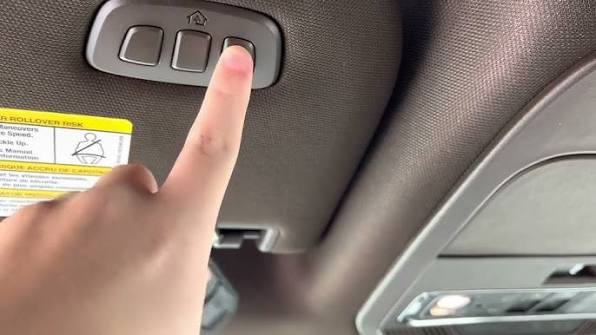
- Locate the HomeLink buttons in your Ford (typically found on the sun visor, rearview mirror, or overhead console)
- Press and hold the two outer HomeLink buttons simultaneously
- Continue holding for approximately 20 seconds until the indicator light begins flashing rapidly
- Release both buttons when the light changes from slow to rapid flashing
Important: This action deletes all previously programmed devices. If you have multiple garage doors or gates programmed, you’ll need to reprogram all of them.
Step 2: Identify Your Garage Door Opener Type
Understanding your garage door opener type is crucial for successful programming. There are two main categories:
| Opener Type | Characteristics | Programming Method |
|---|---|---|
| Fixed Code | Older models (pre-1995) | Simple button press |
| Rolling Code | Newer models (1995+) | Requires additional steps |
Most modern garage door openers use rolling code technology for enhanced security. If your opener was manufactured after 1995, it likely uses this system. Check your opener’s manual or look for a “Learn” or “Smart” button on the motor unit.
Step 3: Program the HomeLink System
Now comes the actual programming phase. Follow these instructions carefully:
- Position your Ford vehicle outside your garage, within clear sight of the garage door opener motor
- Hold your original garage remote 1-3 inches away from the HomeLink buttons
- Simultaneously press and hold the desired HomeLink button and the button on your garage remote
- Continue holding both buttons until the HomeLink indicator light changes from slow blinking to rapid flashing (this may take 20-30 seconds)
- Release both buttons once the rapid flashing occurs
Pro Tip: Keep the remote close to the HomeLink buttons throughout this process. Distance can affect signal transmission.
Step 4: Complete the Programming at the Garage Door Motor
For rolling code openers, an additional step is required at the garage door motor unit:
- Locate the “Learn” or “Smart” button on your garage door opener motor (usually found on the back or side of the unit)
- Press and release this button (the indicator light will illuminate or blink)
- Within 30 seconds, return to your Ford and press the programmed HomeLink button three times
- Test the system by pressing the HomeLink button again
If your garage door activates, congratulations! You’ve successfully learned how to program garage door opener to car Ford.
Step 5: Test and Verify Functionality
Always test your newly programmed system multiple times:
- Open and close the garage door at least three times
- Test from different distances (close range and from inside the garage)
- Verify that the door stops and reverses properly if obstructed
Troubleshooting Common Programming Issues
Even with careful following of instructions, problems can arise. Here are solutions to the most common issues:
Problem: HomeLink Light Doesn’t Flash Rapidly
Solution:
- Ensure you’re holding both buttons simultaneously
- Try moving the remote closer to the HomeLink buttons
- Replace the battery in your garage remote
- Clear the memory again and restart the process
Problem: Garage Door Doesn’t Respond After Programming
Solution:
- Verify you pressed the “Learn” button on the motor unit
- Ensure you completed the process within the 30-second window
- Check if your opener requires a different frequency setting
- Consult your garage door opener’s manual for specific compatibility notes
Problem: Intermittent Operation
Solution:
- Reprogram the system from scratch
- Check for interference from other electronic devices
- Ensure your vehicle isn’t parked near large metal objects that might block signals
- Contact a professional if problems persist
Ford Models Compatible with HomeLink System
Not all Ford vehicles come equipped with HomeLink. Here’s a quick reference guide:
Standard Equipment (Recent Models):
- Ford F-150 (2015 and newer)
- Ford Explorer (2016 and newer)
- Ford Escape (2017 and newer)
- Ford Edge (2015 and newer)
- Ford Mustang (2015 and newer)
Optional or Trim-Dependent:
- Ford Fusion
- Ford Ranger
- Ford Expedition
Check your owner’s manual or look for the HomeLink buttons in your vehicle to confirm compatibility. If your Ford doesn’t have built-in HomeLink, aftermarket universal remotes are available as alternatives.
Frequently Asked Questions
Q: How long does it take to program a garage door opener to a Ford?
A: The entire process typically takes 10-15 minutes. The actual button-pressing phases only require a few minutes, but allow extra time for troubleshooting if needed.
Q: Can I program multiple garage door openers to my Ford?
A: Yes, most Ford HomeLink systems can store up to three different devices. Simply repeat the programming process for each additional garage door, gate, or compatible device using different HomeLink buttons.
Q: What if my garage door opener is very old?
A: Older fixed-code openers (pre-1995) may require a compatibility bridge or kit. Visit the HomeLink website or contact their customer service to determine if your specific opener model needs additional hardware for compatibility.
Q: Will programming my garage door opener void my Ford warranty?
A: No, using the built-in HomeLink system as intended will not affect your vehicle warranty. However, improper installation of aftermarket systems could potentially cause issues.
Q: Can I reset HomeLink if I sell my Ford?
A: Absolutely. Simply follow Step 1 from our guide to clear all programmed devices. This ensures the new owner starts with a clean system and maintains your security.
Q: Why won’t my HomeLink work after changing the garage door opener battery?
A: Changing the garage remote battery shouldn’t affect HomeLink programming. However, if you replaced the garage door opener motor unit itself, you’ll need to reprogram the HomeLink system using the complete process outlined above.
Conclusion
Learning how to program garage door opener to car Ford transforms your daily routine, offering convenience and security with just the push of a button. By following this comprehensive guide, you’ve gained the knowledge to set up your HomeLink system correctly and troubleshoot any issues that may arise.
Remember that patience is key during the programming process. Take your time, follow each step carefully, and don’t hesitate to consult your vehicle’s owner manual for model-specific instructions. With your garage door now integrated into your Ford’s control system, you’ll enjoy the seamless convenience that modern automotive technology provides.
Did this guide help you successfully program your garage door opener? Share your experience on social media and help other Ford owners discover how easy this process can be. Don’t forget to bookmark this page for future reference or if you need to reprogram your system later!



Leave a Reply