Introduction
Struggling to figure out how to program garage door opener to GMC truck? You are not alone; many drivers find this process slightly confusing at first glance. Fortunately, with this easy, step-by-step guide, you will have your GMC seamlessly connected to your garage in just a few minutes.
How To Program Garage Door Opener To GMC Truck: The Basics
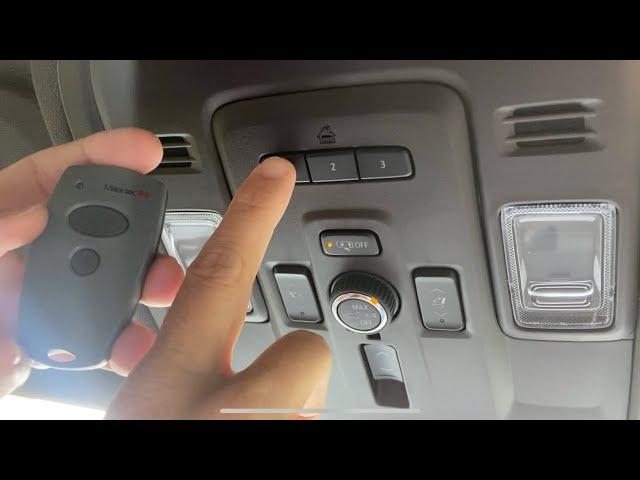
Most modern GMC vehicles (including the Sierra, Canyon, Yukon, and Acadia) come equipped with HomeLink, an integrated wireless control system. HomeLink replaces up to three standard handheld remotes, allowing you to open your garage, gates, or even turn on home lighting directly from your rearview mirror or overhead console.
According to industry data, HomeLink is installed in over 500 million vehicles worldwide, making it the most trusted vehicle-to-everything (V2X) communication system. If you want to understand the broader technology behind these universal transmitters, you can learn more about HomeLink on Wikipedia.
Understanding your system is the first step toward a successful setup. Let’s get your truck ready for programming.
What You Need Before You Start
To ensure a smooth programming experience, gather the following items before you begin:
- Your GMC vehicle with a fully charged battery.
- Your original garage door remote (handheld).
- A stable step ladder (to safely reach the garage door motor unit).
- A flashlight (garages can be dimly lit).
- Your garage door opener’s manual (to identify the “Learn” or “Smart” button color).
Pro Tip: Ensure your vehicle is parked outside the garage, about 1 to 3 feet away from the garage door motor. This distance provides the optimal signal strength during the pairing process.
Step-by-Step Guide: Programming Your GMC Garage Door Opener
Follow these concrete steps carefully. The entire process usually takes less than 5 minutes.
Step 1: Clear Existing HomeLink Codes
Before programming a new device, erase any old codes to prevent signal interference.
- Turn your GMC’s ignition to the “ON” or “ACCESSORY” position.
- Press and hold the two outer HomeLink buttons simultaneously.
- Keep holding for 20 seconds until the indicator light flashes rapidly. Release the buttons.
Step 2: Initiate Training Mode on Your GMC
- Hold your original garage door remote 1 to 3 inches away from the HomeLink buttons in your truck.
- Press and hold the desired HomeLink button in your GMC and the button on your handheld remote at the same time.
- Hold both until the HomeLink indicator light changes from a slow blink to a rapid, solid flash. This may take up to 30 seconds.
Step 3: Activate the Garage Door Motor Unit
- Use your step ladder to locate the motor unit on your garage ceiling.
- Find the “Learn,” “Smart,” or “Program” button (usually located near the hanging antenna wire).
- Press and release this button. Note: You typically have exactly 30 seconds to complete the next step.
Step 4: Finalize the Sync
- Return to your GMC truck.
- Press and hold the programmed HomeLink button for 2 seconds, then release it.
- Repeat this press-and-hold action two more times (for a total of 3 times).
- Your garage door should now activate, confirming a successful connection.
Troubleshooting: Why Won’t My GMC Program to the Garage Door?
Even with careful steps, hiccups can occur. Here is a quick-reference table to diagnose and fix common issues:
| Common Issue | Likely Cause | Quick Fix |
|---|---|---|
| Light flashes, but door doesn’t move | Rolling code mismatch | Press the motor’s “Learn” button again, then press the GMC HomeLink button 3 times rapidly. |
| No indicator light on HomeLink | Vehicle battery or fuse issue | Check your GMC’s fuse box or ensure the ignition is in “ON” mode, not just “ACC”. |
| Remote works, HomeLink does not | Distance or interference | Move the truck closer (1–3 feet) and ensure no large metal objects are blocking the signal. |
| “Learn” button light turns off immediately | Outdated motor receiver | You may need a HomeLink Compatibility Repeater (bridge) for older garage openers. |
HomeLink vs. Aftermarket Universal Remotes: Which is Better?
If you are debating whether to use your GMC’s built-in system or buy a separate universal remote, consider this comparison:
| Feature | Built-in GMC HomeLink | Aftermarket Universal Remote |
|---|---|---|
| Convenience | Excellent (Always in the vehicle) | Moderate (Can be lost or left behind) |
| Aesthetics | Clean (Integrated into mirror/console) | Cluttered (Visor clip or sunroof mount) |
| Security | High (Encrypted rolling codes) | Variable (Depends on the brand/price) |
| Cost | Free (Already in your vehicle) | $20 – $50 (Initial purchase required) |
Expert Insight:
“Integrated systems like HomeLink significantly reduce the risk of unauthorized access because they utilize dynamic rolling-code technology, which changes the access code every time the button is pressed,” explains John Davis, a certified automotive security specialist. This makes your GMC not just convenient, but highly secure.
Frequently Asked Questions (FAQ)
Q1: How do I know if my GMC truck has HomeLink?
A: Look at your rearview mirror or the overhead console near the map lights. If you see three blank or labeled buttons (often with a house icon), your GMC is equipped with HomeLink.
Q2: Can I program a second garage door to my GMC truck?
A: Yes. HomeLink can store up to three different devices. Simply repeat the programming steps using a different, unused HomeLink button for the second door.
Q3: What do I do if my GMC garage door remote is not working after a power outage?
A: Power outages can sometimes reset your garage door motor’s memory. You will need to re-sync the system by pressing the “Learn” button on the motor unit and then pressing your GMC’s HomeLink button three times.
Q4: Does programming the garage door opener drain my GMC’s battery?
A: No. The programming process only takes a few minutes and draws a negligible amount of power. However, always ensure your vehicle is running or in “ON” mode to prevent any strain on the battery.
Q5: How do I reset the HomeLink system in my GMC completely?
A: To erase all programmed devices, turn the ignition to “ON,” press and hold the two outer HomeLink buttons for 20 seconds until the indicator light flashes rapidly, then release. All memory will be cleared.
Conclusion
Learning how to program garage door opener to GMC truck does not have to be a frustrating experience. By following this structured, step-by-step guide, you can leverage your vehicle’s built-in HomeLink system to enjoy seamless, secure, and effortless access to your garage. You save money on extra remotes, reduce windshield clutter, and enhance your home’s security with encrypted rolling codes.
Did this guide help you get your garage door working perfectly? Share this article on Facebook, X (Twitter), or with your fellow GMC owner friends so they can master their vehicle’s features too! If you have any questions or unique troubleshooting experiences, drop a comment below—we love hearing from our community.



Leave a Reply