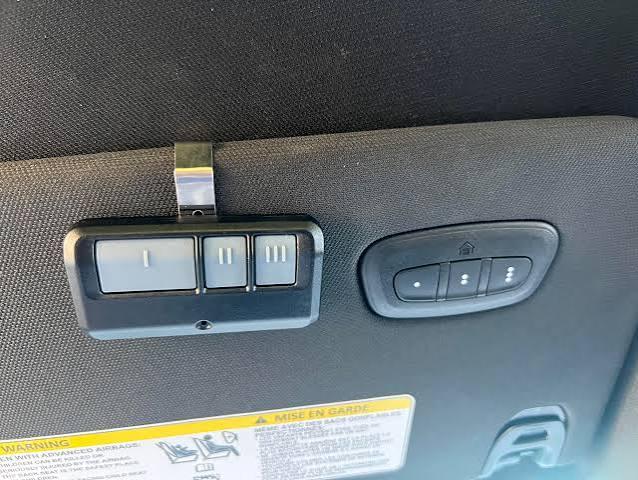
Are you tired of juggling multiple remotes every time you pull into your driveway? If you’re wondering how to program garage door opener to Ram 1500, you’re not alone. Thousands of Ram owners face this challenge when trying to integrate their vehicle’s built-in HomeLink system with their existing garage door opener. The good news is that with the right guidance, you can complete this process in just a few minutes and enjoy the luxury of opening your garage directly from your truck.
What Is HomeLink and Why Does Your Ram 1500 Have It?
Before diving into the programming steps, it’s essential to understand what you’re working with. HomeLink is a universal transceiver system integrated into many modern vehicles, including the Ram 1500. This technology allows your truck to communicate with various radio-frequency devices, such as garage door openers, gate operators, and even home lighting systems.
According to Wikipedia, HomeLink was first introduced in 1992 and has since become one of the most widely adopted vehicle-based control systems in North America. The system operates on multiple frequencies (typically 288-390 MHz and 433 MHz), making it compatible with approximately 95% of all garage door openers manufactured after 1995.
Key Benefits of Using HomeLink in Your Ram 1500
- Convenience: No more searching for separate remotes
- Security: Rolling code technology prevents unauthorized access
- Versatility: Control up to three different devices
- Integration: Seamlessly works with your vehicle’s existing systems
Step-by-Step Guide: How to Program Garage Door Opener to Ram 1500
Programming your Ram 1500’s HomeLink system requires patience and attention to detail. Follow these precise steps to ensure successful integration with your garage door opener.
Step 1: Prepare Your Equipment and Environment
Before beginning, gather the following items:
- Your Ram 1500 with HomeLink buttons (usually located on the sun visor or rearview mirror)
- Your original garage door remote control
- A ladder (if needed to reach the garage door motor unit)
- Approximately 15-20 minutes of uninterrupted time
Important: Ensure your vehicle is parked outside the garage with the ignition turned to the “ON” or “ACC” position. The engine does not need to be running, but the electrical system must be active.
Step 2: Clear Existing HomeLink Memory (If Necessary)
If your HomeLink system has been previously programmed, you’ll need to clear the memory first:
- Press and hold the two outer HomeLink buttons simultaneously
- Continue holding for approximately 20 seconds
- Watch for the indicator light to flash rapidly, then turn solid
- Release both buttons once the light changes
This process erases all previously stored codes and prepares the system for new programming.
Step 3: Initiate the Programming Mode
Now comes the critical phase where you’ll teach your Ram 1500 to recognize your garage door opener:
- Choose which HomeLink button you want to use (Button 1, 2, or 3)
- Hold your original garage door remote 1-3 inches away from the chosen HomeLink button
- Press and hold both the HomeLink button AND the button on your remote simultaneously
- Continue holding both buttons until the HomeLink indicator light changes from slow blinking to rapid flashing (this typically takes 20-30 seconds)
- Release both buttons once the rapid flashing begins
Step 4: Test the Basic Programming
After completing Step 3, test whether the basic programming was successful:
- Press the programmed HomeLink button firmly
- Observe if your garage door responds
- If the door moves, proceed to Step 5
- If nothing happens, repeat Steps 2-3, ensuring you maintain proper distance between the remote and HomeLink button
Step 5: Program Rolling Code Systems (Most Modern Openers)
Most garage door openers manufactured after 1995 use rolling code technology for enhanced security. If your basic programming didn’t work, or if you have a newer opener, follow these additional steps:
- Locate the “Learn” or “Smart” button on your garage door motor unit (usually found on the back or side of the unit hanging from your ceiling)
- Press and release the Learn button (the indicator light will begin blinking)
- You have 30 seconds to complete the next step
- Return to your Ram 1500 and press the programmed HomeLink button three times in succession
- Wait for the garage door to respond
Note: The exact location and color of the Learn button varies by manufacturer. Common colors include yellow, purple, red, or orange. Consult your garage door opener’s manual if you cannot locate this button.
Step 6: Final Testing and Verification
Complete the programming process with thorough testing:
- Drive your Ram 1500 completely out of range (at least 100 feet from the garage)
- Return and attempt to open/close the garage door using HomeLink
- Test the function multiple times to ensure consistency
- Verify that the safety sensors still operate correctly
Troubleshooting Common Programming Issues
Even with careful following of instructions, you may encounter problems. Here are solutions to the most common issues:
| Problem | Possible Cause | Solution |
|---|---|---|
| HomeLink light doesn’t flash | Weak remote battery | Replace battery in garage door remote |
| Door doesn’t respond after programming | Incorrect Learn button timing | Repeat Step 5, ensuring you press HomeLink within 30 seconds |
| Intermittent operation | Signal interference | Reprogram in a different location away from other electronic devices |
| Only works when very close to garage | Weak signal transmission | Check HomeLink button alignment and reprogram |
When to Seek Professional Help
Consider contacting a professional if:
- You’ve attempted programming three times without success
- Your garage door opener is older than 1995 (may require a compatibility bridge)
- You experience electrical issues with your Ram 1500’s HomeLink system
- The garage door operates erratically or unsafely
Frequently Asked Questions About Programming HomeLink to Ram 1500
Q1: Can I program multiple garage door openers to my Ram 1500?
A: Yes, the HomeLink system in your Ram 1500 can store up to three different device codes. This means you can program your primary garage door, a secondary garage, and even a gate operator. Each device uses a separate HomeLink button (1, 2, or 3). Simply repeat the programming process for each additional device using a different button.
Q2: How long does the programming process typically take?
A: For most users, the entire process takes between 10-20 minutes. However, this can vary depending on your familiarity with the system and whether you need to program a rolling code opener. First-time users should allocate at least 30 minutes to avoid rushing through the steps.
Q3: Will programming HomeLink void my garage door warranty?
A: No, programming your Ram 1500’s HomeLink system will not void your garage door opener’s warranty. HomeLink is designed to work with existing openers without modifying them. However, always consult your garage door manufacturer’s documentation if you have specific concerns about warranty coverage.
Q4: What should I do if my Ram 1500 doesn’t have HomeLink?
A: Not all Ram 1500 trim levels come equipped with HomeLink. If your truck lacks this feature, you have several options:
- Purchase an aftermarket universal garage door remote that clips to your visor
- Install an aftermarket HomeLink module (requires professional installation)
- Use smartphone-based garage door openers that connect via Wi-Fi
- Contact your Ram dealer to inquire about retrofitting options
Q5: Can I reprogram HomeLink if I move to a new house?
A: Absolutely. The HomeLink system is designed to be reprogrammed as needed. Simply follow the clearing procedure in Step 2 to erase the old code, then repeat the programming process with your new garage door opener. There’s no limit to how many times you can reprogram the system.
Q6: Is HomeLink secure against hacking or unauthorized access?
A: HomeLink uses rolling code technology, which changes the access code each time you use it. This makes it extremely difficult for unauthorized individuals to intercept and replicate the signal. Additionally, the system operates on encrypted frequencies, providing multiple layers of security. While no system is completely hack-proof, HomeLink is considered highly secure for residential use.
Conclusion: Enjoy Seamless Convenience with Your Ram 1500
Learning how to program garage door opener to Ram 1500 opens up a world of convenience and modern functionality. By following this comprehensive guide, you’ve gained the knowledge to integrate your vehicle with your home’s garage system seamlessly. The HomeLink feature represents exactly what modern truck ownership should be—practical, efficient, and technologically advanced.
Remember that patience is key during the programming process. Take your time with each step, and don’t hesitate to repeat the procedure if needed. Most importantly, always prioritize safety when working with garage door systems and ensure all safety sensors remain functional after programming.
Now that you’ve mastered this skill, why not share your success with fellow Ram owners? Share this guide on social media platforms like Facebook, Twitter, or Reddit’s r/Ram_Trucks community to help others discover the convenience of HomeLink integration. Your experience might be exactly what another frustrated truck owner needs to finally solve their programming puzzle!
Have questions or additional tips about programming your Ram 1500’s HomeLink system? Leave a comment below and join the conversation with other Ram enthusiasts!



Leave a Reply