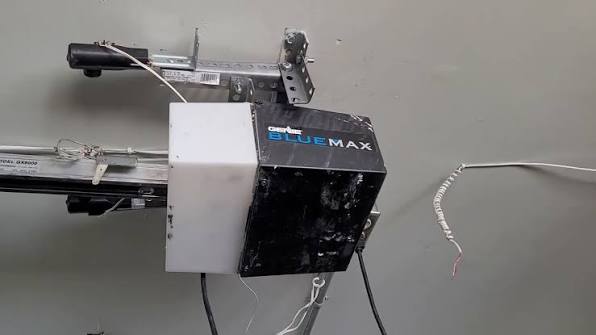
Is your new Genie Blue Max garage door opener sitting idle because you can’t figure out the programming process? You’re not alone—many homeowners struggle with syncing their remotes and keypads, leading to frustration and unnecessary service calls. This comprehensive guide will walk you through how to program Genie Blue Max garage door opener systems quickly and safely, saving you time and money.
Understanding Your Genie Blue Max System
Before diving into the programming process, it’s essential to understand what makes the Genie Blue Max series unique. The Blue Max line represents Genie’s commitment to reliable, user-friendly garage door openers that combine durability with modern convenience features.
The Genie Blue Max models typically operate on secure frequency bands and feature Intellicode technology, which provides enhanced security through rolling code systems. According to industry standards, these systems change their access codes with each use, making them significantly more secure than older fixed-code systems.
Key Components You’ll Need
- Main opener unit (mounted on your garage ceiling)
- Remote control(s) (handheld transmitters)
- Wireless keypad (if applicable to your model)
- Owner’s manual (for model-specific variations)
- Stable ladder (for safe access to the opener unit)
For more information about garage door opener safety standards, you can visit Wikipedia’s article on garage door openers.
Step-by-Step Guide: How to Program Genie Blue Max Garage Door Opener
Programming Your First Remote Control
The most common task homeowners face is programming their first remote control. Here’s the detailed process:
Step 1: Locate the Learn Button Find the “Learn” or “Program” button on your Genie Blue Max opener motor unit. This button is typically located on the back or side of the unit and may be colored purple, red, or orange depending on your specific model.
Step 2: Clear Existing Codes (If Necessary) If you’re replacing an old remote or starting fresh, press and hold the Learn button for approximately 10 seconds until the indicator light blinks or turns off. This clears all previously programmed remotes from the system.
Step 3: Initiate Programming Mode Press the Learn button once briefly. The indicator light should illuminate or begin blinking, signaling that the opener is ready to receive a new code. You typically have 30 seconds to complete the next step.
Step 4: Program the Remote While standing within 5-10 feet of the opener, press and hold the desired button on your remote control. Hold it for 2-3 seconds until you see the opener’s lights flash or hear a click sound. This confirms successful programming.
Step 5: Test the Remote Press the programmed button again to test if the garage door responds. If it doesn’t work, repeat steps 3-4, ensuring you’re close enough to the opener during programming.
Programming Additional Remotes
Once you’ve successfully programmed your first remote, adding additional remotes follows a similar process:
- Press the Learn button on the opener unit
- Within 30 seconds, press and hold the button on the new remote
- Wait for confirmation (light flash or click)
- Test the newly programmed remote
Pro Tip: Most Genie Blue Max models can store up to 7 different remote controls or keypads. Keep track of which devices are programmed for future reference.
Programming a Wireless Keypad
If your system includes a wireless keypad, the programming process differs slightly:
Step 1: Enter Programming Mode Press the Learn button on the opener unit. The indicator light should activate.
Step 2: Enter Your Desired PIN On the wireless keypad, enter your chosen 4-digit PIN code. Choose something memorable but not easily guessable (avoid birthdays or simple sequences like 1234).
Step 3: Confirm the Code Press the “Enter” or arrow button on the keypad. The opener should respond with a light flash or sound confirmation.
Step 4: Test the Keypad Enter your PIN followed by the Enter button to verify the keypad operates the door correctly.
Troubleshooting Common Programming Issues
Even with careful following of instructions, problems can arise. Here are solutions to the most frequent issues:
| Problem | Possible Cause | Solution |
|---|---|---|
| Remote won’t program | Battery too weak | Replace remote batteries with fresh ones |
| Opener doesn’t respond | Out of range | Move closer to opener during programming |
| Light doesn’t blink | Learn button not pressed correctly | Press firmly and hold for 1-2 seconds |
| Multiple remotes fail | System memory full | Clear all codes and reprogram from scratch |
| Intermittent operation | Signal interference | Reprogram away from other electronic devices |
Battery-Related Issues
One of the most overlooked causes of programming failure is weak remote batteries. Even if your remote seems to work occasionally, low battery power can prevent successful programming. Always use fresh, high-quality alkaline batteries before attempting to program any remote control.
Signal Interference Considerations
Modern homes contain numerous wireless devices that can interfere with garage door opener signals. Wi-Fi routers, baby monitors, and cordless phones operating on similar frequencies may cause issues. If programming fails repeatedly:
- Turn off nearby wireless devices temporarily
- Try programming at different times of day
- Ensure no large metal objects block the signal path
Advanced Features and Smart Integration
Many Genie Blue Max models offer compatibility with smart home systems and mobile apps. While basic programming covers remote controls and keypads, smart integration requires additional steps:
Connecting to Aladdin Connect
If your Blue Max model supports Aladdin Connect (Genie’s smart home platform):
- Download the Aladdin Connect app on your smartphone
- Create an account and follow the in-app setup wizard
- Ensure your opener has the necessary Wi-Fi module installed
- Follow the app’s specific pairing instructions
This integration allows you to control your garage door remotely, receive notifications, and monitor activity through your smartphone.
Safety Precautions During Programming
Safety should always be your top priority when working with garage door openers:
- Never attempt programming while standing under a moving door
- Use a sturdy ladder when accessing the opener unit
- Keep children and pets away from the work area
- Ensure the door is fully closed before beginning programming
- Test safety reversal features after completing programming
According to the Consumer Product Safety Commission, garage door-related injuries send thousands of people to emergency rooms annually. Proper programming ensures all safety features function correctly.
Maintenance Tips for Long-Term Performance
After successfully programming your Genie Blue Max system, maintain optimal performance with these practices:
- Test your remotes monthly to ensure they remain synchronized
- Replace batteries annually even if they appear to work
- Keep the opener unit clean and free from dust buildup
- Inspect safety sensors regularly to ensure proper alignment
- Update firmware if your model supports automatic updates
FAQ Section
How many remotes can I program to my Genie Blue Max opener?
Most Genie Blue Max models can accommodate up to 7 different remote controls or wireless keypads. Check your specific model’s manual for exact capacity, as some newer models may support more devices.
What should I do if my remote stops working after programming?
First, check the battery strength and replace if necessary. If fresh batteries don’t resolve the issue, try reprogramming the remote. If problems persist, clear all codes from the opener and reprogram all devices from scratch.
Can I program a universal remote to work with my Genie Blue Max?
Yes, many universal remotes are compatible with Genie Blue Max systems. However, you must ensure the universal remote supports Intellicode rolling code technology. Follow the universal remote’s specific programming instructions, which typically involve entering a Genie-specific code sequence.
How often should I reprogram my Genie Blue Max opener?
Under normal circumstances, you shouldn’t need to reprogram your system regularly. However, consider reprogramming if you experience frequent signal issues, after power outages that affect the opener, or when moving to a new home where previous owners may have had access to your remotes.
Is it possible to program my Genie Blue Max without the original remote?
If you’ve lost all your remotes, you can still program new ones using the Learn button on the opener unit. However, for security reasons, you should first clear all existing codes to ensure no unauthorized remotes remain active in the system.
What’s the difference between programming a remote and a keypad?
Remotes and keypads use different programming sequences. Remotes transmit a unique code when you press the button, while keypads require you to enter a PIN code that the opener stores. Both processes start by pressing the Learn button on the opener, but the subsequent steps differ based on the device type.
Conclusion
Learning how to program Genie Blue Max garage door opener systems doesn’t have to be intimidating. With this comprehensive guide, you now have the knowledge to confidently program remotes, keypads, and troubleshoot common issues. Remember to prioritize safety, use fresh batteries, and keep your owner’s manual handy for model-specific variations.
By following these steps carefully, you’ll save money on service calls and gain greater control over your home’s security and convenience. Don’t forget to share this guide with friends or family members who might be struggling with their own Genie garage door openers—helping others succeed feels great!
Have questions or experiences to share? Leave a comment below or share this article on social media to help other homeowners master their Genie Blue Max systems.



Leave a Reply