Introduction
There is nothing quite as frustrating as pulling into your driveway in the rain, only to realize you cannot get your vehicle’s built-in system to communicate with your garage. If you are struggling with this exact issue and searching for how to sync Craftsman garage door opener to car, you have come to the right place. We understand that technology should make life easier, not more complicated, so we have created this empathetic, jargon-free guide to get you back inside your warm garage quickly and safely.
Understanding Your Craftsman System Compatibility
Before diving into buttons and lights, it is vital to understand what equipment you actually own. Craftsman has been a staple in American garages for decades, but their technology has evolved significantly. Knowing whether you have an older DIP switch model or a newer Security+ 2.0 system will dictate which synchronization method you must use.
According to industry standards, most vehicles manufactured after 2015 utilize the HomeLink wireless control system, which is compatible with the vast majority of modern Craftsman openers. However, if your car is older or your garage door opener was installed before 1993, you may face compatibility hurdles.
Quick Compatibility Check Table
| Craftsman Model Era | Technology Type | Car Sync Method | Difficulty Level |
|---|---|---|---|
| Pre-1993 | DIP Switch (8-12 switches) | Manual Code Matching | High |
| 1993–2011 | Security+ (Purple/Yellow Learn Button) | Standard HomeLink | Medium |
| 2011–Present | Security+ 2.0 (Yellow/Orange Learn Button) | HomeLink + Bridge | Low/Medium |
| Wi-Fi Enabled | myQ Smart Hub | App Integration | Low |
Note: Always check the “Learn” button color on your motor unit. This is the single most important identifier for Craftsman openers.
How To Sync Craftsman Garage Door Opener To Car Using HomeLink
This is the most common scenario for US homeowners. The process generally takes less than five minutes, but precision matters. Follow these steps exactly to ensure a successful handshake between your vehicle and your Craftsman unit.
Step 1: Clear Previous Codes from Your Car
If you bought the car used or previously programmed a different door, you must reset the system first.
- Locate the HomeLink buttons (usually on the rearview mirror, overhead console, or sun visor).
- Press and hold the two outer buttons simultaneously for 10–20 seconds.
- Release when the indicator light begins to flash rapidly. This confirms the memory is wiped.
Step 2: Put Your Craftsman Opener in Learn Mode
- Go to your garage door motor unit mounted on the ceiling.
- Locate the “Learn” or “Smart” button. It is typically yellow, orange, purple, or red.
- Press and release the Learn button. The LED light next to it will illuminate or begin blinking, indicating the unit is waiting for a signal. You now have 30 seconds to complete the next step.
Step 3: Program the Vehicle Transmitter
- Return to your car immediately.
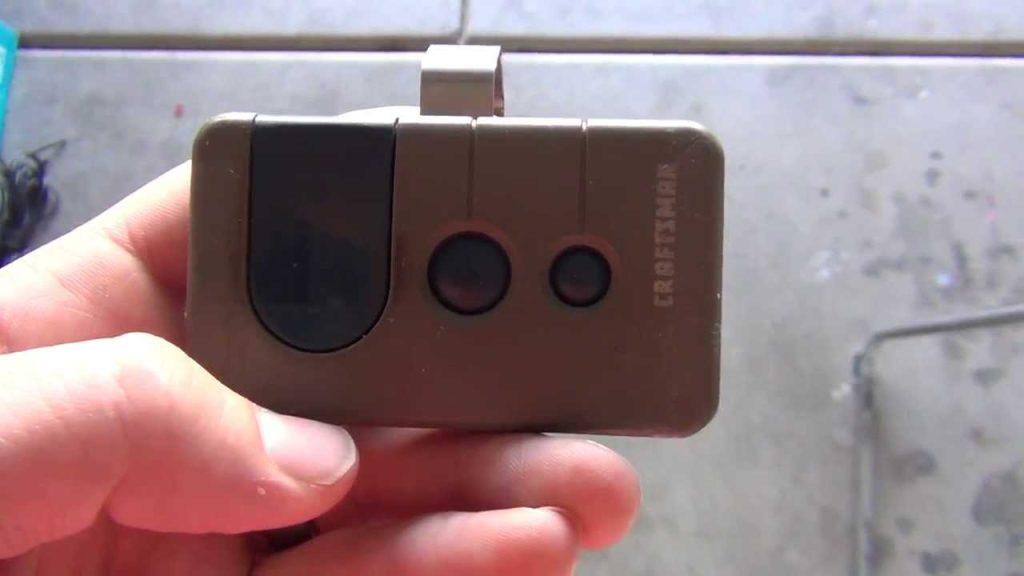
- Hold your original Craftsman handheld remote 1–3 inches away from the HomeLink button you wish to program.
- Simultaneously press and hold both the handheld remote button and the target HomeLink button.
- Watch the HomeLink indicator light. It will flash slowly at first, then rapidly or turn solid. This rapid flash indicates successful synchronization.
- Release both buttons.
Step 4: Test and Verify
Press the newly programmed HomeLink button once. The garage door should activate. If it does not move but the car light flashes, repeat Step 3 while holding the buttons slightly longer.
What If My Craftsman Opener Has No Learn Button?
Owners of vintage Craftsman units often ask this question. If your motor lacks a colored learn button and instead has a panel of tiny sliding switches inside the casing, you have a DIP switch model.
Synchronizing these to a modern car is fundamentally different because there is no digital rolling code. You must physically match the switch positions.
- Open the battery compartment of your car’s visor transmitter (if equipped with manual switches) or use a universal DIP-switch compatible remote.
- Slide the tiny switches to match the exact pattern found inside your Craftsman motor housing.
- There is no “learn” sequence; the hardware alignment is the code.
Expert Tip: If your DIP switch opener is functioning well but refuses to sync with a newer car, consider installing a HomeLink Compatibility Bridge. This small device plugs into your old opener and acts as a translator for modern vehicles, saving you the cost of a full motor replacement.
Troubleshooting Common Synchronization Failures
Even professionals encounter hiccups. If you followed the steps above and the door still won’t open, consult this diagnostic list before calling a technician.
- LED Flashes But Door Doesn’t Move: This usually means the frequency is recognized, but the rolling code wasn’t accepted. Repeat the programming process, but this time, after the rapid flash, press and hold the HomeLink button again until the light turns solid. Some Craftsman Security+ models require this “double confirmation.”
- Range Issues: If the door only opens when you are within 5 feet of the garage, your car’s antenna may be blocked by window tint containing metal particles, or the opener’s antenna wire is damaged. Ensure the copper antenna wire hanging from the motor is fully extended and not coiled.
- Battery Weakness: Even if your handheld remote works, its battery might be too weak to transmit the strong signal needed for the initial car sync. Replace the CR2032 or AA batteries in your handheld remote before attempting to program the car again.
- Interference: LED light bulbs installed in the garage door opener can sometimes emit radio frequency interference that blocks HomeLink signals. Try unscrewing the bulbs temporarily to test if sync improves. If it does, replace them with RF-shielded garage-door-specific LEDs.
Safety First: Critical Warnings During Programming
While learning how to sync Craftsman garage door opener to car, never bypass safety sensors. Modern openers manufactured after 1993 are federally mandated to have photo-eye sensors that reverse the door if an object breaks the beam.
When testing your new car sync, always keep your finger on the HomeLink button. If the door begins to close unexpectedly, releasing the button should stop the cycle. Additionally, ensure your vehicle is parked outside the garage during programming to prevent accidental entrapment or damage to your car’s roof.
Frequently Asked Questions (FAQ)
1. Can I sync multiple cars to the same Craftsman opener?
Yes, absolutely. Most Craftsman Security+ and Security+ 2.0 openers can store up to 30 distinct remote/transmitter codes. Each car in your household can have its own dedicated HomeLink button without interfering with others. Simply repeat the programming process for each vehicle individually.
2. Why does my HomeLink work intermittently after syncing?
Intermittent operation is rarely a programming error; it is usually environmental. Check for new sources of RF interference near the garage, such as baby monitors, Wi-Fi routers, or recently installed smart home devices. Also, verify that the garage door opener’s logic board isn’t experiencing voltage fluctuations due to aging capacitors.
3. Do I need a professional to sync my Craftsman opener to my Tesla or EV?
No. Electric vehicles use the same HomeLink standard as gasoline cars. In fact, many Teslas and newer EVs have software updates that improve Craftsman compatibility. The physical programming steps remain identical to those outlined in our main tutorial above.
4. My car says “Training” but never completes. What’s wrong?
The “Training” message indicates the car is receiving a signal but cannot decode the rolling encryption. This happens frequently with Craftsman Security+ 2.0 (yellow learn button) models paired with older HomeLink versions. The solution is almost always purchasing the official HomeLink Compatibility Bridge, which translates the newer encryption protocol for your vehicle.
5. Will reprogramming my car erase my existing garage door remotes?
No. Programming a car’s HomeLink adds a new code to the opener’s memory; it does not overwrite existing handheld remotes or keypads. However, performing a factory reset on the garage door opener itself (holding the Learn button for 10+ seconds until the light goes out) will erase all devices, including your car. Avoid resetting the motor unless absolutely necessary.
6. How often should I resync my car to the opener?
Under normal circumstances, you should never need to resync. The connection is permanent unless the opener’s memory is cleared or the car’s HomeLink system is reset. If you find yourself needing to reprogram monthly, your opener’s logic board is likely failing and requires professional inspection.
Conclusion
Mastering how to sync Craftsman garage door opener to car transforms your daily arrival experience from a fumbling hassle into a seamless, one-touch convenience. By understanding your specific model era, following precise programming sequences, and applying targeted troubleshooting, you can achieve reliable synchronization without expensive service calls. Remember, patience during the 30-second learn window is usually the difference between success and frustration.
We hope this guide has empowered you to take control of your home automation with confidence. Did this tutorial solve your sync issues? Share this article with friends, family, or neighbors who are still wrestling with their garage door openers! A quick share on Facebook, X (Twitter), or Pinterest could save someone else a rainy evening in the driveway. Happy syncing!



Leave a Reply