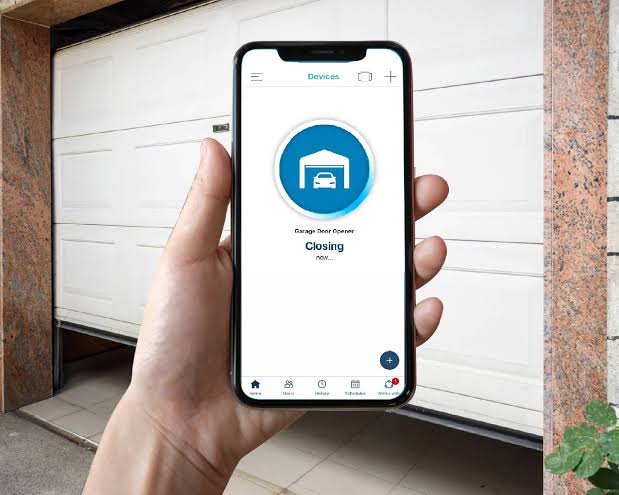
Have you ever pulled into your driveway during a heavy rainstorm, only to realize you left your garage door remote inside the house? Or perhaps you’re halfway to work when that nagging doubt creeps in: Did I actually close the garage door? You are not alone. Many homeowners face these daily inconveniences, leading them to ask a crucial question: is there an app to open your garage door? The short answer is yes, and it might be easier to set up than you think.
Smart home technology has revolutionized how we interact with our homes, turning simple mechanical tasks into seamless digital experiences. In this guide, we will explore the best applications available, how they work, and what you need to get started with secure, remote garage door control.
How Do Smart Garage Door Apps Work?
Before diving into specific brands, it is essential to understand the mechanics behind these applications. A smart garage door system typically consists of two main components: a hardware controller installed on your existing garage door opener and a mobile application on your smartphone.
The hardware connects to your garage door opener’s motor unit via a simple wired connection or wireless protocol. Once installed, it communicates with your home Wi-Fi network. When you tap “Open” or “Close” in the app, a signal is sent from your phone to the cloud, then to your home network, and finally to the garage door controller, triggering the motor.
This process usually takes less than three seconds. According to industry standards, most modern systems use encrypted communication protocols like AES 128-bit encryption to ensure that your garage remains secure from hackers. For more detailed technical specifications on wireless security protocols, you can refer to Wikipedia’s page on Wireless Security.
Top-Rated Apps for Garage Door Control
Not all garage door apps are created equal. Some require proprietary hardware, while others integrate with universal smart home ecosystems. Here are the top contenders currently dominating the US market:
1. MyQ by Chamberlain
MyQ is arguably the most recognized name in the industry. Chamberlain manufactures a vast majority of garage door openers sold in the United States.
- Compatibility: Works with most Chamberlain, LiftMaster, and Craftsman openers manufactured after 2011.
- Key Feature: Seamless integration if you already have a compatible opener.
- Cost: Often free if your opener is compatible; otherwise, a hub costs around $30–$40.
2. Tailwind
Tailwind offers a unique approach by using geofencing technology.
- Compatibility: Universal compatibility with most major brands.
- Key Feature: Automatically opens the door when your phone detects you are approaching home and closes it when you leave.
- Cost: Hardware kit ranges from $99 to $129.
3. Ratgdo (RATGDO)
For tech-savvy users who prefer open-source solutions, Ratgdo has gained significant traction.
- Compatibility: Specifically designed for Security+ 2.0 openers.
- Key Feature: Highly customizable and does not rely on cloud services, enhancing privacy.
- Cost: Hardware is affordable, often under $50, but requires DIY technical setup.
Comparison Table: Popular Garage Door Apps
| Feature | MyQ | Tailwind | Ratgdo |
|---|---|---|---|
| Ease of Installation | Easy | Moderate | Difficult (DIY) |
| Cloud Dependency | Yes | Yes | No (Local Control) |
| Geofencing | Limited | Excellent | Via Home Assistant |
| Price Range | Low – Medium | Medium | Low |
| Best For | Beginners | Automation Lovers | Tech Enthusiasts |
Benefits of Using a Garage Door App
Switching to a smart garage solution offers more than just novelty. It provides tangible benefits that enhance security, convenience, and peace of mind.
- Remote Access: Check the status of your door from anywhere in the world. Whether you are at the office or on vacation, you can verify if the door is closed.
- Guest Access: Grant temporary access to dog walkers, cleaners, or family members without handing over physical remotes. You can revoke access instantly if needed.
- Activity Logs: Most apps keep a history of when the door was opened and closed. This feature is invaluable for monitoring household activity or investigating suspicious events.
- Integration with Smart Home Ecosystems: Connect your garage to Amazon Alexa, Google Assistant, or Apple HomeKit. You can simply say, “Alexa, close the garage door,” instead of pulling out your phone.
Potential Drawbacks to Consider
While the advantages are significant, it is important to be aware of potential downsides. Internet dependency is the most critical factor. If your home Wi-Fi goes down, you may lose remote access. However, most systems still allow you to use the physical wall button or remote control as a backup.
Another concern is subscription fees. While basic features are often free, some companies charge monthly fees for advanced features like video verification or extended history logs. Always read the fine print before purchasing hardware.
Step-by-Step Guide to Installing a Smart Garage Controller
If you decide to upgrade, here is a general step-by-step process for installing a universal smart garage controller. Note that specific steps may vary by brand.
- Check Compatibility: Verify that your garage door opener model is compatible with the smart controller you purchased. Most manufacturers provide online compatibility checkers.
- Gather Tools: You will typically need a ladder, a screwdriver, and possibly a wire stripper. Ensure you have a stable Wi-Fi signal in your garage.
- Power Down: Unplug your garage door opener or turn off the circuit breaker to ensure safety during installation.
- Mount the Controller: Attach the smart controller to the ceiling near the motor unit. Use the provided adhesive or screws.
- Connect Wires: Connect the controller’s wires to the motor unit’s terminal blocks. Usually, this involves connecting two wires to the same terminals where your wall button is connected. Refer to the manual for exact wiring diagrams.
- Power Up and Pair: Plug the opener back in. Download the corresponding app on your smartphone and follow the in-app instructions to pair the device with your Wi-Fi network.
- Test the System: Use the app to open and close the door. Ensure the safety sensors are functioning correctly and that the door reverses if an obstacle is detected.
FAQ Section
Is it safe to use an app to open my garage door?
Yes, reputable brands use bank-level encryption to protect your data. However, always use strong, unique passwords for your app account and enable two-factor authentication (2FA) if available. Avoid using public Wi-Fi networks when controlling your garage door.
Can I use a garage door app if I have an old opener?
In many cases, yes. Universal smart controllers like Tailwind or Meross are designed to work with older openers as long as they have standard terminal connections for a wall button. If your opener is extremely old (pre-1990s), you might need to replace the motor unit entirely.
Do I need Wi-Fi in my garage for the app to work?
Yes, the smart controller needs a Wi-Fi connection to communicate with the app. If your Wi-Fi signal is weak in the garage, consider installing a Wi-Fi extender or a mesh network node to ensure a stable connection.
What happens if my phone battery dies?
You will not be able to use the app, but you can still use your physical remote control, keypad, or the wall-mounted button inside the garage. It is always recommended to keep a physical remote in your car as a backup.
Can multiple people use the same app?
Most smart garage apps allow you to invite family members or trusted individuals to share access. You can manage permissions through the app, allowing others to open and close the door without giving them your personal login credentials.
Conclusion
So, is there an app to open your garage door? Absolutely. From user-friendly options like MyQ to automation-focused solutions like Tailwind, there is a smart garage solution for every type of homeowner. These apps not only eliminate the stress of forgetting to close the door but also add a layer of security and convenience that traditional remotes cannot match.
By understanding your compatibility needs and choosing a reputable brand, you can transform your garage into a smart entry point for your home. Don’t let outdated technology hold you back. Explore the options, install a system that fits your lifestyle, and enjoy the peace of mind that comes with knowing your garage is secure, no matter where you are.
If you found this guide helpful, please share it with friends and family who might be struggling with their garage door remotes. Let’s help everyone step into the future of home automation!



Leave a Reply