Experiencing connectivity issues with your MyQ garage door opener can be frustrating. Delve into the reasons behind “Can’t Connect to MyQ Garage Door Opener” and unlock practical solutions to ensure seamless operation.
Can’t Connect to MyQ Garage Door Opener: Unraveling the Connectivity Challenge
The MyQ smart garage door opener offers convenience and control at your fingertips, but what happens when you encounter connectivity issues? Let’s explore the common reasons behind the challenge of “Can’t Connect to MyQ Garage Door Opener” and discover step-by-step solutions to get your smart garage back on track.
Understanding the Connectivity Challenge
Check Your Internet Connection
The first step in resolving connectivity issues is to ensure that your home’s internet connection is stable. A weak or unstable connection can hinder communication between your MyQ garage door opener and the associated app. Perform a quick internet speed test to rule out connectivity issues.
Verify MyQ Hub Status Lights
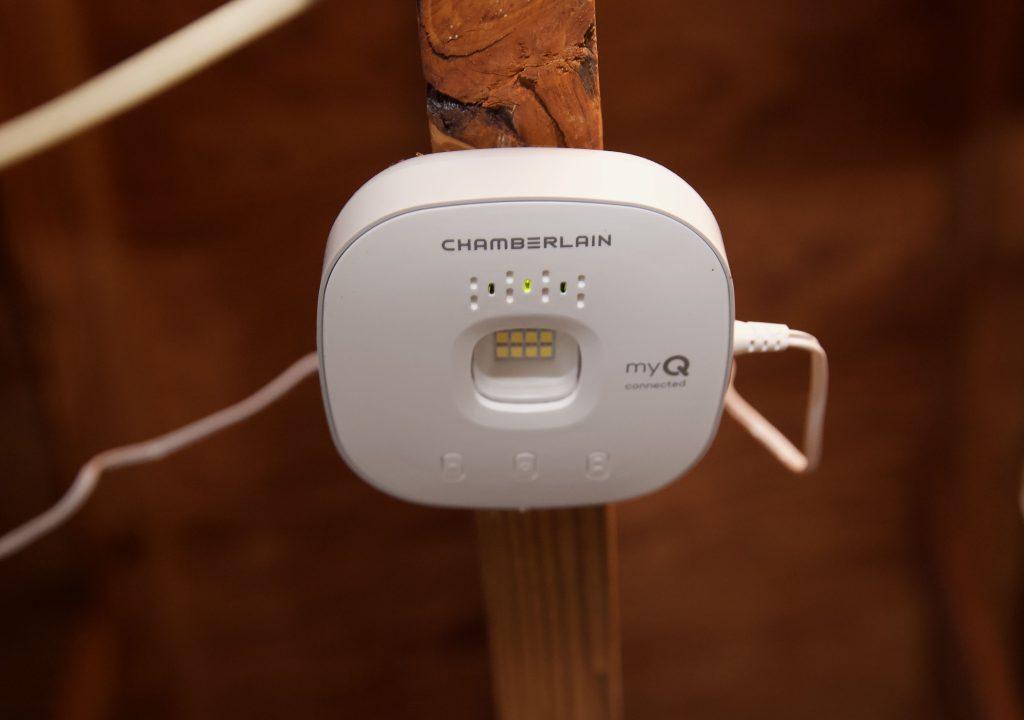
The MyQ Smart Garage Hub has status lights that indicate its connectivity status. Check the lights on the hub and refer to the MyQ user manual for insights into what different light patterns mean. This quick visual check can provide valuable information about the source of the connectivity problem.
Troubleshooting Steps for Can’t Connect to MyQ Garage Door Opener
Restart Your MyQ System
A simple restart can often resolve connectivity issues. Power off the MyQ Smart Garage Hub, unplug it from the power source, wait for a few seconds, and then plug it back in. Additionally, restart your Wi-Fi router to ensure a fresh connection when the MyQ system comes back online.
Update MyQ App and Firmware
Outdated software can lead to compatibility issues. Check for updates to both the MyQ app on your smartphone and the firmware of your MyQ Smart Garage Hub. Keeping both up to date ensures that you have the latest features and improvements, enhancing overall performance.
Connecting MyQ to Wi-Fi Network
Reconnect MyQ to Wi-Fi
If you’ve changed your Wi-Fi network or password, your MyQ garage door opener may need to be reconnected to the new network. Use the MyQ app to navigate to the settings and update the Wi-Fi information. Follow the on-screen prompts to reconnect the MyQ system to your home network.
Ensure Proper Placement of MyQ Hub
The placement of your MyQ Smart Garage Hub can impact its ability to connect to Wi-Fi. Ensure that the hub is placed within the recommended range of your Wi-Fi router and avoid interference from other electronic devices. This simple adjustment can significantly improve connectivity.
Additional Tips for Resolving Can’t Connect to MyQ Garage Door Opener
Check for Signal Interference
Electronic devices, appliances, and other Wi-Fi-enabled devices can cause signal interference. Identify and relocate devices that may be disrupting the Wi-Fi signal to improve connectivity to your MyQ garage door opener.
Contact MyQ Customer Support
If all else fails, reaching out to MyQ customer support can provide expert assistance. They can guide you through additional troubleshooting steps, offer insights into specific issues, and, if needed, initiate advanced troubleshooting to resolve connectivity challenges.
Read too: Genie Garage Door Opener Blue Light Flashing – Decoding the Signal: Troubleshooting the Mystery
Conclusion: Regaining Control of Your Smart Garage
Encountering connectivity issues with your MyQ garage door opener can be a temporary setback. By understanding the common reasons behind “Can’t Connect to MyQ Garage Door Opener” and following the troubleshooting steps outlined above, you can regain seamless control over your smart garage. Embrace the convenience and efficiency of MyQ technology with a stable and reliable connection.



Leave a Reply