In today’s fast-paced world, convenience and automation have become essential components of modern living. One area that has seen significant technological advancements is home automation, particularly with garage door openers. An app for garage door opener provides homeowners with unparalleled control over their garage doors right from their smartphones. This article will explore the benefits, features, and various options available for garage door opener apps, helping you make an informed decision for your home.
What is an App for Garage Door Opener?
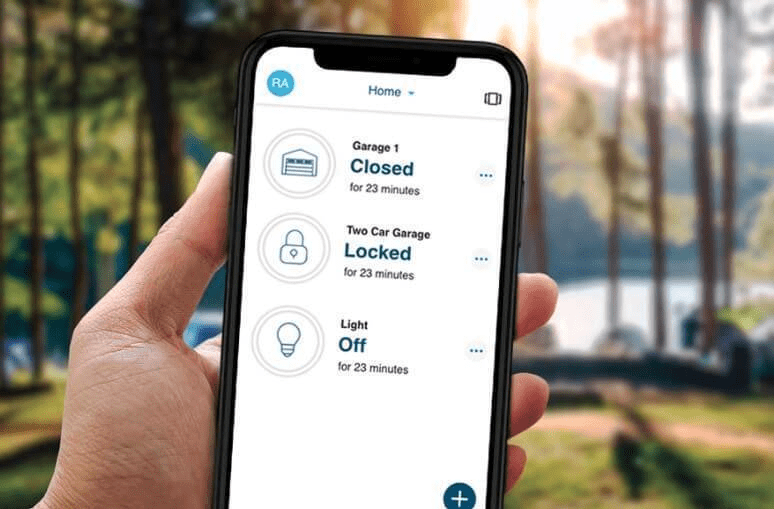
An app for garage door opener allows you to control your garage door remotely using your smartphone, tablet, or other smart devices. Through Wi-Fi or Bluetooth, these apps connect to your garage door opener, enabling you to open and close the door from virtually anywhere. Whether you are at home, at work, or on vacation, you can easily manage your garage door with just a few taps on your smartphone screen.
How Does It Work?
Most garage door opener apps work in conjunction with a compatible smart garage door opener. Once you install the opener and connect it to your home Wi-Fi network, you can download the corresponding app to your smartphone. After creating an account and linking the app to your garage door opener, you can easily control it, monitor its status, and receive notifications.
Benefits of Using an App for Garage Door Opener
Using an app to control your garage door offers numerous benefits:
1. Convenience
With an app for garage door opener, you no longer need to fumble for your remote or get out of your car to open the garage door. You can control it with your smartphone, making it convenient to access your garage whether you’re arriving home with groceries or letting a friend in while you’re away.
Read too: How to Perform a Chamberlain Garage Door Opener Code Change? Mastering Security
2. Remote Access
Remote access is one of the most significant advantages of using a garage door opener app. You can open or close your garage door from anywhere in the world as long as you have an internet connection. This feature is particularly useful for granting access to service people or family members when you are not home.
3. Increased Security
Many garage door opener apps come with advanced security features, such as encrypted connections and notifications when the garage door is opened or closed. Some apps also allow you to set up temporary access codes for guests, ensuring that your garage remains secure even when you’re not around.
4. Real-Time Notifications
Most garage door opener apps provide real-time notifications, alerting you whenever your garage door is opened or closed. This feature can help you keep track of who is accessing your garage, providing peace of mind when it comes to security.
5. Integration with Smart Home Systems
Many garage door opener apps can integrate seamlessly with other smart home devices, such as smart locks, lights, and security cameras. This allows you to create a cohesive smart home experience, where all your devices work together to enhance your home’s functionality and security.
6. Usage Reports
Some apps offer usage reports, which allow you to track how often your garage door is used. This information can help you identify patterns, monitor usage by family members, and make informed decisions about security or maintenance needs.
Choosing the Right App for Your Garage Door Opener
When selecting an app for garage door opener, it’s essential to consider several factors to ensure you choose the right one for your needs:
1. Compatibility
Before purchasing a garage door opener or downloading an app, ensure that they are compatible with each other. Many garage door openers have their dedicated apps, while others may work with multiple third-party applications. Always check the manufacturer’s website for compatibility information.
2. User Interface
A user-friendly interface is crucial for a smooth experience. Look for an app that is easy to navigate, with clear icons and simple controls. Reading user reviews can help you gauge the app’s usability before downloading.
3. Features
Different apps come with varying features. Some essential features to consider include remote access, notifications, voice control capabilities, integration with smart home devices, and user management options. Choose an app that aligns with your needs and preferences.
4. Security
Security is a paramount concern when it comes to controlling your garage door remotely. Ensure that the app you choose uses encryption and offers features like two-factor authentication to protect your account from unauthorized access.
5. Customer Support
In case you encounter issues with the app or your garage door opener, having access to reliable customer support can save you time and frustration. Check if the app developer offers multiple support channels, such as phone, email, or live chat.
Popular Apps for Garage Door Openers
There are several apps available for garage door openers on the market today. Here are a few popular options to consider:
1. Chamberlain MyQ App
The Chamberlain MyQ app is designed to work with Chamberlain garage door openers and many other compatible brands. It offers remote access, real-time notifications, and integration with smart home systems like Google Assistant and IFTTT. The app is user-friendly, making it easy to control your garage door from anywhere.
2. LiftMaster MyQ App
Similar to the Chamberlain MyQ app, the LiftMaster MyQ app is compatible with LiftMaster garage door openers. It provides features like remote control, notifications, and integration with smart home devices. The LiftMaster app is known for its robust security features, ensuring your garage door remains secure.
3. Nexx Garage App
The Nexx Garage app works with the Nexx Garage controller, which can be added to existing garage door openers. This app offers remote access, notifications, and voice control compatibility with Amazon Alexa and Google Assistant. It also provides real-time usage reports, allowing you to monitor your garage door’s activity.
4. Gogogate 2 App
Gogogate 2 is another versatile option that works with various garage door openers. The app allows for remote access, notifications, and integration with smart home devices. It also features a user management system, enabling you to grant temporary access to guests.
Installation and Setup Process
Setting up an app for garage door opener is typically straightforward. Here’s a general outline of the installation and setup process:
1. Install the Garage Door Opener
If you don’t already have a smart garage door opener, you’ll need to install one. Follow the manufacturer’s instructions for installation or hire a professional to ensure it’s done correctly.
2. Connect to Wi-Fi
Once your garage door opener is installed, connect it to your home Wi-Fi network. This step is crucial for remote access through the app.
3. Download the App
Search for the app associated with your garage door opener in the App Store (iOS) or Google Play Store (Android). Download and install the app on your smartphone or tablet.
4. Create an Account
Open the app and create an account. This process usually involves entering your email address, creating a password, and verifying your account via email.
5. Link Your Garage Door Opener
Follow the app’s instructions to link your garage door opener to your account. This process may involve scanning a QR code or entering a code provided by the garage door opener.
6. Configure Settings
Once linked, you can configure the app settings to your preference, such as enabling notifications and setting up any smart home integrations.
7. Test the System
After everything is set up, test the app by opening and closing your garage door remotely to ensure everything works smoothly.
Troubleshooting Common Issues
While using an app for garage door opener is generally reliable, you may encounter some common issues. Here are a few troubleshooting tips:
1. Connection Problems
If the app is not connecting to your garage door opener, ensure that your Wi-Fi network is functioning correctly. Check if your garage door opener is connected to the Wi-Fi network and that it is within range.
2. App Not Responding
If the app freezes or becomes unresponsive, try restarting your smartphone or tablet. If that doesn’t work, uninstall and reinstall the app.
3. Garage Door Not Responding
If your garage door is not responding to the app commands, check the power supply to the garage door opener. Ensure that it’s plugged in and functioning correctly. If the issue persists, consult the manufacturer’s support resources.
Conclusion
An app for garage door opener can significantly enhance your home’s convenience and security. With features like remote access, real-time notifications, and smart home integration, these apps are revolutionizing how we manage our garage doors. By choosing the right app and following the installation process, you can enjoy the numerous benefits that come with this technology. Whether you’re looking to upgrade your existing garage door opener or are considering a new installation, investing in a smart garage door opener and its corresponding app is a decision you won’t regret.



Leave a Reply