Garage door openers have become an essential convenience for homeowners, providing secure and effortless access to their garages. Among the most versatile and widely used devices is the Chamberlain Clicker Universal Garage Door Opener Remote Control. This universal remote allows homeowners to control multiple garage door openers with a single device, offering convenience and enhanced security. Understanding how to use it properly is essential, and this is where the Chamberlain Clicker Universal Garage Door Opener Remote Control Manual comes into play.
Read too: Why Your Liftmaster Garage Door Won’t Stay Closed and How to Fix It? Troubleshooting Tips
In this comprehensive guide, we’ll cover everything from the basic functions, setup instructions, programming procedures, maintenance tips, and troubleshooting strategies to ensure that your Chamberlain Clicker operates efficiently and reliably.
Chamberlain Clicker Universal Garage Door Opener Remote Control Manual – Overview
The Chamberlain Clicker Universal Garage Door Opener Remote Control Manual serves as the official guide for understanding and operating the remote. It provides step-by-step instructions for programming, safety precautions, and troubleshooting common issues. By following the manual, users can maximize the performance and lifespan of their garage door opener system.
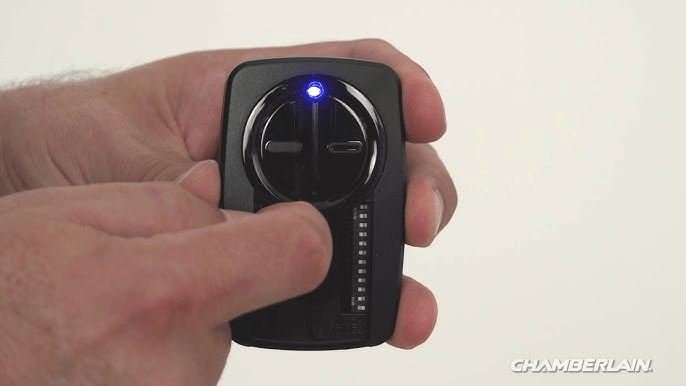
Key Features of the Chamberlain Clicker Remote
- Universal Compatibility: Works with most major brands of garage door openers including Chamberlain, LiftMaster, Genie, and more.
- Multi-Door Control: Can operate multiple doors with a single remote, reducing the need for multiple devices.
- Compact Design: Lightweight and portable, easily fits on a keychain or in a pocket.
- Rolling Code Technology: Enhances security by generating a new code each time the remote is used.
- LED Indicator: Confirms successful signal transmission and programming status.
Setting Up the Chamberlain Clicker Remote
Step 1: Access the Garage Door Opener
Before programming the remote, locate the “Learn” or “Program” button on your garage door opener. This button is typically on the motor head unit or near the antenna wire.
Step 2: Clear Existing Codes (Optional)
If necessary, clear any previous codes to prevent interference. Press and hold the “Learn” button on the opener for 6–10 seconds until the indicator light turns off.
Step 3: Programming the Remote
- Press and release the “Learn” button on the opener.
- Within 30 seconds, press and hold the button on the Chamberlain Clicker you wish to program.
- Release the remote button when the opener’s lights flash or the motor cycles, indicating successful programming.
Step 4: Test the Remote
Press the programmed button to verify that the garage door opens and closes smoothly. If the door does not respond, repeat the programming steps.
Programming Multiple Doors
The Chamberlain Clicker Universal Garage Door Opener Remote Control Manual explains how to program the remote for multiple doors:
- Select a different button for each door.
- Repeat the programming process for each button, ensuring each door responds to the assigned button.
- Confirm that pressing one button does not operate multiple doors unless desired.
Safety and Security Considerations
Using the Chamberlain Clicker remote safely is crucial:
- Keep Remote Out of Children’s Reach: Prevent accidental operation or tampering.
- Avoid Cloning Signals: Do not allow unauthorized persons to duplicate remote signals.
- Regularly Replace Batteries: Low battery levels can reduce range and reliability.
- Check Door Obstructions: Ensure no objects or people are in the path of the garage door when operating.
Maintenance Tips
Proper maintenance ensures the Chamberlain Clicker remote functions effectively:
- Battery Replacement: Use high-quality batteries and replace them every 12 months or when the LED indicator dims.
- Keep Remote Clean: Wipe down with a soft, dry cloth. Avoid water exposure.
- Inspect Buttons: Ensure buttons are responsive and not sticking.
- Store Safely: When not in use, store the remote in a safe, dry location to prevent damage.
Troubleshooting Common Issues
Even with careful use, users may encounter issues. The Chamberlain Clicker Universal Garage Door Opener Remote Control Manual provides solutions:
1. Remote Does Not Work
- Check battery placement and replace if necessary.
- Reprogram the remote following the setup instructions.
- Ensure the garage door opener is powered and functional.
2. Limited Range
- Replace batteries with fresh ones.
- Avoid using the remote near metal objects, Wi-Fi routers, or other electronic devices causing interference.
- Ensure the antenna on the garage opener is fully extended and properly positioned.
3. Door Moves Partially
- Inspect limit settings on the opener.
- Ensure no mechanical obstruction prevents full travel.
- Reprogram the remote if necessary.
4. LED Indicator Not Responding
- Replace batteries or check for corrosion in the battery compartment.
- Confirm the remote is properly programmed.
Advanced Features
Some Chamberlain Clicker remotes offer additional features:
- Multi-Function Buttons: Program a single button for different operations, such as partial door opening.
- Compatibility with MyQ Technology: Allows smartphone integration for monitoring and remote access.
- Enhanced Security Protocols: Rolling code technology reduces the risk of code theft or hacking attempts.
Benefits of Following the Manual
Following the Chamberlain Clicker Universal Garage Door Opener Remote Control Manual offers several advantages:
- Efficient Programming: Saves time and reduces trial-and-error attempts.
- Extended Remote Lifespan: Proper programming and maintenance prevent unnecessary wear.
- Increased Security: Understanding the remote’s features enhances safety and reduces the risk of unauthorized access.
- Peace of Mind: Knowing correct setup and troubleshooting steps ensures reliable operation.
Conclusion
The Chamberlain Clicker Universal Garage Door Opener Remote Control Manual is an essential guide for homeowners who want to maximize the performance, convenience, and security of their garage door opener. By understanding programming procedures, safety considerations, maintenance tips, and troubleshooting strategies, users can ensure reliable operation for years.
Whether you have multiple doors to manage, want to integrate modern smart technology, or simply need a dependable universal remote, the Chamberlain Clicker remote offers flexibility and reliability. Following the manual carefully not only extends the life of the device but also enhances your home’s overall security and convenience.



Leave a Reply