A garage door remote is an essential tool for homeowners who want quick and easy access to their garage. The Genie 3 Button Keychain And Visor Garage Door Opener Remote is one of the best options available, offering convenience, security, and compatibility with multiple garage door openers. Whether you’re looking for a replacement remote or a backup for your garage system, this device is designed to make your life easier.
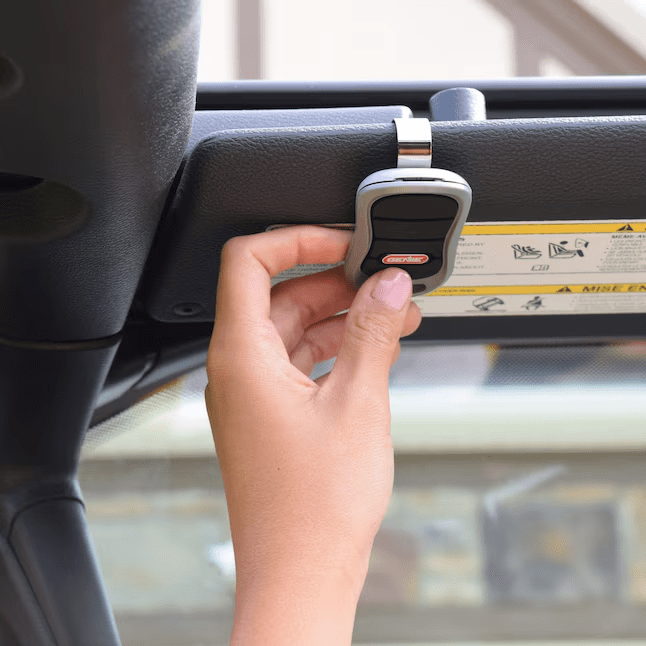
In this article, we’ll explore the features, benefits, setup process, and troubleshooting tips for the Genie 3 Button Keychain And Visor Garage Door Opener Remote to help you determine if it’s the right choice for you.
Read too: Why Are My Garage Doors Opening By Themselves? Troubleshooting Guide
Why Choose the Genie 3 Button Keychain And Visor Garage Door Opener Remote?
The Genie 3 Button Keychain And Visor Garage Door Opener Remote is packed with features that make it an excellent choice for homeowners. Here are some of the top reasons why you should consider this remote:
1. Three-Button Control for Multiple Doors
This remote can operate up to three garage doors, making it perfect for homes with multiple garage access points. You can also use it to control Genie-enabled gate openers.
2. Compact and Versatile Design
The remote is designed to be used in two ways:
- As a keychain remote, making it easy to carry with you.
- As a visor-mounted remote, allowing quick access while driving.
The compact size ensures that it won’t take up too much space in your pocket or on your car’s visor.
3. Compatibility with Genie Intellicode® Technology
The Genie 3 Button Keychain And Visor Garage Door Opener Remote features Intellicode® security technology, which changes the access code each time the garage door is used. This prevents unauthorized access and enhances security.
4. Easy Programming and Setup
One of the best things about this remote is its simple setup process. You can quickly program it to work with your Genie garage door opener without needing professional assistance.
5. Long Battery Life
This remote is designed to last with a long battery life. It comes with a CR2032 coin-cell battery, which provides reliable performance for years.
6. Universal Compatibility with Most Genie Openers
This remote is compatible with most Genie garage door openers manufactured since 1995. This includes popular models such as:
- Genie Intellicode® Series I and II
- Genie G3T-BX Series
- Some Overhead Door® garage door openers
If you have an older Genie opener, you can check compatibility by referring to the manufacturer’s guide.
How to Program the Genie 3 Button Keychain And Visor Garage Door Opener Remote
Setting up your Genie 3 Button Keychain And Visor Garage Door Openers Remote is quick and easy. Follow these steps to program it to your garage door opener:
1: Locate the “Learn” Button on Your Garage Door Opener
Find the “Learn” or “Program” button on your Genie garage door opener motor. This button is usually located under the light cover or on the back panel of the unit.
2: Press and Hold the Remote Button
- Press and hold one of the three buttons on your Genie remote.
- While holding the button, press and release the “Learn” button on your garage door opener.
3: Wait for the Indicator Light to Blink
- The indicator light on the opener should start blinking, signaling that it is in programming mode.
- Release the remote button once the light blinks.
4: Test the Remote
Press the programmed button on your remote to check if it opens and closes the garage door. If it works, the programming is complete.
If the remote does not work, repeat the steps and ensure you are pressing the buttons in the correct sequence.
Troubleshooting the Genie 3 Button Keychain And Visor Garage Door Openers Remote
If your Genie 3 Button Keychain And Visor Garage Door Openers Remote is not working correctly, here are some troubleshooting tips:
1. Check the Battery
A weak or dead battery is one of the most common reasons for a remote failure. Replace the CR2032 battery if your remote is not responding.
2. Reprogram the Remote
If the remote stops working after a power outage or system reset, try reprogramming it using the steps above.
3. Ensure the Opener Is in Range
Make sure you are within the operating range of the garage door opener. If you are too far away, the remote may not send a strong enough signal.
4. Remove Signal Interference
Other wireless devices, such as Wi-Fi routers, cordless phones, or LED lights, may interfere with the remote’s signal. Move these devices away from your garage opener.
5. Inspect the Safety Sensors
If the garage door opener is not responding, check the Safe-T-Beam® sensors for any obstructions. Dirty or misaligned sensors can prevent the door from opening or closing properly.
Benefits of Using the Genie 3 Button Keychain And Visor Garage Door Openers Remote
1. Convenience at Your Fingertips
With the ability to control up to three doors, you don’t need multiple remotes for different garage doors.
2. Enhanced Security Features
The Intellicode® technology ensures that your home remains secure by preventing code theft.
3. Portability and Versatility
You can carry it on your keychain or attach it to your car’s visor for easy access.
4. Affordable and Durable
This remote is an affordable and reliable option for those who need a replacement or backup remote.
5. DIY-Friendly Setup
You can program it in minutes without needing professional installation.
Final Thoughts on the Genie 3 Button Keychain And Visor Garage Door Opener Remote
The Genie 3 Button Keychain And Visor Garage Door Opener Remote is a must-have accessory for any Genie garage door opener owner. Its compact design, ability to control multiple doors, and enhanced security features make it a great choice for those looking for convenience and reliability.
If you need an easy-to-use and secure garage door remote, this model is one of the best options available. With simple programming steps and universal compatibility with most Genie openers, it is a practical addition to your home.



Leave a Reply