When your Genie Garage Door Opener Remote Battery ACSCTG Type 3 stops responding, it can be more than a minor inconvenience — it can disrupt your daily routine. You might press the button repeatedly, only to find your garage door won’t budge.
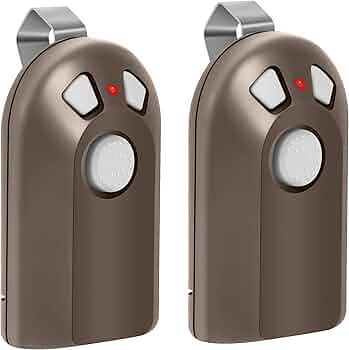
Don’t worry — replacing the battery in your Genie ACSCTG Type 3 remote is simple, fast, and inexpensive. This guide will walk you through everything you need to know: which battery type to buy, how to install it safely, and what to do if it still doesn’t work afterward.
Read too: How To Replace Garage Door Roller Like a Pro? Step-by-Step Guide
What Is the Genie ACSCTG Type 3 Remote?
The Genie ACSCTG Type 3 is a three-button garage door opener remote used for Genie Intellicode openers. It’s a durable, compact, and reliable transmitter, often paired with residential Genie garage door systems.
Key features:
- Operates on 390 MHz frequency
- Controls up to three garage doors
- Uses rolling code technology to prevent unauthorized access
- Compact and lightweight for keychain use
Many homeowners still use this model because of its reliability and easy compatibility with Genie openers manufactured between 1998 and 2004.
What Battery Does the Genie ACSCTG Type 3 Remote Use?
The Genie ACSCTG Type 3 remote uses a CR2032 lithium coin cell battery — the same kind found in many key fobs and small electronics.
Here’s a quick comparison to understand the specs:
| Battery Model | Voltage | Diameter | Thickness | Average Lifespan |
|---|---|---|---|---|
| CR2032 | 3V | 20mm | 3.2mm | 2–3 years |
| CR2025 | 3V | 20mm | 2.5mm | 1.5–2 years |
💡 Pro Tip: Always check the number printed on your old battery. “2032” and “2025” look similar, but they differ slightly in thickness and capacity.
How to Replace Genie Garage Door Opener Remote Battery ACSCTG Type 3
Changing the battery takes only a few minutes. Follow these step-by-step instructions carefully:
1. Gather the Right Tools
You’ll need:
- A small flathead screwdriver
- A new CR2032 lithium battery
- A clean, flat surface to work on
2. Open the Remote Housing
- Find the small seam along the edge of the remote.
- Insert the flathead screwdriver into the notch gently.
- Twist slowly to separate the top and bottom casing. ⚠️ Avoid forcing it open — older plastic can be brittle.
3. Remove the Old Battery
- Gently lift the old coin cell from the slot using your screwdriver tip or fingernail.
- Take note of the battery’s orientation (the “+” side should face up).
4. Insert the New Battery
- Place the new CR2032 battery into the holder with the positive side up.
- Press down until it’s securely seated in place.
5. Close and Test the Remote
- Snap the remote halves back together.
- Press a button — the red LED light should illuminate.
- Test the remote within 10–15 feet of the garage door.
If your door responds, you’re done! 🎉
Troubleshooting: When the Remote Still Doesn’t Work
If your Genie ACSCTG Type 3 still doesn’t work after replacing the battery, check these possible issues:
1. Battery Inserted Incorrectly
Make sure the + (positive) side faces upward. Reversed polarity prevents electrical contact.
2. Dirty Battery Contacts
Corrosion or dirt can block power flow. Clean contacts with a cotton swab dipped in isopropyl alcohol, then let dry completely before reinserting the battery.
3. Remote Needs Reprogramming
If the battery was out for too long, your remote might lose its link to the opener.
To reprogram:
- Press and hold the “Learn” button on your Genie opener until its indicator light begins blinking.
- Within 30 seconds, press and hold the remote button you wish to program.
- Release both once the opener light flashes or you hear a click.
Your remote should now function properly.
4. Faulty Remote Circuitry
If nothing works, the internal circuit board might be damaged. Replacements cost about $25–$45 and are widely available at major retailers or online.
How Long Does the CR2032 Battery Last?
The CR2032 typically lasts 2 to 3 years, depending on usage. However, factors such as cold weather, frequent operation, or poor battery quality can reduce lifespan.
According to Wikipedia, lithium coin cells have a shelf life of 8–10 years when stored properly — making them an ideal long-term choice for remotes and small devices.
Battery Maintenance and Longevity Tips
To get the most out of your new battery:
- Store spares in a cool, dry place. Extreme heat shortens lithium battery life.
- Avoid moisture exposure. Water or condensation can corrode metal contacts.
- Use name-brand batteries. Energizer, Panasonic, or Duracell perform best.
- Test every 6 months. If the LED is dim, it’s time for replacement.
- Remove the battery if you won’t use the remote for several months.
CR2032 vs. CR2025: Which Is Better for Genie ACSCTG Type 3?
| Feature | CR2032 | CR2025 |
|---|---|---|
| Power Capacity | Higher | Lower |
| Battery Life | 2–3 years | 1.5–2 years |
| Compatibility | Recommended | Backup Option |
| Price | Slightly higher | Slightly cheaper |
✅ Verdict: The CR2032 is the best choice — it lasts longer and provides more stable voltage for Genie remotes.
When to Replace Your Genie Remote Battery
Watch for these signs that your Genie Garage Door Opener Remote Battery ACSCTG Type 3 needs replacement:
- Remote only works at close range
- LED light is dim or flickering
- Requires multiple button presses
- Garage door fails to respond entirely
Replacing the battery promptly helps prevent reprogramming issues caused by complete power loss.
FAQ: Genie Garage Door Opener Remote Battery ACSCTG Type 3
1. What kind of battery does the Genie ACSCTG Type 3 remote use?
It uses a CR2032 3-volt lithium coin cell battery. Always check the number on your old battery to confirm compatibility.
2. How long does a Genie remote battery last?
Typically 2–3 years, but frequent use or extreme temperatures can shorten its lifespan.
3. How can I tell if my battery is dying?
If your remote’s LED light becomes dim or your garage door only opens sporadically, your battery is likely weak.
4. Can I use rechargeable batteries?
No. Rechargeable lithium-ion batteries have different voltage levels and may damage the remote’s circuit board.
5. Do I need to reprogram the remote after changing the battery?
Not usually. But if it loses pairing, reprogramming takes just a minute using the Genie opener’s “Learn” button.
6. Where can I buy CR2032 batteries?
You can find them at Walmart, Amazon, Home Depot, or most local hardware stores — usually for under $5.
Conclusion
Replacing your Genie Garage Door Opener Remote Battery ACSCTG Type 3 is one of the easiest home maintenance tasks you can do — and it restores full control of your garage door in minutes.
By following this simple guide, you’ll save money on technician calls, avoid frustrating malfunctions, and keep your Genie opener running smoothly for years.



Leave a Reply