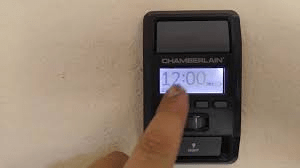
Have you ever noticed that the garage light on your opener stays on too long or turns off too quickly? Understanding how to adjust light timer on garage door opener can solve this common frustration. Proper adjustment not only saves energy but also enhances convenience and safety in your garage.
Why Adjusting the Light Timer Matters
- Energy Efficiency: Prevents lights from staying on unnecessarily, reducing electricity usage.
- Convenience: Ensures the garage is lit long enough when entering or exiting.
- Safety: Proper lighting reduces the risk of accidents in dark garages.
- Longevity: Prevents bulbs from burning out prematurely.
Read too: The Complete Guide to Tighten Chain On Garage Door Opener for Smooth Operation
Step-by-Step Guide to Adjust Light Timer
Tools You’ll Need
- Ladder
- Screwdriver (for models with accessible adjustment screws)
- Chamberlain manual (or model-specific guide)
1. Disconnect Power (Optional but Recommended)
For safety, unplug the garage door opener or switch off the breaker before adjusting components.
2. Locate the Light Timer Adjustment
- Most openers have a knob or dial labeled “LIGHT” or “TIMER” on the motor unit.
- On some models, this is a small screw near the light socket.
3. Adjust the Timer
- Turn clockwise to increase the light duration.
- Turn counterclockwise to shorten the time the light stays on.
- Make small adjustments—1/8 to 1/4 turn at a time—to test the desired duration.
4. Test the Light
- Close the garage door and use the wall button or remote to trigger the light.
- Observe if it stays on for your desired amount of time.
- Repeat fine adjustments until satisfied.
5. Reconnect Power
- After adjustments, plug in the opener and test again to ensure settings are correct.
Tips for Optimal Use
- Use LED bulbs to extend life and reduce heat.
- Avoid frequent over-adjustments to prevent wear on the timer mechanism.
- Check for model-specific variations: Some newer Chamberlain openers allow digital programming via smartphone app.
- Keep bulbs clean—dust can reduce light efficiency.
Troubleshooting Common Issues
| Problem | Possible Cause | Solution |
|---|---|---|
| Light stays on too long | Timer set too high | Turn dial or screw counterclockwise |
| Light turns off too quickly | Timer set too low | Turn dial or screw clockwise |
| Light doesn’t turn on at all | Burned-out bulb or loose connection | Replace bulb or tighten connections |
| Digital timer not responding | Software or app issue | Reset opener or update firmware |
Expert Insight: According to Wikipedia, most modern garage door openers include light timer features to improve convenience and energy efficiency.
FAQ Section
Q1: Can I adjust the light timer myself safely?
A1: Yes, by following safety precautions like unplugging the unit and using a ladder carefully.
Q2: How long should a garage light stay on?
A2: Most homeowners prefer 1–5 minutes, enough to safely enter or exit the garage.
Q3: Does adjusting the light timer affect the door operation?
A3: No, light timer adjustments are independent and do not interfere with opener function.
Q4: Can LED bulbs be used with garage door openers?
A4: Yes, but ensure the LED is compatible with the opener’s power specifications.
Q5: What if my opener has a digital timer?
A5: Follow the manufacturer’s app or touchscreen instructions for duration settings.
Q6: How often should I check light timer settings?
A6: At least once a year or whenever you replace bulbs to ensure optimal duration.
Conclusion
Knowing how to adjust light timer on garage door opener enhances convenience, safety, and energy efficiency in your garage. With simple adjustments, you can customize light duration to suit your needs and prolong the lifespan of your bulbs.
Share this guide with family or friends to help them make their garage more functional and energy-efficient.



Leave a Reply