If your garage door stops too high or too low, it can cause damage to the door, opener, or even your car. Understanding how to adjust limits on Chamberlain garage door opener ensures the door opens and closes correctly every time. This guide provides a clear, step-by-step approach for homeowners, keeping safety and efficiency in mind.
Why Adjusting Limits Is Important
- Ensures smooth door operation
- Prevents damage to the door, tracks, and opener motor
- Improves safety, avoiding pinch points or collisions
- Enhances longevity of your garage door system
Read too: The Complete Guide to Tighten Chain On Garage Door Opener for Smooth Operation
Tools You’ll Need
- Ladder
- Screwdriver (Phillips or flathead, depending on model)
- Safety gloves
- Level
Step-by-Step Guide to Adjust Limits
1. Disconnect Power
For safety, unplug the opener or turn off the breaker before making adjustments.
2. Locate the Limit Adjustment Screws
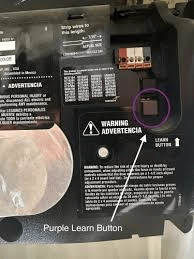
- Chamberlain openers typically have UP and DOWN travel limit screws near the motor unit.
- Some models use digital controls, accessible via app or wall panel.
3. Adjust the DOWN Limit
- Turn the DOWN screw clockwise to move the door up.
- Turn counterclockwise to lower the door.
- Make small adjustments (1/4 turn at a time) and test operation.
4. Adjust the UP Limit
- Turn the UP screw clockwise to raise the door higher.
- Turn counterclockwise to reduce upward travel.
- Ensure the door stops just below the ceiling without striking it.
5. Fine-Tune the Force Settings
- Adjust upward and downward force screws to prevent motor strain.
- Too much force can cause the door to slam; too little may prevent full travel.
6. Test the Door
- Operate the door using the wall button and remote.
- Ensure smooth movement, proper stopping points, and correct reversing on obstruction.
Tips for Perfect Alignment
- Use a level to check that both sides of the door are even.
- Lubricate rollers, hinges, and tracks for smooth operation.
- Avoid over-tightening screws—incremental adjustments prevent damage.
Troubleshooting Common Problems
| Problem | Possible Cause | Solution |
|---|---|---|
| Door won’t close completely | DOWN limit too high | Turn DOWN screw counterclockwise |
| Door won’t open fully | UP limit too low | Turn UP screw clockwise |
| Motor struggles | Force setting too low | Increase upward/downward force |
| Door reverses too soon | Safety sensors misaligned | Adjust sensors to be level and clear |
Expert Insight: According to Wikipedia, adjusting travel limits is essential to maintain safe and reliable garage door operation.
FAQ Section
Q1: Can I adjust the limits myself safely?
A1: Yes, by disconnecting power and following step-by-step instructions, anyone can safely adjust the door limits.
Q2: How often should I check garage door limits?
A2: At least once a year or after extreme weather events, especially if you notice irregular operation.
Q3: Why does my Chamberlain door reverse before closing completely?
A3: This is often due to the DOWN limit set too high or insufficient downward force.
Q4: Can improper limits damage the opener?
A4: Yes, misaligned travel limits can strain the motor and wear out mechanical components.
Q5: Are there digital alternatives for limit adjustment?
A5: Yes, newer Chamberlain models allow limit adjustments via smartphone app or wall panel interface.
Conclusion
Knowing how to adjust limits on Chamberlain garage door opener ensures your door operates safely, efficiently, and quietly. Regular inspection and proper adjustments prevent costly damage and improve convenience.
Share this guide with family or friends to help them maintain safe and smooth garage door operation.



Leave a Reply