A dark garage can be inconvenient and even unsafe, especially when entering or exiting at night. If the light in your LiftMaster garage door opener is out, knowing how to change bulb in LiftMaster garage door opener is essential. Many homeowners avoid this task thinking it’s complicated, but with proper instructions, it’s a simple and safe process. This guide will walk you through replacing the bulb step by step, ensuring proper lighting for your garage without causing damage to the opener.
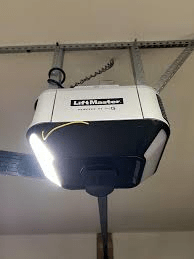
Why Changing Your Garage Opener Bulb Matters
Proper lighting in your garage isn’t just about convenience—it’s about safety and functionality:
- Safety: Prevent trips and falls during low-light conditions.
- Security: Well-lit garages deter potential intruders.
- Device Longevity: Using the correct bulb ensures your opener operates safely without overheating or electrical issues.
Most LiftMaster openers use 40-watt candelabra base bulbs, but some models are compatible with LED bulbs. Always confirm your model’s specifications before purchasing a replacement.
Read too: Mastering Quantum Garage Door Opener Programming: A Comprehensive Guide
Tools and Materials Needed
Before beginning, make sure you have the following items:
- Replacement bulb (check wattage and type in your manual)
- Step stool or ladder
- Gloves or soft cloth (to avoid fingerprints on the bulb)
- Screwdriver (if your opener has a secured bulb cover)
Step-By-Step Instructions: How To Change Bulb In LiftMaster Garage Door Opener
Step 1: Turn Off Power
Always unplug your LiftMaster opener or switch off the circuit breaker before starting. This prevents accidental activation and reduces the risk of electric shock.
Step 2: Locate the Bulb
Identify your opener’s light compartment:
- Some models have a snap-on lens cover that can be gently pulled down.
- Others have screws securing the cover that need to be removed with a screwdriver.
Step 3: Remove the Old Bulb
- Use gloves or a soft cloth to handle the bulb.
- Unscrew the old bulb counterclockwise.
- Properly dispose of burned-out bulbs or handle broken bulbs carefully.
Step 4: Insert the New Bulb
- Confirm the new bulb matches the required wattage and type.
- Screw in the new bulb clockwise until snug, but do not overtighten.
Step 5: Replace the Cover
- Snap the lens cover back into place or reattach the screws.
- Ensure it fits securely to prevent dust and debris from entering.
Step 6: Restore Power and Test
- Plug your LiftMaster opener back in or switch the breaker on.
- Test the light by opening the garage door or using the manual light button if available.
Pro Tip: If the bulb flickers, ensure it’s seated correctly and compatible with your opener. LED options provide longer life and lower energy usage.
Tips for Longer Bulb Life
- Use LED Bulbs: Longer lifespan, lower energy use, and resistance to vibration.
- Do Not Exceed Wattage: Overheating can damage both bulb and opener.
- Clean the Lens Regularly: Dust reduces brightness and can shorten bulb life.
- Check Connections: Loose wiring may cause flickering or bulb burnout.
Common Problems and Solutions
| Issue | Cause | Solution |
|---|---|---|
| Bulb flickers | Loose bulb or wrong type | Ensure proper fit and correct bulb type |
| Opener won’t power on | Blown fuse or tripped breaker | Inspect breaker/fuse and replace if necessary |
| Light stays off | Faulty socket or wiring | Check wiring, replace socket if needed |
| Bulb burns out quickly | Using incandescent instead of LED | Use LED for longer durability |
Frequently Asked Questions (FAQ)
Q1: Can I use any bulb in my LiftMaster opener?
A1: No. Most models use 40-watt candelabra bulbs. Some models support LED bulbs. Always check your manual.
Q2: How often should I replace the bulb?
A2: Incandescent bulbs may last 6–12 months. LED bulbs can last 20,000 hours or more depending on usage.
Q3: Is it safe to replace the bulb while the opener is plugged in?
A3: No. Always disconnect power to prevent accidental movement and electrical hazards.
Q4: Can I upgrade to LED bulbs on older LiftMaster models?
A4: Yes, but ensure compatibility with voltage and candelabra base.
Q5: What should I do if the new bulb still doesn’t work?
A5: Inspect wiring, socket, and breaker. Contact LiftMaster support if issues persist.
Expert Tips for Smooth Replacement
- Use a stable ladder for safety.
- Avoid touching LED or halogen bulbs with bare hands; oils can shorten lifespan.
- Keep a spare bulb in the garage to minimize downtime.
- Verify your opener’s model number for specific bulb recommendations (LiftMaster Garage Door Opener – Wikipedia).
Conclusion
Knowing how to change bulb in LiftMaster garage door opener ensures your garage is safe, functional, and well-lit. Following these steps prevents damage, reduces risk, and helps you choose the best bulb type for longevity. Regular maintenance of your opener and lighting will improve performance and safety. Share this guide with friends or family to help them maintain their garages efficiently!



Leave a Reply