Wondering how to open MyQ garage door with Google Assistant? You’re not alone. Many homeowners want the convenience of controlling their garage door hands-free using voice commands. Connecting MyQ with Google Assistant allows you to open or close your garage safely and efficiently without ever leaving your car or home.
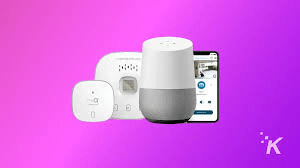
In this guide, we’ll walk through the setup, connection, and tips to ensure your garage is secure while using voice control.
Read too: The Complete Guide to Tighten Chain On Garage Door Opener for Smooth Operation
What Is MyQ And How Does It Work?
MyQ is a smart garage door system developed by Chamberlain that enables users to:
- Open or close garage doors remotely
- Receive notifications if the door is left open
- Integrate with smart home systems like Google Assistant, Amazon Alexa, and Apple HomeKit
MyQ uses Wi-Fi connectivity and a companion app to bridge your garage door opener with voice assistants. This system adds both convenience and security to your home.
According to Wikipedia Smart Home, integrating smart devices like garage door controllers improves daily routines, energy efficiency, and overall home security.
Steps To Open MyQ Garage Door With Google Assistant
Step 1: Ensure MyQ System Compatibility
- Confirm your garage door opener is compatible with MyQ. Most Chamberlain and LiftMaster openers manufactured after 1998 work with MyQ.
- Make sure your smartphone or tablet has the latest MyQ app installed.
Step 2: Connect MyQ To Wi-Fi
- Open the MyQ app.
- Navigate to Device Setup → Add Device.
- Follow prompts to connect your garage door opener to your home Wi-Fi network.
Tip: Use a 2.4 GHz Wi-Fi band for better reliability, as many garage openers do not support 5 GHz.
Step 3: Link MyQ To Google Home
- Open the Google Home app.
- Tap “+” → Set up device → Works with Google.
- Search for MyQ in the list of compatible devices.
- Log in with your MyQ account credentials.
- Authorize Google to access your MyQ devices.
Once linked, Google Assistant can recognize your garage door for voice commands.
Step 4: Configure Voice Control
- Assign a recognizable name to your garage door (e.g., “Main Garage”).
- Test by saying:
- “Hey Google, open the garage door.”
- “Hey Google, close the garage door.”
Security Tip: Enable Voice Match on your Google Assistant to prevent unauthorized users from operating your garage.
Step 5: Enable Notifications
- In the MyQ app, enable door status alerts to your phone.
- Google Assistant can also provide updates if the door is open or closed, adding an extra layer of security.
Best Practices For Safety And Security
- Always use Voice Match on Google Assistant.
- Regularly update firmware for both MyQ and your Google Home devices.
- Keep the MyQ app password secure and use two-factor authentication if available.
- Test the system periodically to ensure reliable operation.
Pros and Cons Of Using MyQ With Google Assistant
| Pros | Cons |
|---|---|
| Hands-free operation for convenience | Voice commands may be limited if Wi-Fi is down |
| Remote monitoring of garage status | Requires compatible devices and firmware updates |
| Integration with other smart home devices | Potential security risks if voice match is not configured |
| Alerts and notifications for peace of mind | Slight learning curve for first-time setup |
Troubleshooting Common Issues
- Garage door not responding
- Check Wi-Fi signal strength near opener.
- Restart MyQ hub and app.
- Google Assistant doesn’t recognize MyQ
- Re-link MyQ account in Google Home app.
- Ensure correct device naming.
- Voice command opens door unintentionally
- Enable Voice Match or use a PIN via MyQ app for added confirmation.
FAQ
Q1: Can I use MyQ without a smartphone?
A: No, a smartphone is required for initial setup and remote monitoring.
Q2: Is it safe to open my garage with Google Assistant?
A: Yes, with Voice Match enabled and alerts set up, it’s secure and convenient.
Q3: Can multiple users control MyQ via Google Assistant?
A: Yes, additional Google accounts can be linked, but each user should have Voice Match enabled.
Q4: Does MyQ work with other smart home platforms?
A: Yes, MyQ integrates with Amazon Alexa, Apple HomeKit, and IFTTT for broader smart home automation.
Q5: What happens if Wi-Fi is down?
A: The garage door can still operate with the manual wall button, but Google Assistant commands won’t work until Wi-Fi is restored.
Q6: Can I schedule my garage door to open automatically?
A: Yes, MyQ allows scheduling through the app, but it’s recommended to keep notifications enabled for security.
Conclusion
Knowing how to open MyQ garage door with Google Assistant transforms your garage into a convenient, smart, and secure part of your home. By following the steps outlined above—connecting devices, configuring Google Home, and enabling safety features—you can enjoy hands-free operation while maintaining security. Share this guide with friends or family to help them automate their garages safely and efficiently.

Leave a Reply