If you’ve recently purchased a Genie Garage Door Opener Model 3060L, you might be wondering how to get it up and running. Programming your garage door opener is essential for making it work with your remotes and other devices, and while it may sound complicated, it’s a fairly simple process. In this guide, we’ll walk you through the entire process of how to program a Genie garage door opener Model 3060L.
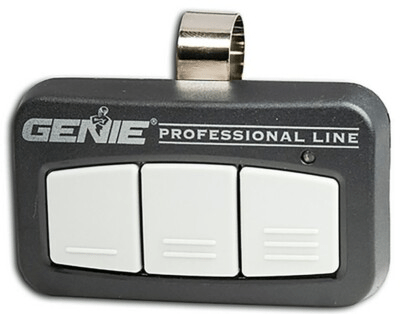
Why You Should Program Your Genie Garage Door Opener Model 3060L
Programming your Genie Garage Door Opener Model 3060L ensures that you can operate your garage door remotely, using either the remote control or keypads, based on your preferences. Whether you need to reprogram an old remote or add new ones, the programming process is straightforward. Once completed, you can control your garage door with ease and efficiency.
Read too: Mastering the Art of Adjusting a Chamberlain Garage Door Opener for Smooth Operation and Safety
Prerequisites for Programming Your Genie Garage Door Opener Model 3060L
Before you begin the programming process, make sure you have the following items:
- Genie Garage Door Opener Model 3060L – Ensure that the unit is installed correctly and powered on.
- Remote Control – If you’re adding a new remote, make sure it’s compatible with your Genie opener.
- Owner’s Manual – It’s always a good idea to have the manual handy for reference, though we’ll guide you through the process.
- Access to the Wall Console – In some cases, programming can also be done using the wall console.
Steps to Program a Genie Garage Door Opener Model 3060L
Follow these simple steps to program your Genie Garage Door Opener Model 3060L. The process may vary slightly depending on whether you’re programming a remote control, a keypad, or a combination of both. We’ll break it down into clear instructions for each scenario.
How to Program a Genie Garage Door Opener Model 3060L with the Remote
Programming the remote control is one of the most common tasks. If you’ve just purchased a new remote or need to reprogram an old one, here’s what to do:
- Locate the “Learn” Button:
- The first step is to find the “Learn” button on the opener itself. For the Genie Model 3060L, this button is typically located on the back of the opener unit, near the antenna wire.
- Pressing the “Learn” button will activate the programming mode.
- Press the Learn Button:
- Press and release the “Learn” button. The indicator light next to the button will start blinking, which signals that the opener is in programming mode.
- You have about 30 seconds to program the remote before the opener exits the programming mode automatically.
- Press the Remote Button:
- Take your Genie remote control and press and hold the button that you wish to use to open and close the garage door.
- Hold the button down for about 5 seconds or until the opener’s indicator light blinks or turns on. This confirms that the remote has been successfully programmed.
- Test the Remote:
- Once you’ve programmed the remote, test it by pressing the button to see if the door opens or closes.
- If the door responds, congratulations! Your remote is now programmed.
How to Program a Genie Garage Door Opener Model 3060L with the Keypad
For additional convenience, you can program a wireless keypad, which allows you to control the garage door without needing a physical remote. Here’s how to do it:
- Enter Programming Mode:
- To begin, locate the “Learn” button on your Genie 3060L opener. As with programming the remote, you’ll need to press and release this button, which will cause the indicator light to blink.
- You have 30 seconds to proceed with programming.
- Enter the Desired Code on the Keypad:
- On your wireless keypad, enter a 4-digit code of your choice. This code will be used to operate the door.
- After entering the code, press and hold the “Enter” key for a few seconds. If done correctly, the opener’s indicator light will blink, confirming that the code has been programmed.
- Test the Keypad:
- After programming the keypad, test it by entering your 4-digit code and pressing “Enter.” Your garage door should open or close as expected.
- If it works, your keypad is successfully programmed.
Troubleshooting Common Issues When Programming Your Genie Garage Door Opener Model 3060L
While the programming process is relatively straightforward, issues can arise. Below are some common problems and their solutions:
- Remote Not Working After Programming:
- Ensure the remote control has a fresh battery.
- Make sure you’re pressing the correct button on the remote.
- Double-check that you’ve pressed the “Learn” button correctly and within the 30-second window.
- Keypad Not Responding:
- Ensure that the keypad has fresh batteries and is in range of the opener.
- Verify that you’ve entered the correct 4-digit code.
- Try reprogramming the keypad following the steps outlined above.
- Opener Doesn’t Respond:
- Ensure that the Genie 3060L is properly connected to power and the safety sensors are aligned.
- Check if the door’s safety mechanisms are triggered, preventing operation.
Why Regularly Program and Maintain Your Genie Garage Door Opener?
Regular programming and maintenance ensure your garage door opener functions correctly and efficiently. Over time, remotes can lose their connection with the opener, and keypads may need to be reprogrammed. By keeping your opener and remotes in sync, you can prevent issues such as failed door operations, security concerns, or inconvenient breakdowns.
Conclusion
Learning how to program a Genie Garage Door Opener Model 3060L is a simple and rewarding task. By following these steps, you can easily connect your remotes and keypads to your opener, providing seamless operation of your garage door. Whether you’re setting up a new opener or troubleshooting an existing one, the programming process can be done in just a few minutes.
If you encounter any issues during the process, refer back to the troubleshooting section or consult the user manual for further guidance. With a little attention, your Genie opener will be functioning smoothly, and you’ll be able to open and close your garage door at the push of a button.



Leave a Reply