Replacing the battery in a garage door opener is a straightforward task, but it’s crucial for maintaining its functionality. A dying or dead battery can lead to inconvenient disruptions, especially when you need to access your garage quickly. This guide will walk you through the steps of how to replace a battery in a garage door opener and provide helpful tips to ensure your opener works seamlessly.
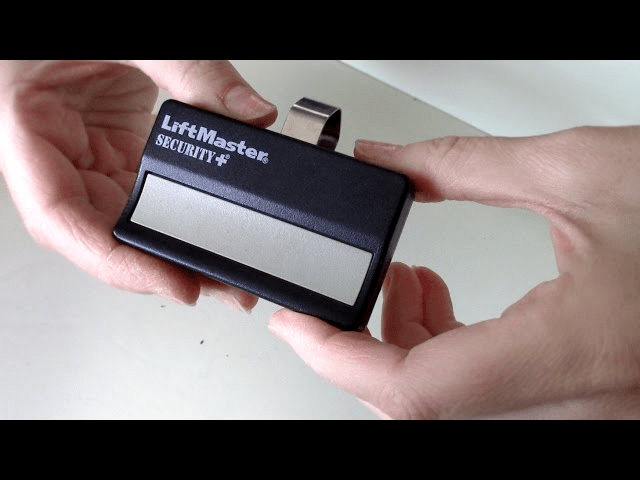
Why Knowing How to Replace a Battery in a Garage Door Opener is Essential
Garage door openers rely on batteries for both remote controls and backup power systems. Understanding how to replace a battery in a garage door opener ensures that your system operates reliably without interruptions.
Key Benefits of Replacing Garage Door Opener Batteries:
- Uninterrupted Access: A fresh battery ensures consistent functionality.
- Enhanced Security: Avoid potential vulnerabilities caused by a non-operational remote.
- Cost Efficiency: Regular maintenance prevents the need for costly repairs.
Read too: The Complete Guide to Tighten Chain On Garage Door Opener for Smooth Operation
Signs That You Need to Replace the Battery
Before jumping into the replacement process, it’s essential to identify when the battery needs replacing.
Common Indicators:
- Remote Control Fails to Respond: The garage door doesn’t open or close as expected.
- Dim Indicator Lights: Weak or flickering lights on the remote or wall console.
- Reduced Range: The remote only works when you’re very close to the garage door.
- Backup Battery Warning: Many modern openers have warning lights or alarms signaling a low battery.
Types of Batteries in Garage Door Openers
Understanding the type of battery you’re replacing is crucial for compatibility. Garage door openers typically use the following batteries:
- Remote Control Batteries: Often small button cells like CR2032 or AA/AAA batteries.
- Backup Batteries: Larger, rechargeable 12V batteries located in the motor unit.
Tools and Materials Needed
To successfully replace the battery, gather the following:
- A screwdriver (if needed for the battery compartment).
- Replacement battery compatible with your opener or remote.
- Soft cloth for cleaning dust and debris.
How to Replace a Battery in a Garage Door Opener
1: Identify the Battery Type
- Check your garage door opener’s manual for the battery specifications.
- For remote controls, the battery type is often printed inside the battery compartment.
2: Replace the Remote Control Battery
- Open the Battery Compartment:
- Locate the compartment on the back or underside of the remote.
- Use a screwdriver if the compartment is screwed shut.
- Remove the Old Battery:
- Take note of the battery’s orientation before removing it.
- Dispose of the old battery properly.
- Insert the New Battery:
- Ensure the positive (+) and negative (-) ends align correctly.
- Close the Compartment:
- Snap the cover back into place or secure it with screws.
- Test the Remote:
- Press a button to confirm the remote operates the garage door.
3: Replace the Backup Battery
For openers with backup batteries, follow these steps:
- Locate the Battery Compartment:
- The compartment is typically inside the motor housing or an accessible panel.
- Turn Off the Power:
- Unplug the opener from the electrical outlet for safety.
- Open the Compartment:
- Use a screwdriver to remove the cover if necessary.
- Remove the Old Battery:
- Disconnect the wires or terminals connected to the battery.
- Install the New Battery:
- Connect the wires to the new battery, ensuring proper polarity.
- Secure the Compartment:
- Replace the cover and tighten any screws.
- Restore Power:
- Plug the opener back in and test the system.
Troubleshooting Common Issues
Even after replacing the battery, you might encounter issues. Here’s how to address them:
Problem: Remote Still Doesn’t Work
Solution:
- Check the battery orientation and ensure proper installation.
- Clean the battery contacts with a dry cloth.
Problem: Backup Battery Warning Still Active
Solution:
- Verify the new battery is fully charged.
- Reset the opener by unplugging it for 30 seconds.
Problem: Garage Door Opener Light Blinking
Solution:
- Consult the opener’s manual for error codes.
- Ensure all connections are secure.
Maintaining Your Garage Door Opener
Regular maintenance ensures the longevity and reliability of your garage door opener.
Tips for Proper Maintenance:
- Check Batteries Annually: Test remote and backup batteries regularly.
- Clean Contacts: Dust and debris can affect battery performance.
- Inspect Connections: Ensure all wires and terminals are secure.
- Lubricate Moving Parts: Prevent strain on the motor with proper lubrication.
Frequently Asked Questions
How often should I replace garage door opener batteries?
- Remote control batteries typically last 1–2 years. Backup batteries should be replaced every 2–3 years.
Can I use rechargeable batteries for the remote?
- Rechargeable batteries are not recommended for remotes, as their voltage may differ from standard alkaline batteries.
How do I dispose of old batteries?
- Take old batteries to a recycling center or designated disposal facility. Avoid throwing them in the trash.
What if my garage door opener doesn’t have a backup battery?
- Consider upgrading to a model with a battery backup for added convenience and safety.
Why Replacing Batteries Is Important
Keeping your garage door opener powered ensures seamless operation and prevents inconvenient lockouts. By learning how to replace a battery in a garage door opener, you gain the ability to maintain your system without professional assistance.
Conclusion
Replacing the battery in your garage door opener is a simple yet crucial task that enhances its performance and reliability. Whether it’s a remote control or a backup battery, following the steps outlined in this guide ensures you’re never left struggling with a non-functional opener. Regular maintenance and timely replacements keep your system in top condition for years to come.



Leave a Reply