Liftmaster Commercial Garage Door Opener Troubleshooting Guide. Are you experiencing issues with your Liftmaster commercial garage door opener? Dive into our troubleshooting guide to uncover effective solutions and tips for diagnosing and fixing common problems. Ensure your commercial property’s security and efficiency with expert advice on Liftmaster garage door opener maintenance.
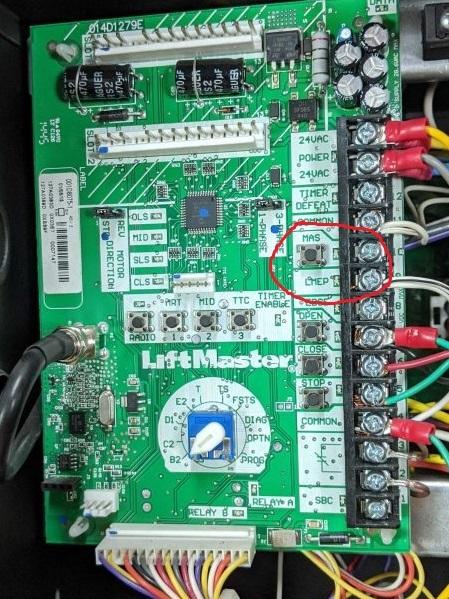
Exploring Liftmaster Commercial Garage Door Opener Troubleshooting
Liftmaster commercial garage door openers are renowned for their reliability and durability. However, like any mechanical device, they may encounter occasional issues that require troubleshooting. Let’s delve into the common problems and solutions associated with Liftmaster commercial garage door openers.
Identifying Common Issues
- Door Not Opening or Closing: If your garage door fails to open or close properly, it could indicate issues with the opener’s sensors, wiring, or motor.
- Unusual Noises: Strange noises such as grinding, scraping, or squeaking may suggest problems with the opener’s gears, chains, or rollers.
- Intermittent Operation: If your garage door opener operates inconsistently, it may be due to issues with the remote control, receiver, or power source.
Liftmaster Commercial Garage Door Opener Troubleshooting Steps
Follow these steps to troubleshoot and resolve common issues with your Liftmaster commercial garage door opener:
Liftmaster Commercial Garage Door Opener Troubleshooting
If you’re encountering problems with your Liftmaster commercial garage door opener, follow these troubleshooting steps to identify and resolve the issue:
- Check Power Source: Ensure that the opener is receiving power by checking the circuit breaker or power outlet. Replace any blown fuses or reset the breaker if necessary.
- Inspect Remote Control: Verify that the batteries in your remote control are functioning properly and replace them if needed. Ensure that the remote is programmed correctly to communicate with the opener.
- Examine Safety Sensors: Inspect the safety sensors located near the bottom of the garage door tracks. Ensure that they are aligned properly and free from obstructions such as dirt or debris.
- Lubricate Moving Parts: Apply lubricant to the opener’s moving parts, including chains, gears, and rollers, to reduce friction and noise. This can help improve the overall performance and lifespan of the opener.
- Test Manual Operation: Disconnect the opener from the garage door and attempt to open and close the door manually. If the door operates smoothly, the issue may lie with the opener itself.
- Reset Opener: Perform a factory reset on the opener by following the instructions provided in the user manual. This can help resolve software glitches or configuration issues that may be causing the problem.
- Seek Professional Assistance: If you are unable to resolve the issue on your own, contact a qualified technician or Liftmaster service center for further diagnosis and repair.
Conclusion
In conclusion, troubleshooting Liftmaster commercial garage door openers requires a systematic approach to identify and resolve common issues. By following the steps outlined in this guide, you can diagnose problems with your opener and implement effective solutions for smooth and efficient operation. Remember to prioritize regular maintenance and seek professional assistance when needed to ensure the continued security and functionality of your commercial property.
Read too: How to Perform a Chamberlain Garage Door Opener Code Change? Mastering Security



Leave a Reply