The MyQ garage door opener is a game-changer in smart home technology, offering homeowners a convenient way to monitor, control, and secure their garage from virtually anywhere. With the rise in smart home devices, MyQ has become an invaluable tool for those looking to enhance the safety and efficiency of their homes. With just a few taps on your smartphone, you can open or close your garage, receive real-time notifications, and even set schedules—all thanks to MyQ’s easy-to-use features.
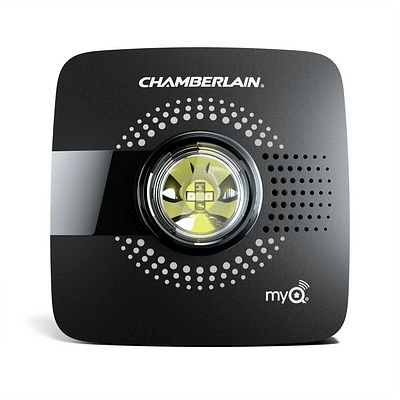
This article provides a comprehensive overview of the MyQ garage door opener, including its main features, setup process, troubleshooting common issues, and why it’s a great addition to your smart home system.
What is a MyQ Garage Door Opener?
The MyQ garage door opener is a smart device developed by Chamberlain Group that allows you to control your garage door remotely via an app on your smartphone or tablet. Compatible with a wide range of garage door openers, MyQ integrates with many smart home ecosystems, including Google Assistant, Amazon Alexa, and Apple HomeKit. This system brings convenience and security, helping you ensure your garage door is always closed when you’re away or opening it easily for deliveries.
Read too: Door and Garage Door Companies: Choosing the Right Partner for Your Needs
Key Features of the MyQ Garage Door Opener
1. Remote Control and Monitoring
One of the most significant advantages of the MyQ garage door opener is its remote control capabilities. You can open or close your garage door from anywhere with a cellular or Wi-Fi connection.
2. Real-Time Notifications
The MyQ app sends you alerts and notifications whenever your garage door opens or closes, so you’re always informed. This feature is particularly valuable for added security, especially when you’re not at home.
3. Voice Control with Smart Assistants
MyQ integrates with voice assistants like Google Assistant, Amazon Alexa, and Apple HomeKit. With a simple voice command, you can control the garage door without lifting a finger.
4. Scheduling and Automation
The MyQ garage door opener also allows users to schedule their garage door operations. This is helpful if you have regular times when you want the garage open or closed, like when you leave for work or expect family members to arrive home.
5. Enhanced Security Features
The MyQ system adds an extra layer of security with features such as guest access, so you can grant temporary access to friends or family. The app also allows you to review the garage door’s activity history to track usage.
6. Compatibility with Amazon Key
For Amazon Prime members, MyQ can be linked to Amazon Key, which allows in-garage deliveries for additional package security.
Setting Up Your MyQ Garage Door Opener
Setting up a MyQ garage door opener is a straightforward process, but it’s essential to follow each step carefully to ensure smooth operation. Here’s a step-by-step guide to get you started.
Step 1: Check Compatibility
Before you begin, verify that your existing garage door opener is compatible with MyQ. Most modern openers work well, but Chamberlain provides a compatibility checker on its website.
Step 2: Download the MyQ App
To control the garage door opener, download the MyQ app (available for both Android and iOS). Once installed, create an account or log in if you already have one.
Step 3: Connect the MyQ Hub to Wi-Fi
The MyQ system uses a Wi-Fi hub to communicate with your garage door opener. Plug in the hub near your garage door, and use the app to connect the hub to your Wi-Fi network. Ensure your Wi-Fi signal is strong in your garage for optimal connectivity.
Step 4: Sync the Garage Door Opener
After the Wi-Fi connection is established, follow the app instructions to sync the MyQ hub with your garage door opener. This process involves pressing the “Learn” button on your garage opener to pair it with the MyQ hub.
Step 5: Test the System
Once setup is complete, use the app to open and close the garage door to ensure everything is working correctly. Make sure you receive notifications and that the door responds to the app commands.
Troubleshooting Common Issues with MyQ Garage Door Opener
While the MyQ garage door opener is designed for easy use, occasional issues may arise. Here are some common troubleshooting tips to help you resolve these issues.
1. Connection Problems
If your MyQ system is not responding, it could be a connectivity issue. Ensure that your Wi-Fi signal is strong enough in your garage. You may need a Wi-Fi extender if your router is far from the garage.
2. App Not Responding
If the MyQ app is not working properly, try restarting the app or your phone. Make sure the app is up-to-date and that your internet connection is stable.
3. Delayed Notifications
If notifications seem delayed, check your phone’s notification settings to ensure that MyQ has permission to send alerts. Additionally, ensure that the app is connected to a reliable Wi-Fi or cellular network.
4. Garage Door Doesn’t Respond to Commands
If the garage door is not responding to the app commands, double-check that the MyQ hub is connected to the Wi-Fi network. You may also need to re-pair the hub with the garage door opener by following the setup steps again.
5. Alexa or Google Assistant Not Recognizing MyQ Commands
For MyQ to work with Alexa or Google Assistant, you’ll need to enable the appropriate skill or action in the assistant’s app. Ensure that MyQ is properly linked to your assistant’s account, and try refreshing the connection.
Why Choose MyQ for Your Garage?
Adding MyQ to your home offers many benefits beyond just controlling your garage door remotely. Here are a few reasons why MyQ stands out among other smart garage door openers:
1. Enhanced Security
MyQ adds an extra layer of security to your home by allowing you to monitor and control garage access. With real-time alerts, you’ll always know if your garage door is opened, giving you peace of mind.
2. Convenience and Automation
With MyQ, you’ll never have to worry about forgetting to close your garage door again. You can set schedules, use voice commands, and control the door from anywhere.
3. Compatibility with Other Smart Home Devices
MyQ’s ability to integrate with other smart home devices allows for a seamless experience, especially if you’re already using systems like Google Home, Alexa, or Apple HomeKit.
4. Affordable and Easy to Install
Compared to traditional garage door automation systems, MyQ offers a cost-effective solution that’s easy to install yourself. This means no need for professional installation unless you prefer it.
Integrating MyQ with Other Smart Home Devices
One of the best features of MyQ is its compatibility with various smart home systems, allowing you to automate and control multiple aspects of your home from a single app or voice command.
Amazon Alexa and Google Assistant
Both Amazon Alexa and Google Assistant allow for voice-activated control of your garage door when integrated with MyQ. Just make sure you’ve linked MyQ within the app settings of your assistant.
Apple HomeKit Integration
With Apple HomeKit compatibility, MyQ works seamlessly with iOS devices, allowing you to control your garage door with Siri voice commands.
Amazon Key In-Garage Delivery
For Amazon Prime members, MyQ offers an additional feature through Amazon Key, allowing in-garage delivery. This feature ensures packages are stored safely inside your garage rather than left on your doorstep.
Conclusion
The MyQ garage door opener is an essential smart home device for those looking to improve convenience, security, and control over their home’s garage. With its user-friendly setup, real-time monitoring, and compatibility with popular smart home systems, MyQ stands out as one of the best options on the market for garage automation.
Whether you’re a tech enthusiast or just looking for a practical way to secure your garage, MyQ provides a simple, affordable solution that can make daily life a little easier. By following the setup and troubleshooting tips outlined above, you can quickly integrate MyQ into your home and enjoy the benefits of remote garage door control and enhanced security.



Leave a Reply