How to Reset Your Liftmaster Myq Garage Door Opener Effortlessly? Is your Liftmaster Myq garage door opener acting up, leaving you frustrated and stuck? Fear not! In this comprehensive guide, we’ll walk you through the process of resetting your Liftmaster Myq garage door opener to resolve any issues and get your garage door back on track.
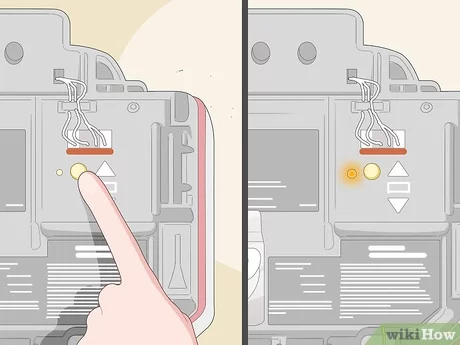
Reset Liftmaster Myq Garage Door Opener: Step-by-Step Guide
Step 1: Power Cycle the Garage Door Opener
The first troubleshooting step is to power cycle your Liftmaster Myq garage door opener. To do this, unplug the opener from the power source and wait for a few minutes. Then, plug it back in and see if the issue persists.
Step 2: Reset the Wi-Fi Connection
If the problem persists, the next step is to reset the Wi-Fi connection on your Liftmaster Myq garage door opener. Refer to the manufacturer’s instructions for your specific model to learn how to reset the Wi-Fi settings. Once reset, re-connect the opener to your Wi-Fi network.
Step 3: Perform a Factory Reset
If power cycling and resetting the Wi-Fi connection don’t resolve the issue, you may need to perform a factory reset on your Liftmaster Myq garage door opener. This will restore the opener to its original settings, erasing any stored data and configurations.
Read too: The Complete Guide to Tighten Chain On Garage Door Opener for Smooth Operation
Step 4: Re-configure the Settings
After performing a factory reset, you’ll need to re-configure the settings on your Liftmaster Myq garage door openers. This includes setting up Wi-Fi connectivity, programming remote controls, and adjusting other preferences as needed.
Step 5: Test the Garage Door Opener
Once you’ve completed the reset process and re-configured the settings, test the Liftmaster Myq garage door openers to ensure that it’s functioning correctly. Open and close the garage door using both the remote control and the Myq app to verify proper operation.
Troubleshooting Tips for Common Issues
- If the garage door opener still isn’t working after resetting, check for obstructions in the door’s path and ensure that the sensors are aligned properly.
- Make sure that the Myq app is up to date and compatible with your garage door opener model.
- Contact Liftmaster customer support for assistance if you encounter any difficulties during the reset process.
Conclusion
Resetting your Liftmaster Myq garage door opener is a straightforward process that can help resolve common issues and restore functionality to your garage door system. By following the step-by-step guide outlined above and troubleshooting tips, you can ensure that your garage door opener operates smoothly and reliably.



Leave a Reply