Programming your 2020 Jeep Grand Cherokee Garage Door Opener can make your daily routine much more convenient. Imagine pulling into your driveway and opening your garage door without having to step out of your vehicle. With just a few steps, you can easily program your Jeep to open and close your garage door using the built-in HomeLink system.
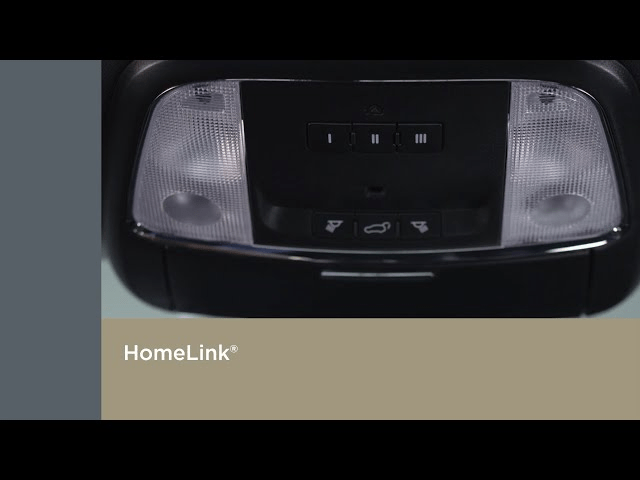
In this article, we’ll walk you through the process of how to program the 2020 Jeep Grand Cherokee garage door opener. Whether you’re a first-time user or simply need a refresher, this guide will provide you with all the necessary steps and tips to get your garage door opener working seamlessly with your vehicle.
Why Program Your Jeep’s Garage Door Opener?
Before diving into the how-to, it’s important to understand why programming your Jeep Grand Cherokee’s garage door opener is worth the effort.
- Convenience: With a programmed garage door opener, you can open or close your garage door with the press of a button while in your vehicle.
- Security: Programming your garage door opener into your vehicle’s system can help keep your garage secure by eliminating the need to carry an extra remote.
- Smart Features: The 2020 Jeep Grand Cherokee comes equipped with HomeLink, a universal remote system that can be programmed to operate various devices, including your garage door opener.
Read too: No Power to Genie Garage Door Opener – Resolving the Issue with Ease: Troubleshooting Guide
With these benefits in mind, let’s jump into the steps of how to program the 2020 Jeep Grand Cherokee garage door opener.
Step-by-Step Guide: How to Program 2020 Jeep Grand Cherokee Garage Door Opener
The HomeLink system in the 2020 Jeep Grand Cherokee allows for easy programming of your garage door opener. This system is compatible with most modern garage door openers, and the process only takes a few minutes.
What You’ll Need:
- 2020 Jeep Grand Cherokee with a working HomeLink system.
- Your garage door opener remote.
- Access to your garage door opener’s “Learn” button (located on the opener unit in the garage).
- A few minutes of your time!
1. Clear the HomeLink System (If Needed)
If you’ve already programmed your Jeep’s HomeLink system with other devices and want to program your garage door opener, you may need to clear out old programming first.
- Start your Jeep Grand Cherokee, and keep it in “Run” mode (don’t start the engine).
- Press and hold the two outer HomeLink buttons (located on the rearview mirror) for about 10 seconds until the indicator light blinks rapidly. This will clear the existing codes and reset the system.
2. Prepare the Garage Door Opener
To ensure your garage door opener syncs correctly with your Jeep’s HomeLink system, you need to have access to the opener unit in your garage. Follow these steps:
- Find the “Learn” button on your garage door opener. The location may vary depending on the brand, but it’s typically located near the antenna or on the back panel.
- Press the “Learn” button. You should see a light on the opener that begins to blink, which indicates the opener is in programming mode.
3. Program the HomeLink System in Your Jeep
Now that the garage door opener is in programming mode, it’s time to program the HomeLink system in your 2020 Jeep Grand Cherokee.
- Sit in the driver’s seat of your Jeep and ensure the ignition is in the “Run” position (engine off).
- Hold your garage door opener remote 1-3 inches away from the HomeLink buttons on the rearview mirror.
- Press and hold the HomeLink button that you wish to program. At the same time, press and hold the button on your garage door opener remote. Hold both buttons until the HomeLink light flashes (this could take 10-20 seconds). Once the light starts blinking rapidly, release both buttons.
4. Test the Garage Door Opener
After you’ve successfully programmed the HomeLink system in your Jeep, it’s time to test the garage door opener.
- Press the HomeLink button you just programmed and wait to see if your garage door opens or closes. If the door responds, you’ve successfully programmed the system.
- If the door doesn’t respond, repeat the programming process. You may need to press and hold the HomeLink button for longer, or try a different button on your remote to ensure it syncs properly.
5. Syncing with Multiple Openers
If you have more than one garage door opener or additional devices you want to control using your HomeLink system, you can program multiple buttons on your 2020 Jeep Grand Cherokee.
- Repeat the same process for each device you want to program.
- For example, if you have a second garage door opener, follow the same steps with a different HomeLink button.
6. Optional: Programming Without the Remote
Some newer garage door openers have a rolling code feature for added security. If your opener uses this system, you’ll need to perform an additional step:
- After completing the steps above, go back to your garage door opener and press the “Learn” button again.
- Within 30 seconds, press the HomeLink button in your Jeep again and hold it until the door operates.
Troubleshooting Tips for Programming Issues
While programming your 2020 Jeep Grand Cherokee Garage Door Opener is generally simple, sometimes issues arise. Here are some troubleshooting tips to help you resolve them:
1. Check the Battery in Your Remote
If your remote is not syncing with your Jeep’s system, the battery might be weak. Replace the battery in your garage door opener remote and try programming again.
2. Ensure Your Garage Door Opener is Compatible
Older garage door openers may not be compatible with HomeLink or may require an additional interface. Ensure your opener is compatible with the system before attempting to program.
3. Consult the Owner’s Manual
If you’re still having trouble, consult both the 2020 Jeep Grand Cherokee manual and your garage door opener’s manual for more detailed instructions. Some vehicles or openers may have unique requirements.
4. Check the Opener’s “Learn” Button
Make sure you are pressing the “Learn” button on your opener and not the “Reset” or “Erase” button. The “Learn” button activates the programming mode.
Conclusion
Programming the 2020 Jeep Grand Cherokee Garage Door Opener is a quick and straightforward process that adds convenience and security to your daily routine. Once set up, you’ll be able to control your garage door with ease directly from your vehicle. With just a few steps, you’ll be able to open and close your garage door without stepping outside of your Jeep.
By following the steps in this guide, you can ensure a smooth and hassle-free programming experience. And remember, if you encounter any difficulties, there are always troubleshooting tips to help resolve the issue quickly.



Leave a Reply