If you’re troubleshooting lights, inspecting wiring, or performing basic maintenance, learning how to remove cover on Chamberlain garage door opener is an essential skill. Many homeowners hesitate because the opener is mounted overhead and looks complex. The good news is that Chamberlain designs its openers for service access, and with the right steps, removing the cover is safe and straightforward.
What Is the Cover on a Chamberlain Garage Door Opener?
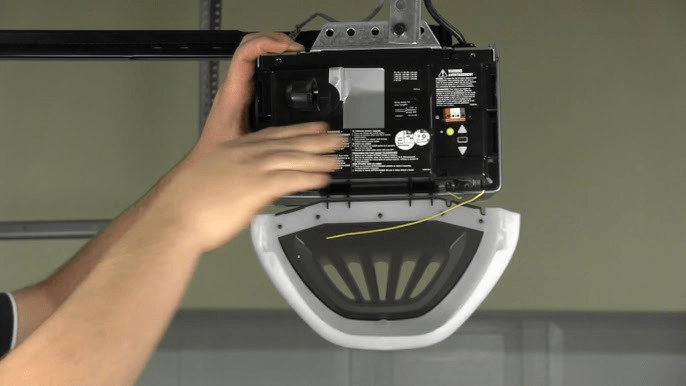
The outer cover—also called the housing or shell—protects all internal components from dust, debris, and accidental contact.
Read too: How To Replace Garage Door Roller Like a Pro? Step-by-Step Guide
Components protected by the cover:
- Motor assembly
- Logic/control board
- Wiring terminals
- Light sockets
- Wi-Fi module (on newer models)
Removing the cover allows access for inspection, cleaning, and minor repairs.
About Chamberlain Garage Door Openers
Chamberlain is one of the most trusted garage door opener manufacturers in the U.S., widely used in residential homes.
Common Chamberlain opener types:
- Chain-drive openers
- Belt-drive openers
- Screw-drive models
- Smart Wi-Fi enabled openers
Most ceiling-mounted Chamberlain openers follow a very similar cover removal process.
Is It Safe to Remove the Cover Yourself?
Yes—as long as basic safety rules are followed.
It’s safe when:
- Power is completely disconnected
- You avoid touching live terminals
- You’re performing inspection or light maintenance
Call a professional if:
- You see burnt wiring or melted plastic
- The motor or capacitor needs replacement
- The opener shows severe electrical damage
Simply removing the cover does not damage the opener or void warranties.
Tools You’ll Need
Prepare these tools before starting:
- Phillips-head screwdriver
- Flat-head screwdriver (optional, for tabs)
- Step ladder (6–8 ft)
- Safety gloves
- Flashlight
Most Chamberlain covers are secured with standard screws or snap tabs.
Step-by-Step: How To Remove Cover on Chamberlain Garage Door Opener
Step 1: Disconnect Power
This is the most critical step.
- Unplug the opener from the ceiling outlet
- If hardwired, switch off the breaker
- Wait 30–60 seconds to allow residual power to discharge
⚠️ Never work on the opener while it’s powered.
Step 2: Make Sure the Garage Door Is Closed
- Ensures stability
- Prevents accidental movement
- Reduces tension on internal parts
You do not need to disconnect the door or trolley.
Step 3: Locate the Cover Screws or Tabs
Depending on the model, the cover may be secured by:
- 2–4 screws (rear or sides)
- Snap-in plastic tabs
- Screws hidden near the light lenses
Check all sides of the motor housing carefully.
Step 4: Remove the Screws
- Support the cover with one hand
- Use a Phillips screwdriver to remove screws
- Place screws in a small container
Most screws are 1–1.5 inches long and reusable.
Step 5: Release Snap Tabs (If Present)
If the cover doesn’t come loose after removing screws:
- Gently pull downward
- Slide the cover slightly backward
- Use a flat-head screwdriver to press release tabs
⚠️ Use light pressure only—do not pry aggressively.
Step 6: Lower and Remove the Cover
Once released:
- Tilt the cover downward
- Carefully clear the light bulbs
- Set the cover aside on a flat surface
You now have full access to the opener’s internal components.
What You Can Do Safely With the Cover Removed
Once the housing is off, homeowners commonly:
- Replace light bulbs
- Check LED diagnostic codes
- Inspect loose wiring connections
- Clean dust using dry air
- Identify part numbers
These tasks are safe if you avoid electrical contact points.
What You Should NOT Touch Inside
Even with power disconnected, avoid:
- Capacitors
- Transformer terminals
- Circuit board solder joints
- Limit adjustment screws (unless instructed)
These components can cause damage or require recalibration if disturbed.
How To Put the Cover Back On
Reinstallation is simple and quick.
Reverse steps:
- Align the cover with housing grooves
- Slide or snap it into place
- Reinsert screws (hand-tight only)
- Restore power
Do not overtighten screws—plastic housings can crack.
Common Problems and Easy Fixes
Cover Won’t Come Off
- Hidden screws near light sockets
- Tabs still engaged
- Cover needs to slide backward before lowering
Cover Feels Stuck
- Recheck all sides for screws
- Gently wiggle—never force
Lights Fall Out
- Normal when the cover is removed
- Reinstall bulbs before replacing cover
Differences Between Chamberlain Models
While the general process is the same, designs vary slightly.
| Model Type | Cover Style | Difficulty |
|---|---|---|
| Chain Drive | Two-piece shell | Easy |
| Belt Drive | One-piece housing | Easy |
| Screw Drive | Rear-slide cover | Moderate |
| Smart Models | Snap-tab panels | Easy |
Always support the cover to prevent drops.
Why Homeowners Remove the Chamberlain Cover
Common reasons include:
- Light bulb replacement
- Troubleshooting blinking LED errors
- Inspecting Wi-Fi modules
- Cleaning insects or debris
- Identifying logic board issues
Knowing how to remove the cover saves time and service costs.
Helpful Safety Insight
Garage door openers rely on internal control boards and motors to operate safely. For a general overview of how garage door openers work, you can reference Wikipedia:
https://en.wikipedia.org/wiki/Garage_door_opener
FAQ: How To Remove Cover on Chamberlain Garage Door Opener
Q1: Do I need to remove the garage door first?
No. The door can remain fully closed and attached.
Q2: Can removing the cover damage the opener?
No, as long as you follow proper steps and don’t force the housing.
Q3: How long does it take to remove the cover?
Most homeowners complete it in 5–10 minutes.
Q4: Are Chamberlain covers interchangeable?
No. Covers are model-specific and not universal.
Q5: Should I unplug sensors before removing the cover?
No. Safety sensor wiring does not need to be disconnected.
Conclusion
Learning how to remove cover on Chamberlain garage door opener is a simple yet valuable DIY skill. With basic tools and proper safety steps, you can access the motor and control board for inspection, cleaning, or light maintenance—without calling a technician. This knowledge empowers homeowners to maintain their garage systems confidently and safely.
If this guide helped you, share it on social media so other homeowners can handle basic garage door maintenance with confidence. 🚪🔧



Leave a Reply