If your garage door suddenly stops responding, you may be wondering How To Reset A Genie Intellicode Garage Door Opener without calling a technician. This issue is common after power outages, remote replacement, or security concerns. The good news is that resetting a Genie Intellicode system is straightforward and can usually be completed in under 15 minutes.
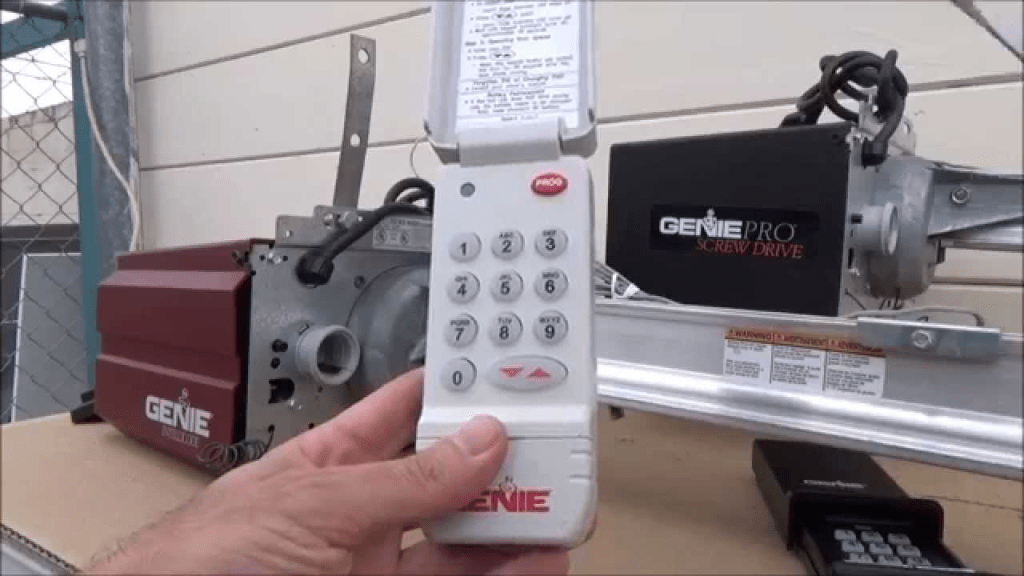
What Is a Genie Intellicode Garage Door Opener?
A Genie Intellicode garage door opener is a rolling-code security system designed to prevent unauthorized access. Each time you use your remote or keypad, the system generates a new access code.
Read too: Door and Garage Door Companies: Choosing the Right Partner for Your Needs
Key Characteristics:
- Rolling-code technology
- Wireless remote and keypad compatibility
- Strong resistance to code grabbing
- Widely used in U.S. residential garages
According to industry experts, rolling-code systems like Genie Intellicode reduce unauthorized entry risks by over 90% compared to fixed-code openers.
How Does Genie Intellicode Technology Work?
Genie Intellicode uses dynamic encryption between the opener and the remote.
How It Protects Your Home:
- Each signal is unique
- Old codes are invalid after use
- Prevents replay attacks
- Enhances long-term garage security
If synchronization is lost, resetting restores communication between devices.
Why Would You Need to Reset a Genie Intellicode Garage Door Opener?
Resetting clears stored remotes and restores default security settings.
Common Reasons:
- Lost or stolen remote
- Moving into a new home
- Power surge or outage
- Remote not responding
- Security concerns
Garage security professionals recommend a reset whenever control over access devices changes.
How Do You Know If Your Genie Intellicode Needs a Reset?
Before resetting, check for these warning signs.
Symptoms:
- Remote light turns on, door doesn’t move
- Wall console works but remote doesn’t
- Door opens intermittently
- Opener light flashes without movement
If multiple remotes stop working at once, a reset is often the solution.
Is It Safe to Reset a Genie Intellicode Garage Door Opener?
Yes. Resetting is safe, reversible, and non-destructive.
Safety Notes:
- No wiring changes required
- No tools needed
- Does not affect door balance or tracks
You are only clearing and reprogramming wireless memory.
What You Need Before Resetting
Preparation increases success.
Required Items:
- Ladder
- All remotes and keypads you want to reprogram
- Fresh batteries (recommended)
Battery Specifications:
- Voltage: 3V coin cell or AA (model dependent)
- Ideal temperature range: 22–28°C (72–82°F)
Weak batteries can cause programming failures.
How To Reset A Genie Intellicode Garage Door Opener (Step-by-Step)
This process applies to Genie Intellicode I and II systems.
Step 1: Locate the Learn Button
Climb the ladder and find the motor unit on the garage ceiling.
The Learn / Program button is typically:
- Square or round
- Red, black, or gray
- Near the antenna wire
Step 2: Erase All Stored Remotes
- Press and hold the Learn button
- Continue holding for 10 seconds
- Release when the LED turns off
This erases all previously programmed devices.
Step 3: Enter Programming Mode
- Press the Learn button once
- The LED should begin blinking
- You now have 30 seconds to program a remote
Timing is critical.
Step 4: Reprogram the Remote Control
- Press the button on the remote you want to use
- Hold for 2–3 seconds
- Wait for the opener light to flash or hear a click
This confirms pairing.
Step 5: Program Additional Remotes or Keypads
Repeat Step 4 for each remote.
For keypads:
- Enter your desired PIN
- Press
PROGRAMorENTER - Confirm with door movement or flashing lights
Step 6: Test the System
Close the garage door fully.
- Test each remote
- Test keypad access
- Observe door response
Test at least two full open-close cycles.
What If the Genie Intellicode Reset Doesn’t Work?
If the opener still doesn’t respond, try these steps.
Troubleshooting Checklist:
- Replace remote batteries
- Stand within 10 feet during programming
- Remove LED bulbs that cause radio interference
- Verify remote compatibility
LED interference is one of the top causes of programming failure in modern garages.
Genie Intellicode I vs Intellicode II
| Feature | Intellicode I | Intellicode II |
|---|---|---|
| Security Level | High | Very High |
| Rolling Codes | Yes | Enhanced |
| Compatibility | Older models | Newer models |
Intellicode II adds stronger encryption for modern security standards.
Advantages vs Disadvantages of Resetting
✅ Advantages
- Restores secure access
- Removes unauthorized remotes
- Improves system reliability
- No professional service needed
❌ Disadvantages
- All remotes must be reprogrammed
- Requires ladder access
- Time-sensitive steps
Despite minor inconvenience, resetting is far cheaper than replacement.
Security Best Practices After Resetting
Once you understand How To Reset A Genie Intellicode Garage Door Opener, follow these best practices:
- Change keypad PINs every 6–12 months
- Reset after losing a remote
- Store remotes securely
- Avoid leaving remotes in vehicles
Security studies show garages are a primary entry point in over 9% of home break-ins.
How Often Should You Reset a Genie Intellicode Opener?
Recommended reset intervals:
- After moving homes
- After power surges
- When adding or removing users
- If system behaves inconsistently
Routine resets improve long-term reliability.
Why Genie Intellicode Systems Lose Programming
Common causes include:
- Power interruptions
- Battery voltage drops
- Signal interference
- Environmental exposure
High-quality batteries can extend remote lifespan by up to 30%.
Authoritative Reference
For general information about rolling-code access systems, see:
👉 https://en.wikipedia.org/wiki/Rolling_code
FAQ: How To Reset A Genie Intellicode Garage Door Opener
Q1: How long does it take to reset a Genie Intellicode opener?
Usually 10–15 minutes including reprogramming.
Q2: Will resetting remove all remotes?
Yes. All remotes must be reprogrammed afterward.
Q3: Can I reset without a remote?
Yes, but you will need at least one compatible remote to regain access.
Q4: Does resetting affect door alignment?
No. Resetting only affects wireless controls.
Q5: Is Intellicode II more secure than Intellicode I?
Yes. Intellicode II offers enhanced encryption.
Conclusion
Knowing How To Reset A Genie Intellicode Garage Door Opener empowers homeowners to quickly fix access issues, restore security, and avoid unnecessary service calls. With a few simple steps, you can regain full control of your garage door system safely and efficiently.
If this guide helped you, share it on social media so others can secure their garages with confidence 🚪🔐
Leave a Reply